🚀 Upgrade your USB game—never run out of ports or speed again!
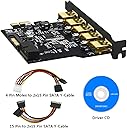
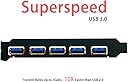
The Mailiya PCI-E to USB 3.0 5-Port Expansion Card transforms your desktop with ultra-fast 5Gbps USB 3.0 connectivity, supporting up to 7 devices via 5 external and 2 internal ports. Equipped with a 15-pin SATA power connector and included power cables, it ensures stable power delivery for high-demand peripherals. Compatible with a wide range of Windows and Linux systems, this card offers easy plug-and-play installation, making it the perfect upgrade for professionals seeking reliable, high-speed USB expansion.
| ASIN | B01LZWC7TL |
| Brand | Mailiya |
| Compatible Devices | Desktop |
| Customer Reviews | 4.2 out of 5 stars 297 Reviews |
| Hardware Interface | PCI, USB 2.0, USB 3.0 |
| Item Weight | 2.2 Ounces |
| Manufacturer | Mailiya |
| Mfr Part Number | PCIEU35P20P04B |
| Model Number | PCIEU35P20P04B |
| Operating System | Linux, Windows 7, Windows XP |
| Style | Classic |
| Style Name | Classic |
R**R
Windows 7 Driver Problems & Failing on Linux Kernel's >5.8 missing renesas_usb_fw.mem!
The driver disk fails to install drivers within sometime during the middle lifetime and after the lifetime of Windows 7. After viewing the drivers used for Windows 10, it is almost obvious the drivers had to be rewritten/recompiled by Microsoft instead of the manufacturer. I had to perform many downloads from 3rd party risky websites as Renesas (the chip maker or original designer of this layout) does not publish Windows 7 drivers until I finally acquired several reliable ones from Dell/HP and other sites. (2020.02.20 Currently, Renesas only hosts a download for the USB library design kit only, no driver files or source code.) If you're using Windows 7 or other operating system aside from Linux or Windows 10, you're going to be vainly searching for an "Extensible USB Host Controller" driver. (Windows 7 installs an inoperable/non-working stub driver "USB Host Serial" driver.) Linux dmesg | grep 03:00 [ 0.412520] pci 0000:03:00.0: [1912:0014] type 00 class 0x0c0330 Vender: 1912 Device: 0014 Linux lspci | grep 03:00 03:00.0 USB controller: Renesas Technology Corp. uPD720201 USB 3.0 Host Controller (rev 03) (prog-if 30 [XHCI]) Maker: Renesas Model: uPD720201 From my memory, chips imprinted with Made in China. How to manually install drivers for Windows 7/Vista/XP: The driver EXE (RENESAS-USB3-Host-Driver-30230-setup.exe) package installs driver and application files to: C:\Program Files (x86)\Renesas A sub-extracted MSI (.msi) rusb3drv.msi file containing the actual Renesas drivers can be found within: C:\ProgramData\Downloaded Installations\{58A47A70-7367-4CD6-BCF0-D6857A4093FB} However, once the driver EXE file performs a partial install, or has an existing installation, all the drivers can be found within the Program Files (x86)\Renesas folder without using the EXE again. Simply use the the Windows 7 device manager to update the non-working (Renesas VENDOR: 1912 DEVICE 0014) Host Controller driver with specifying the Program Files (x86)\Renesas folder as the location of the driver files. Likely will have another non-working driver (Renasas Root Hub driver) install and showing within the Device Manager, and will need to manually update the driver pointing to the Program Files (x86)\Renesas folder as well. Also may need to search the Task Manager for a rusb3.exe process related to the Renesas program install, starting automatically, and maybe needed to end the process prior to attempting to install/update the drivers. PROS 1) Four 3.0 USB rear ports with an internal USB 3.0 header for front USB 3.0 ports. 2) Does work in Linux and Windows 10. 3) Gold plated preventing corrosion. 4) Still working after 2.5 years. CONS 1) Driver install disk fails to install drivers via it's automation. 2) Driver disk does not contain any easily extractable or obtainable driver for manual or fallback installation methods. 3) Driver package RENESAS-USB3-Host-Driver-30230-setup.exe install fails within middle lifetime and after lifetime of Windows 7. 2020.02.20 After more research and tries, I found where the actual drivers are extracted/installed to and manually used the Device Manager to install/update the drivers. Likely at one time half installed the drivers, then failed, with no fallback to complete installing the drivers. I reverted my review from one star to four stars. 2021.07.21 Works only in Windows or Linux kernel's <5.8, now getting a firmware file missing: "xhci_hcd 0000:03:00.0: Direct firmware load for renesas_usb_fw.mem failed with error -2" [root@4void roger]# dmesg |grep 03\:00 [ 3.589337] pci 0000:03:00.0: [1912:0014] type 00 class 0x0c0330 [ 3.589366] pci 0000:03:00.0: reg 0x10: [mem 0xf6200000-0xf6201fff 64bit] [ 3.589509] pci 0000:03:00.0: PME# supported from D0 D3hot D3cold [ 4.976775] xhci_hcd 0000:03:00.0: Direct firmware load for renesas_usb_fw.mem failed with error -2 [ 4.976778] xhci_hcd 0000:03:00.0: request_firmware failed: -2 [ 4.978151] xhci_hcd: probe of 0000:03:00.0 failed with error -2 2021.07.22 Seems I had to update the firmware on the controller using a user's Linux Renesas firmware updating tool (eg. upd72020x-load) from GitHub as well as updated firmware from another user's GitHub. 1) Find the PCIe port the controller is installed on, in my case, 03:00. # lspci | grep Renesas 2) Detach the controller, if it isn't already due to the error: # echo -n 0000:03:00.0 > /sys/bus/pci/drivers/xhci_hcd/unbind 3) Update the firmware, states non-persistent, but upon reboot, I had no problems using the USB controller with no need to re-run the firmware uploading. # ./upd72020x-load -u -b 0x03 -d 0x00 -f 0x0 -i /home/roger/src/renesas/uPD72020x-Firmware/UPDATE.mem 4) Attach the USB PCIe controller: # echo -n 0000:03:00.0 > /sys/bus/pci/drivers/xhci_hcd/bind 5) I also copied the UPDATE.mem firmware file to /lib/firmware/renesas_usb_fw.mem, so plausible the firmware could be uploading now on reboot, as the card might now recognize the more recent firmware as legit? I'll need to perform many more reboots to figure-out if the /lib/firmware/renesas_usb_fw.mem file is still needed, etc. Reference: https://github.com/markusj/upd72020x-load https://github.com/denisandroid/uPD72020x-Firmware
M**M
A high quality item that performs as advertised
This is a very well made add on PCI-E card, especially suited for upgrading an older computer than has an empty PCI slot but not enough USB3 ports. The data transmission speed through the card ports is faster than what I get from the original header off the motherboard. I advise being careful to check the exact specs and part numbers when purchasing this type of product, since the quality and reliability of different brands varies from poor to excellent. The Mailiya brand seems to be excellent. A couple words of advice on installing this card. They have thoughtfully included plenty of cords to connect this card to your PSU. The supplemental power connection is really necessary, since you could end up drawing in excess of 25 watts through the card if you are careless in your choice of plug in accessories. The PCI card slot can't support that power draw and you'll have problems without the supplemental direct connection to the PSU. Also, for my particular computer, the data transmission speed through the 20 pin extra connector (like to the front panel of the computer) seemed a bit slower than the five direct ports. This may have been an individual thing with my hardware and not necessarily a fault of the card. I would not consider this a negative.
C**Y
seems to work perfectly after changing some hidden settings.
i installed this product so i could have usb ports for windows 7 on my z390 motherboard(google running windows 7 on a z390 motherboard to see why i needed it). i run a dual boot 7/10 os. i was getting constant disconnects in windows 7 that were very annoying. i checked everything that i knew to check but with no resolution. i went in "device manager" and right click everything related to this device to deselect the turn off to save power option. i stumbled on a setting called "disable usb 3.0 power management functions". i checked that box and applied it. the application hung for a moments but it eventually applied itself and un-hung. i have not had a single problem with it since and i have been using it for several hours now. that appears to have fixed it. i only gave this four stars because that shouldn't be some hidden setting that no one tells u to look for but it will cause u no end of troubles. u may also want to go into the advanced power settings in windows control panels and disable all the "suspend" and "turn off" function for things like the usb ports and pcie power management. other than that, i'm very happy with it at this point. have had no issues with it in windows 10. p.s. if u r also trying to install windows 7 on a z390 motherboard, after u get it up and going use a program called "snappy driver installer"(google it) to find a bunch of drivers for windows 7 that u otherwise would not have like chipset, ect.(you'll still need the included c.d. to install drivers for this product though). it still won't have any usb drivers for ur motherboard though so u will still need this product.
D**N
Convenient USB 3.0 expansion board!
First, we made the mistake of ordering an Inateck board from the competitor that has some sort of intermittent failure. The board didn't work when first installed, then worked and even transferred high-bandwidth video from a Microsoft Life Cam. A few minutes later, the Inateck board had died again. (Notice that several users talk about their boards mysteriously disappearing from their installed devices, only to reappear later!) When we read the manual section on trouble shooting, we felt like we must have fallen down a 20-plus-year-old time warp into the days of manually setting addresses and interrupts on the ISA bus. Nevertheless, we needed to get the USB 3.0 ports working, so we followed the Inateck manual advice and moved the Inateck board to a different slot. The board performed no better, so we did try a third slot. We then called the factory to see what they had to say. They said that everybody was out of the factory the first week in January, so trouble shooting was by email only! Shesh! Moral of Story: Don't buy an Inateck board! If you somehow have no choice, be sure to read the manual first: •If there is a yellow exclamation point on the controller in the Device Manager: 1. Please shut down your computer and move the card to another available PCIe slot, then re-install the USB 3.0 driver. 2. In the device manager, select the Fresco Logic Xhci (USB 3) Root hub, right-click using your mouse, and select “Update Driver”to update the USB driver. 3. This exclamation point usually means there is a resource conflict between this card and another card in your system. Please move the card to another available slot and then restart your computer. Windows will re-configure itself and reassign resources. Check the device manager again to insure the issue has been resolved. That was on Tuesday. We filed a return with Amazon for the Inateck and ordered (for $1 less), the Mailiya PCI-E to USB 3.0 5-Port PCI Express Expansion Card and 15-Pin Power Connector, Mini PCI-E USB 3.0 Hub Controller Adapter with Internal 20-Pin Connector - Expand Another Two USB 3.0 Ports Mailiya PCI-E to USB 3.0 5-Port PCI Express Expansion Card. The Mailiya card arrived the next day, today, Wednesday, although we only asked for regular shipping! (Thanks, Amazon!) The Mailiya card is installed and all five ports are working as expected. (Even though it's installed in the same PCIe slot as the nonfunctional Inateck ard.) Additionally, the ten-pin connector connects to the cable supplied with the XinYS USB 3.0 7-Ports 5.25 inch Metal Front Panel USB Hub, sold by Amazon! XinYS USB 3.0 7-Ports 5.25 inch Metal Front Panel USB Hub with 15 Pin SATA Power Connector [ 20 Pin Connector & 2ft Adapter Cable ] So we have five USB 3.0 connectors on back and seven USB 3.0 connectors on the front of the computer.
R**L
POWERful solution for people who need super-dependable non-quirky POWERED USB 3.0 x 5 connections!
I was told by other flight simulation enthusiasts that USB is a stumbling block, and unexpected behavior can occur when using powered external USB hubs, but I refused to believe it - UNTIL I began having weird behavior and sudden USB disconnects with an external USB powered-hub that had 9 or 10 USB devices plugged in. A noted simulation PC-builder (Jetline systems, Florida, USA) recommended I go with PCI-e internal USB cards, and I hunted up the Mailiya cards that are the subject of this review. I ordered two of them, came to about $53 including tax with free prime shipping. They showed up, and IMPORTANT- they came with both MOLEX and SATA power splitter cables, which is a HUGE and IMPORTANT thing when upgrading. I was able install these in my Dell XPS 8500 side-by-side, even after I had upgraded the video card to a GTX 770 2-wide gpu. Plugged 9 or 10 USB devices into these two cards, and Bob's my uncle! Fired up perfectly on first boot, no issues, no problems and NO DRIVERS NEEDED (Windows 10 system). If you are on the fence, I recommend you try these cards. They are all that and two bags of Tostitos! Truly, one of the BEST upgrades I have ever discovered. Would buy again.
S**O
Arc and burn smell after 3 months, failed
I am a veteran PC Technician with over 20 years PC repair experience professionally, I am also a professional software engineer / robotics developer. So I know what I am doing with PC's. After two months, the USB port worked fine on Install and had enough bandwidth to handle the XBOX Kinect SDK. When I plugged a usb flash drive there was a huge arc between drive and board and a burning smell. Card failed after that and I had to remove it. Defects happen after manufacturing all the time so mine may be a special case, but sdalhy I think its out of warranty.
C**R
Plug'n Play Card
I purchased this item to replace an older card I had, which only provided an internal USB header for two additional usb ports. I'm really happy with the 4 external usb ports in my desktop, plus the internal usb header. Installation was very easy, just plug-in the card in an available pci-e x1 slot, and attach a sata power cable (needed in case you plug in something to the card that requires power), and your're ready to go. The card includes a small CD with drivers, which you will probably won't need unless you are running an old operating system, and necessary power cables to fiddle with your power supply. I had to buy a sata power extension cable Cable Matters (3 Pack) 15 Pin SATA Power Extension Cable 8 Inches just because I didn't have any available close to where I installed the card. Overall, quite satisfied, no issues after boot up, Windows 10 / 64-Bit recognized the card immediately, the scanner, printer, and external hard drive I had connected to it began to work flawlessly as well.
M**L
This product came in cardboard box with no labels or ...
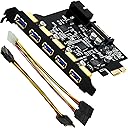
This product came in cardboard box with no labels or instructions. Which is ok. I got 5 USB version. I build my computer 6 months ago and I forgotten anything about them. Hahaha! What confused me is that it came with 2 cables and has 2 slots on the back of it. I think 15 pin cable is for older PSU's and SATA to 4 pin is for same reason. I didn't use any of them. I got fully-modular PSU which came with it's own cables. This is how you do: 1) Shut-off your computer and disconnect it from power supply. 2) Figure out which PCIe x1 slot you want to put it in and take out backplate from your case. Keep the screw. 3) Plug this device in PCIe slot and screw it in with that screw that kept backplate. This will work for any device that accepts PCIe x1. PCIe connection transfer power and data, but some usb attachments can draw more power PCIe provides. To give more juice to your USB port do this: 4) Connect this card to your PSU for more power (i had daisy chain SATA cord going from PSU to SSD drive.) This product came with tiny little cd that I assume are drivers. I don't have disk drive so I didn't run it. Product worked right after I booted up my PC.
Trustpilot
2 months ago
2 weeks ago