🖨️ Compact. Connected. Clever. Print your way to productivity!
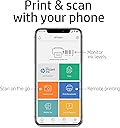
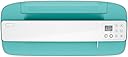
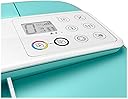
The HP DeskJet 3755 is a compact all-in-one wireless inkjet printer designed for home use, offering copy, scan, and print functions with fast first-page output and versatile media support. It features seamless mobile and voice-activated printing, supports HP Instant Ink for cost-efficient ink management, and fits perfectly in small spaces without compromising on performance.


| ASIN | B01LAK6JVW |
| Additional Printer Functions | Copy, Scan |
| B&W Pages per Minute | 19 ppm |
| Best Sellers Rank | #81,159 in Office Products ( See Top 100 in Office Products ) #70 in Ink Tank Printers |
| Brand | HP |
| Built-In Media | HP 65 Setup Black Instant Ink Ready Cartridge (~120 pages), HP 65 Setup Tri-color Instant Ink Ready Cartridge (~100 pages), Power Cord, Software CD |
| Color | Seagrass |
| Color Depth | 24 bpp |
| Color Pages per Minute | 15 ppm |
| Compatible Devices | PC, Smartphones, Tablets |
| Control Method | Voice |
| Controller Type | Amazon Alexa, Vera |
| Customer Reviews | 3.9 3.9 out of 5 stars (21,595) |
| Display Type | 7 segment + icon LCD |
| Dual-sided printing | Yes |
| Duplex | Manual |
| Global Trade Identification Number | 00889899920602 |
| Hardware Interface | USB 2.0 |
| Ink Color | Black |
| Item Dimensions D x W x H | 6.97"D x 15.86"W x 5.55"H |
| Item Type Name | HP DeskJet 3755 Compact All-in-One Photo Printer with Wireless & Mobile Printing, Instant Ink ready - Seagrass Accent (J9V92A) |
| Item Weight | 5.1 Pounds |
| Manufacturer | HP |
| Maximum Copy Resolution Black and White | 300 x 300 dpi |
| Maximum Copy Resolution Color | 300 x 300 dpi |
| Maximum Copy Speed Black and White | 19 ppm |
| Maximum Media Size | 8.5 x 14 inch |
| Maximum Print Resolution Black and White | 1200 x 1200 dpi |
| Maximum Sheet Capacity | 60 |
| Maximum print Resolution Color | 4800 x 1200 dpi |
| Model Name | J9V92A#B1H |
| Model Number | 3755 |
| Model Series | DeskJet |
| Number of Trays | 1 |
| Other Special Features of the Product | Cloud Print Enabled, Energy Star, HP Instant Ink Eligible, Network-Ready, Optional HP High-Yield Cartridges |
| Output sheet capacity | 60 |
| Paper Size | 3 x 5 to 8.5 x 14, Letter, Legal, Envelope |
| Power Consumption | 0.06 Watts |
| Print media | Envelopes, Paper (plain) |
| Printer Connectivity Type | wired, wireless |
| Printer Output Type | Color |
| Printer Type | Inkjet |
| Resolution | 4800 x 1200 |
| Scanner Type | Sheetfed |
| Specific Uses For Product | Home |
| Total USB 2.0 Ports | 1 |
| Total Usb Ports | 1 |
| UPC | 889899920602 |
| Unit Count | 1.0 Count |
| Warranty Description | One-year limited hardware warranty |
| Warranty Type | limited warranty |
A**R
Great compact printer for basic tasks at an excellent price.
First off, the "What's in the Box" blurb on the page that I ordered from was incorrect: the printer does not come with a CD or a USB cable. It does come with the two necessary ink cartridges: one for color and one for black. That said, the CD is really not necessary, and I purchased a USB cable from Amazon for $8.99 which was delivered the next day. Setup was simple, following the very clear and easy instructions. Going online to 123.hp.com gets you to the software download, accomplished quickly in simple steps. I opted out of the automatic ink option, since this is a printer that will not be used frequently. After the connections and setup were done, the single test page printed, in color, very quickly. I also printed a page that was simply text - it printed very quickly (less than 5 seconds from hitting the "print" option on the app). There is a recent review as of this writing that complains that the printing is very slow, but I would guess that is a local software or connection problem, and not a problem with the printer, unless the unit is defective in some way. All in all very pleased with the footprint (it sits with room to spare on a 20" X 10" side table top), ease of use, functionality, quality, and value. Update 7-18-2023: Still a good, compact, reliable printer for light use and basic tasks. But I have it directly connected and dedicated to a single desktop computer, so I can't comment on the WiFi issues. I must modify my initial statement about how quickly it prints text - my first pages were MS-Word documents, and it worked flawlessly and fast. Printing text from PDF files is much slower, about 45 to 60 seconds per page. So not a printer I would recommend for high volume PDF file printing.
L**M
Perfect little printer
This is our third deskjet all in one. We have one for our home office, one for our second home and one for work. By far our favorite. We have had our first one for five years. These are so darn cute. Not the fastest or high quality but it’s darn close. Love the Alexa feature, print from phone and space saver. Does not require you to subscribe to expensive monthly service like the new printers. Please start making these models again. I had to search everywhere to find this one.
K**Y
Worst printer setup EVER! Wouldn't connect to WiFi or USB, and came with a dried out ink cartridge!
If you are about to make the same mistake I did by purchasing this printer b/c it's the least expensive one available for same-day delivery via Prime, then save yourself time and money by reading this first. I literally spent 5 hours working on setting this up today and finally ended up having to call HP Support for assistance. They took 45 minutes to troubleshoot over the phone. 1. This printer ONLY connects to 2.4ghz wi-fi, and not all wi-fi routers are "manually" switchable. So if you have a non-manually-switchable 5ghz router (like I have through Spectrum, model sac2v2s), then you have to call HP Support to get 5ghz drivers by letting them remote-in to your computer because the drivers aren't easy to find. The person I spoke with at HP Support even installed the wrong driver pak on my computer initially. So if you fall into the category of having a router that auto-switches between 2.4ghz to 5ghz without the option to manually switch, then getting the right drivers installed is the ONLY way you'll be able to connect to wi-fi. 2. If you can't connect to wi-fi, then you have to connect via a SPECIAL USB cable... not just any old USB cable. And this printer DOES NOT COME WITH THE CABLE! You must purchase a USB-A to USB-B cable separately (one end is a normal USB connection but the other end is a big old fat square shape with a slightly curved top). It's an "old" printer style cable. 3. But I couldn't even connect via USB, so had to call HP Support for assistance. After the technician remoted-in to my computer, installed the wrong drivers, installed the right drivers, tried figuring out why the printer was showing an error for the ink cartridge (after it super-slowly auto-printed 2 pages of wi-fi setup instructions TWICE, for a total printing of 4 pages overall), then they made me "watch" a video on how to remove the ink cartridges b/c they couldn't tell me how to do it (and there were no instructions included about it), they finally determined there was an issue with the black ink cartridge. She said it happens periodically where the cartridges arrive already "dried up." - This normally wouldn't be that big of an issue since you can print using the multi-color cartridge, but since it's 5 days before Christmas and I just bought the printer this morning on a Prime same-day delivery rush to print shipping labels since my big printer died last night, I'm going to end up using a lot of the color cartridge to get the job done and HP said they were ONLY going to send me a new black cartridge. I had to protest MULTIPLE times since their "defective" black cartridge is going to cost me money because I'll have to replace the color cartridge sooner than normal. The Tech finally got approval from a Supervisor to send me a color and black cartridge - and I'm supposed to receive them in 17 days. SEVENTEEN DAYS! *** Do your homework before buying this printer. When I think about how much time I wasted today and all the hassle I went through just to print labels to ship Christmas packages, I truly wish I had spent $100 more and bought a "decent" printer. This one is AWFUL and the setup experience was beyond horrendous. *** Your only safety net for ensuring you'll be able to print quickly upon delivery is to buy backup ink cartridges and a USB-A to USB-B cable (if your router isn't "manually" switchable or if you're unsure). And even with all that, it will still probably take you a while to setup so it's usable. And you'll still end up with an old model printer with poor print quality that requires you to download the HP Smart software through the HP website before you can do one darn thing! Trust me, keep shopping.
J**R
I use my printer in my home for personal use. The printing is very clear and the colour is very vibrant and great to look at. The printer is also very compact and fits in the space I have for it very nicely. The delivery time of my new printer was excellent from Amazon. I believe now that I have my printer working, I will be very happy with this product. Also, Amazon Canada accepted my Debit Visa as payment which again the HP Website Canada would not, therefore I was not able to get in on the HP Canada Day Sale. Thank you Amazon! I really appreciate the support Amazon Canada has given me in setting up my printer! HP Instant Ink Canada was helpful, but HP Support was not helpful at all.
R**H
I spent a whole day trying to make this work. It would not connect to wifi. I checked many website, I watched many videos. I tried to use the phone app to connect the printer to the wifi but my phone wouldn't detect the printer, when I looked it up I was told I had to change my wifi from 5G to 2.4G for it to work which is impossible to do if you have a newer phone. I tried using my laptop- PC AND Mac and it still didn't work, it kept saying if I didn't have a touchscreen printer I had to use the USB to connect even though this printer was advertised as being able to connect to wifi wirelessly. Not to mention they didn't even GIVE me a USB. The customer support was useless and impossible to get a hold of. Worst item I've gotten from Amazon and I'm returning it. Wasted my time, my ink, my paper and my money.
A**R
Whew!!! What a relief when I finally got it working. I’m not a technical guru in any way, shape or form. After searching the web and YouTube for hours, I discovered the password for the wifi setup. It’s 12345678. Hopefully this will save someone else the grief of trying to set up their wireless device. The printer was destined for the recycle pile but I’ll hang on to it now. Glenn
J**E
I purchased this printer/copier/scanner this week for my personal home use and I absolutely loooooove it! Although I am not a tech savvy girl, I was able to set it up on my laptop with my WiFi in just minutes. I just followed the instructions on the web site and it was as easy as 1-2-3. I've tried all 3 features since and they work perfectly. I also love the Insta Ink feature which allows me not to worry about running out of ink and having to go purchase it myself. I would definitely recommend this great little printer. It looks great too! :)
F**R
I nevdr had so many troubles to installed a Printer, i have payed a Pro for a company because i was not able to do it and with the HP instructions so many limnks and anyones his the good one to help you anyway that Pro of Informatique he spend more then 2 hours to try to installed my porinter and after everythings he did whe recieved a post who say PROBLEM WITH THE PRINTER DAMMAGE AND THE COLORS INKS SAME DON'T WORK OR IT'S EMPTY OR DAMMAGE! I was so upseth because i was shure having my tiny Printer and being able to print all of the Documents for my Job but no i have to returnthis Printer to get my refund so very disapointed!
Trustpilot
1 week ago
1 month ago