Buy anything from 5,000+ international stores. One checkout price. No surprise fees. Join 2M+ shoppers on Desertcart.
Desertcart purchases this item on your behalf and handles shipping, customs, and support to Ireland.
๐ Upgrade your network, upgrade your hustle.
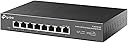
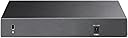
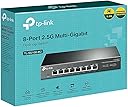
The TP-Link TL-SG108-M2 is an 8-port unmanaged network switch featuring 2.5Gbps Multi-Gigabit Ethernet ports that deliver up to 40Gbps switching capacity. Its plug-and-play design requires no configuration, while auto-negotiation ensures compatibility with a wide range of devices. The fanless metal case offers silent operation and durability, making it ideal for professional home offices or small business setups. Backed by a 3-year warranty, itโs a reliable, future-ready upgrade for anyone serious about fast, stable networking.
| ASIN | B08ZHZL5Q7 |
| Best Sellers Rank | #89 in Computer Networking Switches |
| Brand | TP-Link |
| Built-In Media | Installation Guide, Power Adapter, Rubber Feet, TL-SG108-M2 |
| Case Material Type | Metal |
| Color | 8 Port, 2,5G |
| Compatible Devices | Desktop |
| Current Rating | 1 Amps |
| Customer Reviews | 4.5 out of 5 stars 873 Reviews |
| Data Transfer Rate | 100 Megabits Per Second |
| Interface | RJ45 |
| Item Dimensions L x W x H | 8.9"L x 5.2"W x 1.38"H |
| Item Type Name | Ethernet Switch |
| Item Weight | 0.93 Kilograms |
| Manufacturer | TP-Link |
| Mfr Part Number | TL-SG108-M2 |
| Model Number | TL-SG108-M2 |
| Number of Layers | 3 |
| Number of Ports | 8 |
| Platform | Not Machine Specific |
| Product Dimensions | 8.9"L x 5.2"W x 1.38"H |
| Switch Type | Metal |
| UPC | 840460605342 |
| Upper Temperature Rating | 40 Degrees Celsius |
| Voltage | 9 Volts (DC) |
| Warranty Description | Limited Lifetime Warranty |
A**D
Finally, An Easy Way to Get More Than 1 Gigabit
Upgraded my home Internet to 2 gigabit fiber, and home fileserver with SSD storage, so I bought the TP-Link 8-port TL-SG108-M2 and 5-port TL-SG105-M2 to upgrade my home network to multi-gigabit speed. It was easy to swap my old gigabit switches with these TP-Link 2.5 giggers, using my existing ethernet cables. Per-port lights made it obvious which ports run at 2.5 gigabit, 1 gigabit, and 100 megabit. I loved the fan-less design - zero noise coming from these TP-Link switches. I will never buy a fan-based switch again - they collect dust, and eventually die unless kept clean. Speed: Tested throughput extensively using iperf3 on the local network, and speedtest.net for Internet speed. LAN (local network) bandwidth tests reliably 2.3 gigabit average between two computers. Same speed when 2 computers are on the same switch, and when they are connected switch-to-switch. This was a HUGE improvement over a gigabit network which maxed out at about 0.95 gigabits. Was worried whether my investment would actually get close to 2.5 gigabit, especially switch-to-switch, but they did! Two TP-Link switches are linked with a 40-foot in-wall Cat-6 cable, and computers can get 2.3 gigabit between the two switches. Internet speed tested at 2.0 gigabit download and 910 megabit upload with Google Fiber 2 Gig! The TP-Links were fully backward compatible with 1 gigabit and 100 megabit devices and switches. Connected various slower devices including a gigabit switch (1gig), a Ubiquiti AC Lite AP (1gig), a printer (100meg), and voice-over-IP box (100meg). Heat: These TP-Link switches get slightly warm but never hot. Ethernet Adapters: Using Sabrent 2.5 Gigabit NT-S25G USB 3.0 adapters on all my computers, since none of my computers came with 2.5 gigabit as of mid-2021. I had some auto-negotiation issues on bootup, where the adapter would sync at 100 mbit or 1 gbit (not 2.5gig) when the adapter powered on. After boot, I would manually adjust the driver's speed setting from auto-negotiate to 2.5 gigabit, or 2.5 gigabit to auto-negotiate, which would re-sync at 2.5-gig with the switch. Contacted Sabrent support who also believed the issue was with the latest Realtek driver, a fix may be coming soon. Another reviewer here believed the TP-Links are responsible for auto-negotiate issues, it may be a TP-Link issue but I'm not sure. When I connected my TP-Link 2.5 gig switches to each other, they always synced at 2.5 gig. Same with the Google Fiber router's 1/2.5/5/10 port which always auto-negotiated at 2.5 gig. Only my Realtek-chip adapters would sync at lower speed on initial power-on. I figured out that by plugging my 2.5gig adapters into always-on USB 3.0 ports via USB 3.0 hub, kept the adapters locked at 2.5 gigabit even after the PC rebooted. When my adapters did sync at lower speed, a quick re-sync of the driver would fix it. On Windows, Network Connections (Control Panel), double-click the adapter, Configure, Advanced tab, Speed & Duplex, switch it to "2.5 gig full" or "auto-negotiate", either will trigger the adapter to re-try its link to the TP-Link. On Linux, after boot, run: ethtool -s enx002341234567 autoneg on advertise 0x80000000002f (replacing the enx002... with your device name) Ethernet Cables: My rooms have Jadaol flat Cat-6 cables that range in length from 1-foot to 25-feet, all worked with 2.5 gigabit. My home had professionally-installed Cat-6 in-wall cabling, with some cable lengths up to 40 feet long, all worked with 2.5 gigabit. Is this worth the price: If your Internet speed is more than 1 gigabit, then yes! If you transfer files between computers that have SSDs capable of more than 125 megabytes per second, then yes! Otherwise, no. One gigabit is plenty fast for nearly everyone's needs. If you do buy one, you can keep your existing 1 gig switch for your gigabit devices, and plug your multi-gigabit devices into one of these TP-Link 2.5 giggers.
C**T
Works great for basic 2.5gb in the home!
Using this as a backbone switch in my new home to enable 2.5gb and it works great! No configuration so nothing to go wrong. It's living in the non climate controlled garage and has never gotten too hot. Made of metal and seems to be high build quality. The wall mounts make it really easy to tuck away in the home and it links up to both 2.5gb and 1gb easily!
L**D
They don't last long
Well, I got this switch sometime at the end of 2023, it lasted to the beginning of 2025. I don't think it's worth the money. I woke up one morning and my network was down, and I looked at the switch, and the only light that was on was the power light. There were no activity lights on any of the ports. I had ethernet cables connected to... so my switch died.
N**K
Supports full 2.5G speed with ASUS WIFI-7 routers
This is how a good 2.5G switch should work. After getting throttled speeds with a Tenda 2.5G switch and a more expensive Netgear managed switch, this one does the trick. Out of the box I'm getting full bandwidth that matches a direct router cable connection to my PC. Using this with an ASUS RT-BE92U and it works perfectly so far. Other switches have trouble negotiating full speed or get wildly fluctuating speeds.
J**N
Pricey but works well
Great for hosting high speed home servers, but that price is pretty high when youโre only running 2gb fiber internet. 1gb is 50 and the moment you go over that youโre paying $200 for an unmanaged switch. But it does work well, TP link is my go to brand for switches.
M**E
Inexpensive and good
Great unmanaged switch. Just works.
T**R
Great Product.
Excellent product. Works great. Great delivery.
T**N
Fast network speed
TP usual quality. Works great.
T**K
Best value for the money among other 2.5G routers
I recently integrated the TP-Link TL-SG105-M2 into my home setup after getting a new 1.5Gbps Internet connection. If you have a high-end gaming PC, or a Wi-Fi 6/6E router with a 2.5G port, this is one of the most cost-effective ways to actually see those speed benefits. Build Quality & Design: The first thing I noticed is the build quality. It features a heavy-duty metal casing that feels premium and acts as a heat sink. Since this is a fanless design, it is completely silent, making it perfect for a desk or a media center. Despite being fanless, it stays remarkably cool even under heavy data loads. Performance: After getting my new 1.5Gbps Internet connection I switched to this router and tested the LAN speeds. Even though I was not able to check the maximum bandwidth supported by this unit, because of hardware limitations on my setup, I was able to achieve about 1.4Gbps of consistent speed. Key Highlights: Plug-and-Play: Zero configuration required. I just plugged in my Cat6 cables and it worked instantly. LED Indicators: The multi-color LEDs are actually useful here; they indicate whether the connected device is running at 100M/1G or the full 2.5G speed. Backward Compatibility: It worked perfectly with my older 1G devices without any handshake issues. Value: While 2.5G gear is generally more expensive than standard Gigabit, this TP-Link model is priced very competitively. Itโs a solid investment if youโre looking to eliminate bottlenecks in your local network. Pros: High speeds on all 5 ports. Silent, fanless operation. Durable metal housing. No setup required. Cons: Like most 2.5G switches, itโs slightly larger than a standard 5-port 1G switch, but still very compact. Final Verdict: If you are tired of waiting for large file transfers or want to get the most out of your high-speed internet and local hardware, this switch is a no-brainer. Itโs reliable, fast, and built to last. Highly recommended for power users! Also the packing of this unit was also very commendable. No damages during shipping.
M**O
Perfect 2.5G Networking Upgrade
This switch is incredibly fast and truly plug-and-play, making my home network upgrade completely seamless. The fanless metal design keeps it silent and cool while providing outstanding performance and reliability. Also cheap for 2.5GBPS
J**R
Excelente produto.
Excelente produto. Recomendo. Atende adequadamente as necessidades.
G**N
Plug and play
Plug and play. It's very easy to use
J**N
Does the job
Works as advertised
Trustpilot
4 days ago
2 weeks ago