Desertcart purchases this item on your behalf and handles shipping, customs, and support to Ireland.
🔒 Unlock your digital fortress with a touch — security that means business.
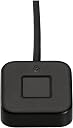
The Kensington VeriMark Desktop 1.0 is a FIDO U2F and FIDO2 certified fingerprint reader designed for professional-grade biometric authentication. It integrates seamlessly with Windows Hello and Microsoft services, offering advanced Match-in-Sensor technology for 360° fingerprint recognition with top-tier anti-spoofing. Its long USB cable ensures flexible desktop placement, while compliance with major privacy laws and federal standards makes it ideal for enterprise and government environments.


| Asin | B08WPHWN83 |
| Batteries | A batteries required. |
| Best Sellers Rank | #7 in Security & Surveillance Biometrics |
| Brand | Kensington |
| Computer Memory Type | DIMM |
| Customer Reviews | 4.1 4.1 out of 5 stars (1,085) 4.1 out of 5 stars |
| Date First Available | February 16, 2021 |
| Item Dimensions Lxwxh | 5.2 x 4.6 x 1.8 inches |
| Item Model Number | K62330WW |
| Item Weight | 2.01 ounces |
| Manufacturer | Kensington |
| National Stock Number | 0 |
| Product Dimensions | 5.2 x 4.6 x 1.8 inches |
| Series | K62330WW |
User
Secure, Convenient Fingerprint Login
This Kensington VeriMark Desktop Fingerprint Reader works great for Windows Hello and Passkeys, making logins incredibly easy. It sets up quickly and the speedy technology ensures secure authentication every time. It's so much more convenient and frankly, more fun than typing passwords. Highly recommended for a seamless, secure desktop experience. Reads fingers very fast and is very small and lightweight.
User
Makes security convenient.
Works great with Windows 11 and roboform.
User
Convenient when they work but limited utility
I got a couple to try on my home PCs and I like them, but have to fall back to pin/password fairly often, and my spouse usually can't get them to work at all. I considered recommending these at my office, but after using them a while the issues would make them a nightmare, plus there's no easy way to use these as a second factor for MFA system login even if you get your users over the trust issues with biometrics. Get these for convenience but don't rely on them.
User
Easy and improved security (works with powered USB hub)
I was looking to improve the login security of my Windows 11 Pro workstation. I was using an unchanged 6-digit PIN and was being encouraged to both increase the complexity of that PIN and to change it regularly. While I understand and agree with the objective, doing so is a hassle. So, I decided to switch my login process to biometric authentication--no switching required. Given my setup, I wanted to connect this device to a USB hub and not directly to my PC. I was concerned that some reviewers said this would not work but I also noted that they didn't identify the type of USB hub they tried. Years ago, I switched to using an independently powered USB hub as I found it always worked, when non-powered USB hubs didn't. I bet that this fingerprint reader would also work using my powered USB hub and it does--flawlessly. I've been using this for just over a week now and am very happy with its performance. Easier login with better security--it's a win-win.
User
Works well if you plug it directly into your PC's USB-A port, no extension cables, no USB hubs
This product requires a custom driver to be installed (on Windows), will not work via most USB hubs and will not work with most USB extension cables. The failure is often a crash of the driver during system boot which requires you to unplug the reader and then plug it back in to bring it back to life. So ... only buy this if you can plug it directly into your PC's USB-A port without any extension cable. The cable it comes with is 48" long so make sure that will work for you. If you don't have any of those problems, it works well with the actual fingerprint ID. I use it for Windows login and for auth with my password manager on a Windows 11 desktop PC.
User
Worked for a while - Now it is useless
UPDATE:I've had it about a month and a half. Or about 2 weeks past the return window. It got more and more fussy about reading our fingerprints. I thought it was just me because of dirt and oil and whatever on my hands from working in the garage. But my wife had the same issues.Now it's just a useless piece of junk.I switched over to Digital Persona 4500 fingerprint reader. I haven't had any issues since. You can find them on Amazon - but buying a used one on eBay from a reputable seller is the better bet. It also costs a lot less. They don't come with drivers. However all you need to do is google Digital Persona 4500 driver and look for the HID Global website to find them. It's no more complicated than downloading any other driver and installing it.Original:I've had it about a week and so far so good. I started looking at these when one of our kiddos somehow obtained our Windows pin #, then used that to obtain some other sensitive information from our desktop computer and got himself in a boatload of trouble....I'm using Win 10 and it was very easy to get it set up with Windows Hello. Now instead of entering a PIN or password we just touch our finger.I couldn't get this to work with Dashlane. So we switched to NordPass and now instead of entering the master password to unlock it we just touch our finger.I initially encountered some issues with it going to sleep and not waking up as others have mentioned. After doing some research I double checked the BIOS settings to make sure the USB ports were powered even if the machine was off. That was how BIOS was set - so that wasn't the issue.I then checked in device manager and under Power Management I had to uncheck a box that allowed the computer to turn it off to save power. Once I did that I haven't had any issues with it not working.I love the small size of it. I'm not entirely sure the kiddos even know what it is.The adhesive on it was worthless. Even after cleaning the desk with an alcohol wipe and letting it dry the adhesive on it didn't last a day. I replaced it with a good quality double sided tape and haven't had any issues. There isn't much weight to it - so you really do need to secure it to the desk for it to be usable.It's much easier and faster to touch a finger and log into windows, and log into the password manager. And it keeps any kiddos from looking over our shoulders. It's a win win situation. Couldn't be happier so far. Will update if it doesn't last or other issues crop up.
User
Windows login simplified
Game changer for logging into windows very accurate this replaced my old thumb drive fingerprint reader and I am satisfied with it this works every time no problems my thumb drive fingerprint reader was hit or miss
User
Accurate Fingerprint Reads with the Trust of Kensington
I had an older fingerprint reader that seemed to have problems reading my fingerprints causing me to have to retry many times. This gets a good read the first time every time. It has a sticky baser so when you put if on a surface it stays when you press your finger and doesn't move around. You don't need to press hard: a light touch will do the trick. It has excellent sensitivity.,I use it for system login, website login, passkey verification, etc.It's well worth it.
User
LOVE IT
Was so easy to set up and works really well with Windows 11!I got a YubiKey-5 and was planning on using that to login to my machine, but it turns out you still have to enter your username and password in addition to the hardware key.So I decided to get a fingerprint scanner that works with Hello! on Windows 11.I heard good things about this one on YouTube so I decided to spend the money.Just got it out of the box, plugged it into one of my USB ports on the back on my system,No drivers to install, Windows took care of it.Went to sign-in options. Set a couple of things like my two index fingers for it to read.Rebooted my machine, saw the log in screen, it said "please touch fingerprint", I touched the sensor....BAM...INSTANTLY LOGGED IN! So cool!!!Nothing but good things to say. Super easy to setup and use! :)
User
Recomendo
Muito bom
User
Fonctionne parfaitement !
Ça fait 3 mois que je l'utilise, rien à redire. Je voyais ça plus gros mais c'est tout petit. Ça marche nickel avec Windows ou même les clés de sécurité comme sur BoursoBank.
User
consistently fast & reliable for Windows Hello functions
Surprised how heavy & solid this little thing is for its small size. The weight makes it sit flat on the surface rather than float about on its cable & it also has an anti slip pad on its undersurface.Like:Went to "setup fingerprint recognition" (for Windows Hello) in Windows 11, & the device was there waiting for selection.Recognition is very fast, faster than any I have experienced on previous laptops or an older USB device.Also using it with Bitwarden & KeepassXC for quick unlock via Win Hello.Microsoft account recognized it for signing in to MS-365Heavy & small enough to stay put on the deska LED turns on when it is expecting a print input, flashes red if it doesn't recognise.Don't like:Not much so farExpensiveI'm not sure how to take advantage of U2F/FIDO2 for other apps or in browsers.Regrets? Not buying it earlier.Update 2024-04-29:1: Since the wider re-learning as item 1 below, performance has been rock solid. Fantastic.2: Item 2 problem below RESOLVED. Uncheck: "Allow the computer to turn off this device to save power" found in Windows Device Manager>Biometric Devices>VeriMark DT Fingerprint Key>Properties>Power Management.Update 2023-09-16:1 I found I was inconsistent in positioning my finger for reading, so I re-learnt my print, using an especially broad finger print area with the learning process. That really helped with improved reliability of recognition.2 For some reason the driver or something occasionally goes to sleep & it gets unresponsive. I had this problem with a windows hello camera in the past so I assume it is somewhere in windows. Sometimes unplugging, pausing, & plugging back in restores life.
User
Funkar med Windows11 och Windows Hello
Funkar med Windows11 och Windows Hello.behöver försöka med fingret 2-3 gånger för att det ska funka ibland.
Trustpilot
1 month ago
3 weeks ago