Desertcart purchases this item on your behalf and handles shipping, customs, and support to Ireland.
💼 Your ultra-portable office in a stick — power, speed, and freedom on the go!
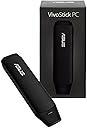
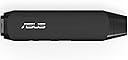
The ASUS VivoStick TS10-B017D is a sleek, ultra-compact Windows 10 PC that plugs directly into any HDMI display, instantly transforming it into a fully functional computer. Powered by a quad-core Intel Atom x5-Z8350 processor, it supports multitasking with reliable performance, enhanced by built-in cooling. Featuring 802.11ac Wi-Fi and Bluetooth 4.1, plus USB 3.0 and 2.0 ports, it offers versatile connectivity for peripherals and fast external storage. Ideal for professionals seeking a portable, space-saving computing solution without compromising on speed or connectivity.
| ASIN | B01EZGYV9A |
| Best Sellers Rank | #724 in Bluetooth Network Adapters |
| Brand | ASUS |
| Built-In Media | AC Adaptor, HDMI Extension Cable, Holder Mount, Power Cord, Quick Start Guide, Warranty Card |
| Color | Black |
| Compatible Devices | Desktop, Keyboard, Smart TV |
| Customer Reviews | 3.7 out of 5 stars 228 Reviews |
| Data Link Protocol | 802_11_AC |
| Global Trade Identification Number | 00889349370926 |
| Hardware Interface | Bluetooth, HDMI , USB |
| Item Dimensions L x W x H | 5.3"L x 1.4"W x 0.6"H |
| Item Weight | 2.56 ounces |
| Manufacturer | ASUS Computer International Direct |
| Mfr Part Number | TS10-B017D |
| Model Number | TS10-B017D |
| Number of Items | 1 |
| Product Dimensions | 5.3"L x 1.4"W x 0.6"H |
| UPC | 889349370926 |
| Unit Count | 1 Count |
| Warranty Description | 1 Year |
B**S
Great for Linux and some technical stuff...
First off, like most of the reviews here, this thing is impressive! I bought this blindly looking for a small computer to run linux. I didn’t do any research first, just ordered it. When it arrived, I was amazed at how well it ran Windows 10. I hate Windows 10. I let it run it’s updates, tried a few things, then went straight to work disabling Cortana and setting as many privacy settings to off as I could. I wanted something to use until I could get a functioning distro running. I have no interest in letting M$ into my house / life anymore, but that is topic too broad for this review. All I can do is to ask you to research them and their telemetry gathering methods and make your own conclusion… The lack of a micro sd on this did not bother me. Most memory stick ports on computers are routed through a standard USB port. Regardless of how great a memory card you have, the performance will always be capped by the limits of the bus it is running through. My real main concern was the USB 3 connection and if or how well it would or could handle a UASP connected SSD. I’m here to say that it handles it surprising well. So much so, that it out performs the internal drive that comes with it - and you can boot with it too! I used this enclosure and hub: Inateck 2.5 Inch USB 3.0 Hard Drive Enclosure External Case for 9.5mm 7mm SATA/HDD/SSD with 3 Ports USB 3.0 Hub, UASP Supported, Tool-Free(FE2007) It really adds some dimension to what you can do with this Vivostick. A word of warning though, it must be externally powered and the power must be applied before booting up the stick. The enclosure will not swap power on the fly and the Vivostick will sputter/crash if it has to supply it. I used Ubuntu Mate 16.10. I got the distro from Ian Morrison’s site. Even though his images were designed to operate on the Compute Stick, they worked fine of the Vivostick. He commented that a couple of things were still broken like wifi. I know the posts were a little dated and may have been fixed since, but everything including wifi works on the Vivostick. I’d like to mention that if you do find use in his images, please do what you can to support his work. Also, if you’re interested in booting something other than Windows on this device, you must disable fastboot in the BIOS. I plan to keep this updated as I go. I hope you find it helpful.
K**R
Great device but not upgradable
I have 5 of these purchased fall of 2017, operationally I love it no problems streaming or playing videos which is what I bought it for. The 2 problems I have are, 1: it will only operate using the included power supply I have tried numerous others including TV's, and it will not work. 2: I have yet to be successful at upgrading to the latest version of Windows 10 as of April 2018, insufficient hard drive space. The latest version of win 10 requires all of the upgrade be done using C drive only. As received there is only about 4gb on the hard drive of useable space available, windows takes up the rest. The win 10 upgrade requires 8 - 10 gb I have purchased similar devices from other manufactures that have 64Gb hd and the upgrade is slow but no problems, also no issue's with the power supplies
A**W
Works well as a Kodi device but hard to start
Update: The powering on problem seems to have righted itself, maybe through windows updates. The Vivostick is easily four stars worth of value now. Old review below, other than above notation, everything else still applies. I'd give it 4 except for the following The Bad: Hard time getting it to turn on. I have to unplug it several times and plug it back in. The instructions say press the power button for one second however in practice you have to press the button sometimes more than 10 sexonds to get the blue powered light to come on. The device will not run off of the USB on your TV and the USB cable that comes with it is only a few feet long. The only usb power adapter that works is the one that comes with it. I had problems getting other micro usb cables to work with it, so when this one goes bad like all usb cables do I'm not sure what I will have to do. The Good: Kodi runs really good on this thing. Windows 10 64bit comes with the device so your really getting the stick for only a few bucks. I can view video at 4k but it sometimes buffers which may be my internet so not listing it as a negative.
D**R
Didn't have a keyboard around, still loved it
Brilliant little marvel. Went with this instead of one of the many other (even cheaper) PC-on-a-stick devices available because I wanted the additional USB 3.0 port and audio jack. Thanks for adding those, ASUS! I was pretty excited after plugging it into a television to test it and it just worked. Sweet blue power indicator. Windows 10 64 bam. Setup was straightforward, wifi worked great, so did my wireless mouse. I didn't have a keyboard handy so I used Windows' on-screen keyboard to set email up, install TeamViewer, and so on. Device is a little slower than I'm used to, but very tolerable. I had no issues at all, other than a handful of pixels were cut off on the left screen edge for some reason. Didn't like my TV? Great, useful PC under $130, and Amazon Prime put it in my hand overnight--probably only 12 hours later.
G**E
Disappointing, but not sure if it's hardware or software that is the reason.
UPDATE: Windows just performed its first automatic update, and the first thing to 'hang' is Microsoft Edge. 1.) For whatever reason, MS wants me to know that Edge is best optimized for this VivoStick, yet EDGE has hung twice on this brand new hardware. 2.) Microsoft Edge 'reset' my preferences without permission. I had installed WPS Office because I was tired of being asked to purchase Office 365 every time I needed to view a .pdf file. Mind you , I'm not trying to do anything but read a pdf. Still, every time I am asked to buy 365 before I can view a document. I don't think it is right that Edge universally overrode my preference. 3.) WIndows has applied 3 updates in 2 days, and I'm already running out of storage. Edge let me know that it was storing previous versions of Windows, and that I could delete them to free up space. Original Post: It's hard to know where the problems split on this product. Knowing whether the issues are with ASUS or MICROSOFT are difficult to identify. On one hand, you could argue, hardware with such minimal specs has to be the reason why mundane tasks take so long. OR, it would also not surprise you to believe it's a foolhardy-attempt to reduce Windows 10 down adequately to function within the limitations of a 'stick' computer. Either way, I'm not a power user. Straight out of the box, this device took 5 minutes to get to a Blue Screen of Hype, then took another 3 minutes to show the setup page. After entering my preferences, the device needed 3 more minutes before Desktop arrived. Promptly, the device reacted slowly to keyboard and mouse input, and needed a reboot. After a couple of restarts, things got a bit better, but I was disappointed that the Internet access was slow. I have 200 Mbps Time Warner, with the wireless router sitting 1 foot from the WinStick. Pages should have loaded faster than a public Wi-Fi experience. My other portable devices(tablet and deactivated smartphone) have faster browsing. While I have yet to customize my WinStick, certain things do not make sense. For example, my viewing preferences won't stay in 'Thumbnail' once I close a window. Every time I re-open my Pictures folder, the view is an 'List' regardless of my preference. Another annoyance is Explorer Edge. I prefer to browse the Internet with Internet Explorer, but opening IE prompts a message that" Edge is better optimized for web browsing. " Maybe, but if that were the case, why include IE at all? And IE is not even visible from the desktop environment. It was only offered as an "Open With" option that I came across accidentally, so I had to "Pin" IE to the taskbar in order to find it again. Explorer Edge may be optimized, but I don't care to have anything other than a web browser open when I am web browsing. Is that wrong? Here's another annoyance. Office Mobile won't allow spreadsheets to be viewed unless you give permission to have your document converted by MS online service. Why? Doesn't converting a native document seem redundant? The overall experience is one of an aging Windows pc that has grown slower over time. I wasn't expecting that with a brand new device. Even updates take longer. My last shutdown prompted an update, which only completed 30% before turning off. The last 70% took place at the next start-up. Really?
H**R
Good unit for basic use.
Overall very good. My unit was defective and had issues with staying in sleep mode, I didn't want it running 24x7. A small computer will burn out running constantly. (I was charged return shipping WTF). It will display windows in 4k but it will not process 4k video :-( Overall performance was okay for basic things. I would recommend the next generation for smoother performance and hopefully 4k video support.
K**G
Somewhat limited and Windows 10 can be a problem with it but there’s a work around.
8/15/19 - I’m laughing at myself for bothering to update this review after 2+ years BUT here’s why: this thing can work for you if you do a couple of things: buy yourself a flash drive to work with this thing. I had a 128Gb SanDisk lying around doing nothing so I used that. Migrate the OS to the flash drive. Now, for the faint of heart, this really not very difficult. There are a number of ways to do this. For my money the easiest way is to download Mini Tool Partition Wizard. The free version is all that you need to migrate the OS to the external SSD (flash drive). Then a slightly tricky part: you hafta go into the BIOS and change which drive the unit will boot up from. You want it to boot from the flash drive where the migrated OS is located. Without going into details, you can find out how to do this on either YouTube or other places on the web. The problem with Windows 10 updates is that the OS is kept on the drive and the update (full update) is downloaded. There’s not enough room for the OS AND the update. That’s why you have to migrate the OS to a larger place. Since I’ve done this, I haven’t had a problem updating Windows 10. I don’t even like Windows. I’m an Apple user but I just keep this thing hooked up to my Samsung TV for giggles. But you might wanna think about using for travel. After all the thing fits in your pocket. Good Luck 5/9/18 - I finally managed to get Windows 10 reinstalled. This was after ASUS informed me that since the unit was no longer under warranty it would cost 60 bucks to do a reinstall (more if there were additional problems). I ran into additional problems because I don’t have a computer running Windows 7.1, 8.0 or 10. Ya need a Windows computer to fix a Windows computer! I finally found the work around but it’s not for the faint of heart. As I type I’m creating a recovery drive for this baby in case it crashes the next time Windows tries to update itself. Good luck trying to stop Windows 10 from updating itself. Unless you REALLY NEED a mini/micro computer running Windows, I'd recommend that you look into a Chromebooks, box or stick. So many less headaches than Microsoft. 5/1/18 - Update: Windows 10 update killed it. Truthfully not ASUS or any mini/micro PC makers fault. Microsoft is totally to blame. I’m still going round & round with ASUS trying to get this thing up and running again and truthfully ASUS has been reasonably responsive but I’m not holding out much hope. I got this thing on a lightening sale so I’m out < $100. BUT I WILL NEVER BUY ANOTHER PRODUCT THAT HAS THE MICROSOFT NAME ATTACHED TO IT AGAIN. If I can’t get this thing straightened out and updated (without the update Microsoft won’t update the security), it's Chromebook/Chromebox here I come. Stand by for future updates. First of all, my wife and I are an Apple family BUT we both came from the Microsoft world so we're familiar with it. We just got tired of the constant updates/upgrades and the need to buy anti-malware protection, etc. plus, we're iPhone, iPad, iMac & Mac Book users. That being said, there were still times when we had to break out the retired Dell laptop or my ASUS Netbook (God, I loved that thing.) for various reasons. Additionally, we're cord cutters (if you understand what that means). I stumbled upon this little gizmo when it was on sale ($108.50; yeah I wadta buy a keyboard and eventually a mouse as well; so, figure 128 bucks.). Lemme tell ya, I'm impressed. I hooked this baby up to my Samsung TV and in ten minutes it was up and running without a problem. It connects to my network via WiFi (minimum 50 Mbps via a $20 TP-Link router acting as an access point.) and it WORKS FINE. I don't know (I kinda doubt.) that this can be your primary computer but for what I use it for, streaming video, music, checking e-mail, cruising the net it's a hoot. My Samsung TV has now become a 46" monitor! I had 128 Gb SanDisk flash drive that I plugged into this thing and just use that as additional storage. My wife and I are traveling to Europe this fall and I'm seriously considering taking it with us. Just plug it into a HDMI capable TV and connect to a available WiFi network and you're good to go. The damn thing fits in your pocket!
A**R
Pleasantly Surprised
UPDATE: I finally took the time to test the streaming and it plays beautifully. The browser action is also smoother/faster after removing all the memory hogging bloatware. I've noticed the stick turns off the fan noise when it drops to around 50% ram usage. The whirring was a bit annoying when it was at 85% out of the box. ORIGINAL: I had very low expectations for this mini pc stick. But it was so cheap I thought I'd give it a try. And I'm glad I did because I love it! I used the extender to plug it into my 27" hp monitor, plugged in the AC adapter, turned it on, plugged in my wired keyboard and wireless mouse receiver, then quickly set up windows. I chose not to install the huge windows update, turned off all their express settings, uninstalled all the bloatware and was all set! My memory jumped from 85% to 50% after the uninstalls and disabling of Microsoft edge. I have 3/4 of hard drive space too I then installed Scrivener and turned on airplane mode. Super happy with this writing setup. Also tested a 128gb USB stick with all my movies and they play beautifully too. I noticed the browser action was slow though so I don't see how it would stream anything. But maybe I'll test out the Netflix app later. I don't really care for the distractions of the internet though so it's not a big deal for me.
A**S
Great product
Awesome mini computer. Runs Windows 10. Suggestion - plug in 32gb usb stick that it has enough memory for all the updates. 5 stars
J**E
Excelente , es una computadora en todos los sentidos.
Es una computadora al 100%, al inicio durante las primeras horas sera un poco lenta pues se estara actualizando en segundo plano , en cuanto acaba de actualizarse la velocidad mejora el doble y se vuelve agil , funciona sin ningun problema y lo mejor es que tu monitor sera del tamaño de tu TV en mi caso 75" y en 4K se ve de excelente (la vivostick es 4K) , por otro lado la conecte directo a mi AVR por HDMI y puedo escuchar TIDAL en MASTER esto para quien guste de la musica HD , en fin es un magnifico aparato para uso medio como internet, word , youtube, correo y cualquier aplicacion comun excepto juegos de video pues no esta hecha para eso , la recomiendo 100%.
O**Z
Quick delivery
It is what it says it is. Only used it a few times but so far its fine.
C**N
No lo recomiendo
Es muy lento
J**.
I was extremely unimpressed with the performance of the VivoStick ...
I was extremely unimpressed with the performance of the VivoStick even at it's price. It can't even keep up with running windows let alone any program or app. There are a slew of devices in the $100 range that can stream video at 1080p and this device is not one of them. I have no idea who this product is for, even if you are extremely budget conscious take your time and save up for something with a little bit more power.
Trustpilot
3 days ago
1 month ago