Desertcart purchases this item on your behalf and handles shipping, customs, and support to Ireland.
🔗 Power Up Your Productivity — Connect More, Control Better!
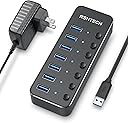
The RSHTECH 7-Port Powered USB Hub (RSH-518) is a robust USB 3.0 hub that expands your device connectivity with 7 powered ports, delivering fast 5Gbps data transfer speeds. Featuring individual power switches with LED indicators, a durable aluminum and ABS build, and a universal 5V power adapter, it’s designed for professionals seeking efficient, organized, and reliable multi-device management across Windows, Mac, Linux, and more.


| ASIN | B08TT1ZK8G |
| Additional Features | Anti-Slip, Fast Data Transfer, Indicator Light, Plug and Play, Powered |
| Best Sellers Rank | #79 in USB Hubs |
| Brand | RSHTECH |
| Cable Length | 3.3 feet |
| Color | Black |
| Compatible Devices | Desktops, Digital Cameras, Gaming Consoles, Laptops, Printers |
| Customer Reviews | 4.5 out of 5 stars 1,759 Reviews |
| Data Transfer Rate | 5 gigabits_per_second |
| Enclosure Material | Acrylonitrile Butadiene Styrene (ABS), Aluminum |
| Hardware Interface | USB 3.0 |
| Item Dimensions L x W x H | 5.12"L x 1.85"W x 0.82"H |
| Item Highlight | Aluminum USB Hub Splitter with Universal 5V Adapter,Individual On/Off Switches, 3.3ft USB 3.0 Cable for Laptop and PC, Black |
| Manufacturer | RSHTECH |
| Mfr Part Number | 1 |
| Minimum Required Operating System Version | Windows 10 |
| Model Number | RSH-518 |
| Number of Items | 1 |
| Number of Packs | 1 |
| Number of Ports | 7 |
| Operating System | Chrome OS, Linux, Mac OS, Windows 10,8,7 |
| Special Feature | Anti-Slip, Fast Data Transfer, Indicator Light, Plug and Play, Powered |
| Total USB Ports | 7 |
| Total Usb Ports | 7 |
| Unit Count | 7 Count |
| Warranty Description | 18 months warranty for non-human damage |
S**N
Extremely well made and flexible use!
RSHTECH RSH-ST10C-6 10-Port Powered USB 3.2/USB-C Hub Review If you're someone who works with a wide variety of USB peripherals—ranging from external hard drives to webcams and flash drives—you know that a reliable and feature-rich USB hub is not a luxury, but a necessity. Whether you're managing a tidy workspace or dealing with the clutter of devices and cables, a robust hub can drastically improve efficiency and organization. In this detailed review, I’ll walk through my experience using the RSHTECH Model RSH-ST10C-6, a 10-port powered USB 3.2/USB-C hub splitter that includes a mix of USB-A and USB-C ports. It promises high-speed data transfer, ample power delivery, and a durable design—all packed into a compact, user-friendly form factor. After putting the hub through its paces on both a Windows and Mac OS machine, I’ll be sharing everything from unboxing impressions to build quality and real-world performance. ________________________________________ Unboxing and First Impressions The RSHTECH RSH-ST10C-6 arrives well-packaged in a sturdy box, which reflects a thoughtful approach to presentation and protection during shipping. Inside, you'll find the USB hub itself, a 60W power adapter, and a USB cable for connecting the hub to your computer. One design choice I particularly appreciated was the thoughtful cable setup: the connection cable has a USB-C on one end to plug into the hub and a USB-C on the other end—with a tethered USB-C to USB-A adapter attached. This tethered adapter can be used or detached based on your system's needs but won’t get lost thanks to the built-in tether. It’s small details like this that show the product designers really thought about the user experience. I was not expecting to find this flexibility so this was a nice surprise. Upon first glance, the device looks and feels solid. It’s not a flimsy piece of plastic; rather, it features a predominantly metal housing that gives it a durable and premium feel. It was clear right away that this wasn’t just a cheaply made hub you’d find for a few bucks online—it had a certain heft and quality construction that promised long-term use. This was also a pleasant surprise. ________________________________________ Build Quality and Design The RSH-ST10C-6 feels well-engineered and robust. The casing, primarily made of metal with some plastic components, offers a solid balance between weight and durability. It’s not too heavy, making it portable if needed, but still feels grounded on your desk. What stands out in the design is the array of ports, all well-labeled and accessible. Each port also features its own individual touch-sensitive switch. A light tap on the power icon turns the port on, while holding it down for 2–3 seconds will switch it off. This functionality is subtle but incredibly useful, especially in a professional environment where you might not want all devices powered at the same time. Each port includes an LED indicator, letting you know its power status at a glance. The light is not overly bright or distracting—just a subtle blue glow that communicates its power status clearly. One noteworthy addition I made was inserting white USB-A and black USB-C dust covers into the unused ports. You will see these in the video which I posted. These did not come with the unit, but I purchased them separately to help protect the ports from dust which exists in my work environment. Given how practical this is, it might be a good suggestion for RSHTECH to include a few protective port covers in future iterations of this USB hub. ________________________________________ Connectivity and Ports This hub is marketed as a 10-port USB 3.2/USB-C hub, and it lives up to the claim: • 3 x 10Gbps USB 3.2 Ports: These consist of 2 USB-C and 1 USB-A. They are capable of delivering extremely fast transfer speeds for devices that support USB 3.2 Gen 2. • 7 x USB 3.0 Ports: This includes 4 USB-C and 3 USB-A ports, capable of 5Gbps speeds. The balance between USB-A and USB-C ports makes it versatile and future-proof. Many newer devices — especially from Apple — are moving toward USB-C exclusively, but legacy devices still rely on USB-A, so having both available ensures the hub stays relevant for years to come. The high-speed ports are particularly useful if you regularly transfer large files or work with external SSDs. Even though I haven’t tested it with all 10 ports in simultaneous heavy use, I did run six or seven devices simultaneously—including a webcam, an external hard drive, a USB microphone, and some flash drives—and the performance was seamless. No issues! ________________________________________ Power and Performance One of the main selling points of the RSH-ST10C-6 is that it’s a powered hub, which means it comes with its own 60W power adapter. This is critical if you're using power-hungry devices or plan to use multiple ports at once. A bus-powered hub simply wouldn’t be able to keep up. In my use, even with 6–7 ports active, I didn’t run into any issues with underpowered peripherals. Devices worked reliably without disconnects or power warnings. While I didn’t test the hub with all 10 ports fully maxed out with high-draw devices, the 60W adapter suggests it should be capable of supporting a full load within reason. It's also worth noting that the hub does not support charging laptops, which is to be expected—it’s meant for peripheral connectivity, not as a USB-C dock. Data transfer rates were impressive. Using a USB 3.2 Gen 2 SSD, I saw transfer speeds close to the advertised 10Gbps rates when plugged into the corresponding high-speed ports. USB 3.0 ports offered expected speeds around 5Gbps, which is still more than sufficient for most tasks like transferring media, backups, or operating external devices. ________________________________________ Compatibility and Setup Setup was a breeze. I tested the RSH-ST10C-6 on both a macOS and Windows 10 system, and it worked flawlessly with both. There were no drivers to install, no firmware updates to worry about — just plug and play. On the Mac, it was used with a brand new Mac Mini, which has limited ports. This hub expanded that capability significantly and allowed simultaneous use of multiple drives and accessories. On the Windows machine, a more port-heavy laptop, the hub served to declutter and centralize peripheral connections. Whether you’re using this hub for creative work (video editing, photography), office productivity, or casual use (gaming peripherals, storage, etc.), it adapts well to various setups. ________________________________________ Features and Functionality The individual touch switches are easily one of my favorite features. Being able to toggle power on each port is great not only for energy efficiency but also for privacy and security. If you’re using a USB mic or webcam, for instance, you can disconnect power with a touch when not in use. It’s a minor feature with major benefits in real-world use. The LED indicators are another thoughtful touch. They allow for a quick glance to see what’s active without having to fumble around with device settings or guess which device is connected. Additionally, the 3.3-foot cable included is just about perfect for desktop setups. It gives you the flexibility to position the hub where you need it, even if your tower or laptop is a bit further away. The inclusion of a tethered USB-A adapter on the computer end of the cable is a very nice touch, just in case you need to connect the hub to a different machine with a different type of port. ________________________________________ Areas for Improvement No product is perfect, and while the RSH-ST10C-6 comes close, there are a couple of minor improvements that could make it even better: 1. Include Dust Covers: As mentioned, I had to buy separate port covers to keep unused ports clean. Including a few basic silicone or plastic covers would be a low-cost but high-impact improvement. 2. User Manual Clarity: The user manual is very brief and does not explain the touch switch functionality in detail. I initially missed how to power off individual ports, which required holding the switch for a few seconds. Clearer documentation could avoid confusion for first-time users. 3. Slightly Larger LED Labels: While the LEDs are effective, the icons themselves are a bit small. Slightly larger symbols or optional labeling could improve visibility in low-light conditions. ________________________________________ Final Verdict The RSHTECH RSH-ST10C-6 is a feature-packed, durable, and thoughtfully designed powered USB hub that delivers exceptional value for its price. With 10 ports, high-speed USB 3.2 support, a robust metal housing, individual touch switches, and broad compatibility across platforms, it addresses the needs of both casual and professional users alike. Whether you’re looking to tidy up a multi-device workstation or expand your laptop’s limited connectivity options, this hub is more than capable. The reliable performance with both Mac and Windows systems make it a smart addition to any tech setup. If RSHTECH includes a few dust covers and polishes the documentation in future models, they’ll have a nearly perfect USB hub on their hands. But even as it stands, the RSH-ST10C-6 earns a solid recommendation. It’s a small investment that can have a big impact on productivity and organization.
A**7
Great Gadget to Power You USB Items
This hub solved my "USB port shortage" instantly. It's fast, well-built, and the individual touch switches are surprisingly handy—no more unplugging devices just to turn them off. With 10 ports, plenty of space for everything. I am using it for a Podcast (DougHasQuestions) hosted on YouTube, Spotify and Apple Podcast, using three Obsbot Cameras. All are USB-C. Would have needed to buy a computer with three usb-c connections to make it all happen. This was a game changer. One plug to the computer, one plug to power, then 10 available ports.
T**O
Solid build, does what it says, Good Mid Lvl at a low price point
The RSHTECH 7-Port Powered USB Hub Expander is the good solution for anyone looking to expand their laptop, desktop, smart TV or gaming host's USB capabilities. This USB 3.0 data port hub is equipped with 7 USB 3.0 ports that offer data transfer speeds up to 5Gbps. The speeds are maxed at 5GBPS which I only consider low given todays standards of 10GBPS to 40GBPS. That said this would be a good option for those needing extra ports for moving around small files and are not worried about time. This USB hub is also equipped with a 5V power adapter that ensures your connected devices have a steady and safe data transfer. This is great for sitting at home at a desk but for travel requires one more plug to worry about. But its small size of both the unit and the plug make it acceptable if you are considering to travel with it. Additionally, the RSHTECH USB hub features individual On/Off switches with LED indicators, making it easy to keep track of power status for each port. I found each button worked constantly and easily without fail. have a smooth tactile responsive feel and low throw. LED lights are bright and easy to see even in day light and the location next to the port instead of above and below leave no room for error in hitting the wrong one. The hub is made of high-quality aluminum alloy and ABS design, making it sturdy and durable. The compact design makes it easy to install and use in your home or office. I have found that all of RSHTECH's products have a great sturdy design. I have found all of their products ascetically pleasing. feels solid in its design. The cables supplied are very thick and need to be bent into shape or can easily flip or move the unit as it is very lightweight. The package includes the RSHTECH 7-Port USB 3 Hub, a universal 5V/2A power adapter, a 3.3ft long USB 3.0 detachable cable, and a user manual. This item is good for those looking for a reliable unit at a low price point who aren't bothered by mid level speeds. The company itself has always stood by their warranty and quickly issued any replacements if requested. the customer support has always been friendly and quick to offer solutions. I would love to see them push past the 10GBPS barrier but do not believe they have an interest in doing so. That said I believe if they would beef up the power supply, add an ethernet port, and an HDMI port this device could see a wider audience. Until Next Time Deleted User
S**E
Works as expected, rubber bottom, so it doesn't move all over the desk
This is an excellent product, it works as expected, I like the power on power off, connected to each port. I also have power-hungry devices, connect to it, a microphone, external drive, camera, and a few other things. This didn't work with the hub that wasn't powered, but works fine with this. But the thing I really like the most about it is that it has some mass to it and it has rubber on the bottom so it doesn't slide all over the desk. That was a really big thing. The last one I had was all over the place, and it just added to a tangled mess.
S**I
Works Good. Dead ports? Read this…
Pros: - Switching off unused devices speeds boot-up & saves RAM. - Continues charging your device after the PC shuts down. - Saves wear and tear on your PC ports Cons: - Charges better than my PC alone, but don’t expect “quick charging”. - About those dead ports, it might not be the hub. I’m not sure about IOS, but Windows can be finicky with USB hubs. Some of my RSHTECH ports went dead, so instead of digging into device manager, BIOS or the registry, try this: 1. Shut down your PC 2. Unplug the RSHTECH power 3. Unplug the RSHTECH USB from your PC 4. Plug in a new device (like a thumb drive) into that same port 5. Reboot and make sure the new device is working properly 6. Shut down the PC 7. Unplug the new device and re-insert the RSHTECH plug into the same port 8. Reconnect power to the RSHTECH 9. Boot up your PC If you’re lucky, Windows will recognize the hub as a new device and reset everything.
C**J
Everything i needed and more
Wow, this was a life saving game changer for my setup in my home office. I recently bought a new laptop about 4 months ago. Did this because I started talking classes online from goggle to change careers from Executive Chef to Ai Developer and coding. Well I started using AI to teach myself how to code and have been building an app. Ran into over heating issues, since I didn't plan on building apps and was originally just doing classes i bought a really good home office laptop but it wasn't setup for coding. Well to fix my over heating issues I've had to add external cooling system, external hard drive, I use 3 screens as well which my laptop wasn't designed for so I was using several different add on tools like c-port hub then hdmi splitter because I found out my USB-C wasn't a thunderbolt it was only power. Anyways i tried this device and I have several of the ports used at once.And I must say that I have no issues, no power issues, no lagging, no nothing. I definitely was skeptical at first because I don't like buying off brand names when it comes to tech. There's a lot of people out there that just produce knockoffs, or unfortunately 💩 product. By this company, right here should be the standard for powered USB. Hubs. I live stream all my app designing and my classes and have a pretty good following. So I will definitely be. I'm showcasing this to my followers. And I hope for all the other tech add-ons or equipment. I might need that. I remember this company and that they have it.
M**H
An excellent USB hub
Because my relatively new MacBook Air has only two ports, both of which are USB-C, I need some kind of solution that both adds ports and accommodates my older devices that have only USB-A connectors. This device - RHSTECH's RSH-ST10C-6, answers the issue VERY well. It provides a high-speed (up to 10Gbps) USB3.2 port (actually THREE such ports) for my external hard drive. It provides more than enough appropriate ports for my other needs (keyboard, headset, external CD-ROM drive, camera). I am no "power user," but it's very nice to have enough ports and enough power for whatever gadget comes along. Here are some other things I like about the device: It's compact - smaller than 7-port hub that I had before. It worked immediately out of the box. It was convenient to set up and came with very clear instructions. It connects to the laptop with a USB-C cable that has an attached USB-A adapter, which an older laptop than mine might require. There is a separate switch for each port, so you can turn off a device without having to unplug it. The switches are on the top of the device, which is more convenient than having them on the side like my previous hub did. The only USB device I have that I could connect through it was my HDMI monitor because the USB-C ports are not video-enabled. That said this hub provides more than enough ports that I CAN use for my other devices so that the remaining USB-C port on the laptop itself is available for the monitor.
J**R
Powered on for a sec, then non responsive
Unit plugged in. The power lights came on. I connected my mouse/keyboard receiver and it worked for a second. Then the lights went out, never to power on again. I tried connecting to all my ports with no luck. I tried connecting one device at a time, I tried restarting my computer. I messed around for a good hour trying to connect a plug and play device. Should have given up after 5 minutes but I wanted to believe that I was doing something wrong. I am an electrical engineer and should have known better. This is the first time buying anything from this company. Now they are on my personal "do not buy" list. Oh well. I'll just keep using my cheap USB hub I got from work with their logo on it.
S**.
This one doesn’t work. No data transfer.
This one doesn’t work. No data transfer. Had to return and had to pay import duties. Don’t order from Canada.
A**R
Grata surpresa!
Excelente produto, sem arrependimento algum.
Trustpilot
3 weeks ago
2 months ago