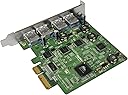
๐ Upgrade your USB game โ speed, power, and compatibility in one sleek card!
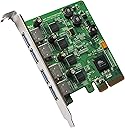
The HighPoint RocketU 1144C is a high-performance 4-port USB 3.0 PCI-Express 2.0 x4 controller card designed to deliver blazing-fast 5Gb/s transfer speeds. Featuring UAS support for enhanced data throughput and broad compatibility with USB 2.0/3.0 devices across Windows, Mac, and Linux platforms, itโs the ultimate upgrade for professionals demanding reliable, multi-device connectivity and uncompromised performance.
| ASIN | B00DW5QGLM |
| Brand | HighPoint |
| Compatible Devices | Personal Computer |
| Customer Reviews | 3.8 out of 5 stars 33 Reviews |
| Global Trade Identification Number | 00643653114467 |
| Hardware Interface | USB 3.0 |
| Item Type Name | HighPoint RocketU 1144C raid card PCI - Express 2.0 x 4 4 x External USB 3.0 Type A ports |
| Manufacturer | HighPoint |
| Mfr Part Number | RocketU 1144C |
| Model Number | RocketU 1144C |
| Number of Items | 1 |
| Operating System | PC |
| Style | 4-USB 3.0 Ext. Ports |
| Style Name | 4-USB 3.0 Ext. Ports |
| UPC | 044112737249 643653114467 |
| Warranty Description | 1 year warranty provided by the manufacturer from date of purchase |
A**A
HighPoint Rocket PCI USB 3.0 card ROCKS
Updated Review | 7/1/2015 Make sure you are using good USB 3.0 cables or you may encounter problems. Don't forget that this card is not powered, so running cheap 6ft cables may not work for certain devices. Review 03/01/2015 - 5 Stars I don't know what people are complaining about. We use this product at our computer repair center to do HD Recovery with multiple drives at the same time. This PCI USB 3.0 card ROCKS!!! Download the drives from their website and get it working. It's cheaper than eSATA and it's compatible with a full range of products because it's USB 3.0. I've used all the ports, and even-though there is a speed decrease when using all the ports at the same time, it's insignificant, you won't even notice.
B**I
Wish all needed files were on the disk or download site. Otherwise, excellent
I had to take a star off for the missing 'base devic' driver. As mentioned by others, it is only attainable by registering and looking it up in the FAQ section (thanks for posting that everyone). I had to do a manual device search and point it only to the 64 bit folder. Windows 7 didn't find it by checking subfolders. After install, it works great. I'm using it in a longer PCI express x16 slot on an old Asus P5Q Pro Turbo board. Should've done this ages ago. This will help me hold off on upgrades until the end of the year, when all of the truly new and worthy of upgrading tech comes out.
L**S
Super fast and they work in Dell PowerEdge servers
I wanted a fast USB 3.0 card to install in Dell PowerEdge T620 servers for my clients. This gives me the speed (about 4 times USB 2.0 speed) and allows me to connect external hard drives for copying large amounts of data (backups). I didn't really need 4 ports, but it is nice to have them if I need them.
I**N
Missing Base System Device Driver??
I am dumbfounded. I bought this card because of the reviews and because this card was allegedly plug and play. Think again. It appears that the CD that comes with the product is missing a critical driver needed for Windows 7-64 bit. As a result, the Device Manager complains that it can't find the needed base system driver for the device, and Windows is flat out unable to locate the needed driver. The card won't initialize correctly in our Windows 7-64 bit machine. I guess the card's manufacturer expects me to spend countless hours trying to find a compatible driver on the web as others have done. Forget that. This is ridiculous. Given the premium cost of this card, one would think that such driver issues would be non-existent. This is totally inexcusable. As of 13 JAN 2015, I am waiting to hear back from HighPoint's tech support. I'll give'em one week from today to resolve the driver issue. If they can't, I'll request a refund and return the card to Amazon. What crap. Update: 17JAN 2015 - After countless exchanges with HighPoint's tech support, installation of the alleged missing base device driver, re-seating/re-installing the RocketU 1144C card countless times in different open PCIe slots in our system as instructed by HighPoint's tech support, I am still unable to get the card to properly initialize and run in our system. So just for the hell of it, I ordered from Amazon a cheaper PCIe 2.0 USB 3.0 card by Inateck (4-Port USB3.0 PCI-E Card - KT4005 for $18.99. - http://www.amazon.com/Cord-free-Expansion-Controller-Additional-Connection/dp/B00JFR2I2C/ref=sr_1_1?ie=UTF8&qid=1421528968&sr=8-1&keywords=Inateck+KT4005 ) Not surprisingly, the Inateck card installed and ran perfectly upon the first reboot. So much for spending 5X for a premium 4-port USB 3.0 adapter card. Granted, the Inateck doesn't provide 4 simultaneous 5GB/s USB 3.0 expansion ports, but at least it works as advertised right out of the box with no missing driver issues. After informing HighPoint's tech support of this, they then suggested that perhaps the RocketU 1144C card I received is defective. I therefore contacted Amazon to replace the product (which Amazon agreed to do without hesitation - this is one of the many reasons why Amazon has earned and keeps my trust). I am now waiting to receive the replacement. I will post another update when I receive it. Update: 19JAN 2015 - I received and installed the replacement RocketU 1144C card from Amazon. This card installed and appears to run fine. At this point, I can only conclude that the first card was either defective, or that the first card was damaged because of missing hardware drivers. When I installed the replacement card, my system already had all required system drivers from the previous failed install of the first RocketU 1144C card. The purchase of this product was a very frustrating and costly waste of my precious time. I strongly suggest that HighPoint improve the quality of their driver installation CD that they provide with the product. This would have helped to avoid the inconvenience and frustration of installing the product. In summary, I conclude that the product is expensive and not worth the price I paid. Avoid the product. Regards, Jean-Claude
A**N
Unreliable on 2009 Mac Pro 4,1 tower running Mavericks
As soon as I installed this card and tried to do a backup of several internal drives to an external SATA disk using an Anker USB 3 to SATA bridge (comparing speed by looking at the Carbon Copy Cloner log of the same backups done with a USB 2 bridge using the built-in ports), my machine started running hot (about 20 degrees Fahrenheit more than usual on all sensors), and the fans spun up. I left the computer alone for a few hours while the backup seemed to proceed normally. When I came back it had crashed. The behavior is totally repeatable. Any large sustained file transfer will cause a kernel panic. Sleep functions do not work while USB3 devices are connected (Apple acknowledges this bug but has not prioritized fixing it--a nice way of saying they don't really care about the users of the old Mac Pros, which are wonderful workhorse machines available used at bargain prices--but I digress). By doesn't work, I mean that if you put the display to sleep, as I tried to do during another backup test, the machine will crash. The really frustrating thing is that I did see massive speed increases (4x over USB2) according to CCC logs. And I have other machines using USB3 devices under Linux just fine that I would like to be able to share (sometimes the easiest way to move a file is just Sneakernet and a flash drive). As far as I can tell, despite manufacturer claims to the contrary, no USB 3.0 cards using Apple's included drivers are reliable with OS X on a Mac Pro tower. I've tried both this version and the Inateck and cheaper $20-$25 cards available on auction sites. Don't waste your money. Stick with FireWire 800--slower, but rock solid reliable. eSATA is also an option for external drives on the Mac Pro--but don't buy a card for it, just use the appropriate backplane adaptor to run a cable from one of the internal SATA ports.
C**J
Backup Plus 4TB disconnects during write functions - Mac Pro 5,1
This is not a full product review at this time, I will update this review after comprehensive testing. This HighPoint RocketU 1144C doesn't work with the Seagate Backup Plus 4TB desktop external drive. It won't allow benchmarks because it won't allow writing to the drive. When you try to write, the drive will disconnect. I would blame it on the Seagate drive, except that the drive works perfectly on the same machine with an Inateck KT4004 USB 3.0 card installed. The drive also works perfectly (but slow) when attached to an internal USB 2.0 port. I contacted Seagate and HighPoint Technologies about the issue. Seagate offers no help at all, and HighPoint blames Apple's native drivers for the ASmedia chipset. I've filed a bug report with Apple for now. I plan to get a bare 4TB drive and place it in a TOURO enclosure for testing. HighPoint Tech. did say that this card works well with both WD 4TB and Hitachi 4TB external desktop USB 3.0 drives. More later...
D**E
More life for the classic Mac Pro, who needs that ridiculous trash can?
Pretty good, very fast operation. Found that USB in general seems to be suited for burst transfer. The larger the file the more it seems to slow. On Macs you need to be aware that periodically, (in my case anyhow), it will interfere with BlueTooth and your mouse pointer will be erratic. Quite sure itโs not just me as Iโve seen the same on a few forums.
J**H
Nice performance.
Really nice card with excellent results so far. (get the drivers from the vendor though) I moved a 750 MB video @ 213 MB per second on the server with a Kingston 64 GB USB 3.0 flashdrive. I moved a folder of the same video copied over and over (5.7 GB) @ 370 MB per second to a Fantom 4 TB external drive. I then tested the same folder from the hard drive to the hard drive @ 370 MB per second. The machine was the limitation with my testing at the time.
A**.
Great!
Really useful USB 3.0 extension that works at full speed on each USB 3.0 connector. Connected HDD speed do not fall under 90MB/s. However, my MB required a custom firmware to support them on PCIe slots.
G**H
Worked first time!
Fitted to an HP DL360 G8 to work with Veeam and USB HDDs It flies, and is detected and works with MS native drivers. Superb throughput.
Trustpilot
1 month ago
1 week ago