⚡ Power up your game with effortless wireless charging!
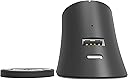
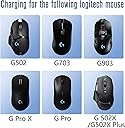
The Soarking Charging Dock is a sleek, third-party wireless charging solution designed for Logitech’s premium gaming mice including the G PRO X SUPERLIGHT and G502 series. Its compact, non-slip design ensures stable charging at home or on the go, while smart battery protection maintains optimal charge levels between 76% and 95%. Compatible with multiple Lightspeed models, this dock offers a cost-effective, cable-free power boost that keeps your mouse ready for action without the bulk or expense of OEM alternatives.


| ASIN | B08L99TRN7 |
| Best Sellers Rank | 14,691 in Computers & Accessories ( See Top 100 in Computers & Accessories ) 437 in Computer Keyboard & Mice Accessories |
| Guaranteed software updates until | unknown |
| Item model number | LGM1 |
| Manufacturer | Soarking |
| Package Dimensions | 11.8 x 11.4 x 5.4 cm; 150 g |
D**C
Works flawlessy and worth every penny.
Had the Logitech G POWERPLAY Wireless Charging Mouse Pad which was good (but expensive) and after a year or so just seemed to have a hard time keeping the mouse charged. Couldn't justify spending the same money to replace it so I started looking at alternatives. This mouse stand/charger is what I found. So what do you get? A USB-A to USB-C cable, a mouse stand and "puck" that goes in the bottom of your lightspeed mouse. Plug the cable into the stand and PC, plug the wireless USB reciever that came with your mouse into the back of the stand, stick the stand to your desk, replace the existing mouse puck with the one that came with the charger......done. A few notes:- The mouse puck has a removable 10 gram weight. The stand is magentic so when you get the mouse in the right position it sticks. Some reviewers have mentioned that sometimes the puck pulls from the mouse and stays on the stand so a rolling motion should be used to remove the mouse from the stand. This hasn't happened to me but I can see how it could. Conclusion: Does the job and does it well. Much cheaper than the official Lightspeed charging mat and much easier than plugging the mouse in repeatedly to charge. Well worth the money for me.
K**I
Great, with a few caveats
Really good. I have it plugged in and left off to the side and put my G502 X Lightspeed on it every 2 or 3 days (no RGB so the battery life in the G502 X Lightspeed is amazing - that's another review, I guess). It's well built, sleek and has a good amount of weight to it so it can support the range of Logi mice just fine. Couple things to note that are mentioned in the product description but are easily overlooked - the main one being that this will not charge your mouse over 80%. You'll never get a 100% charge from using this. They say it's an overcharge protection feature which is a bit unusual but there we are; if you're really desperate to get a 100% charge out of it, there may be other options. The supplied weighted "coin" that inserts in the bottom of the mouse (you'll know it if you own a Lightspeed mouse) is really not great in my opinion, especially if you have a G mouse that's intended to be lighter. The added 10g weight seems completely unnecessary and the overall condition of this piece is sub par. Mine came as a rough plastic, completely unlike the base of the mouse and just adds an unnecessary amount of weight and friction to a mouse that should be relatively light and glides across my desk mat otherwise. Maybe yours will be in slightly better condition but I strongly recommend you just don't use it - it's not that much hassle to just remove the one from your mouse and insert the mouse onto the stand and it isn't necessary to make the charging dock work. Another quick thing to note is that you _don't_ need to use the included adhesive to fix the stand to your desk. As mentioned, I have the Logi G502 X Lightspeed which is on of the "heavier" mice Logi offer and the stand supports it just fine without being fixed to the desk. Might be important to some like me who want the flexibility to move it around.
A**R
Works well but...
There are a few things to note about this charging station. 1: When the mouse is charging you would expect the charging lights on the mouse itself to light up but that's not the case, turns out however that this is normal for "Powrplay" charging....it would have been nice to have some sort of front led indicator on the dock to show when the mouse was charging but for the price you get what you get. 2: The magnetic puck that replaces the one that comes with the G502 constantly pulls out of the mouse when it's lifted from the dock, this is incredibly frustrating as depending on your mouse pad it will snag as you move it around due to the large hole on the bottom of the mouse, the only real solution to this is to twist the mouse as you take it away from the dock to keep the puck on place, this becomes easier over time but still a hassle All in all it'd a great little dock but there are just a few things that are frustrating about it that could be better
N**A
Don't write that negative review yet...
I felt like I wasted money the next day after I bought this device and was almost going to write a negative review, however, I think this device is 👌 now. First, for your mouse to last longer and so you get to charge it less, turn off the ALWAYS ON setting of the DPI Lighting and dim (or turn off) the logo light. I have dimmed mine by setting it to #1B0303 and I get less than 10% battery reduction after a full day of use. You can enable the device startup effect so you are aware of when your device actually wakes up from sleep. Secondly, I would advise that you get into the habit of putting your computer to sleep, instead of shutting down (or hibernating if that turns off USB power), so you still have power from your USB ports that will charge your mouse all night when the mouse is attached to the magnetic cradle. Maybe play around with your BIOS to see if you can keep USB power after your computer is shut down. ¯\_(ツ)_/¯ Lastly, don't expect GHub to indicate that your mouse is connected but not charging. Despite the manual, product description, and reviews saying that the device doesn't charge your device above 80%, I still expected GHub to indicate that my mouse is connected but not charging. I initially thought the mouse wasn't contacting the charging points on the cradle, I fiddled with it for a while, then eventually thought the device is damaged before I figured it out. Enjoy!
M**H
It's a con
Firstly, this product is not compatible with the G502 Lightspeed. It does not charge the mouse, and the magnet consistently detaches from the dock, causing the weight to fall out. The functionality is severely lacking, which likely accounts for the numerous negative reviews.
S**.
Ich nutze die Soarking Ladestation für meine Logitech G502 Lightspeed und bin total begeistert. Das kabellose Ladesystem funktioniert einwandfrei und macht das Aufladen der Maus super bequem – kein lästiges Anstöpseln mehr. Die Station ist hochwertig verarbeitet, steht stabil auf dem Schreibtisch und sieht dabei edel aus. Die Kompatibilität mit verschiedenen Logitech-Modellen ist ideal, ich konnte sogar ohne Probleme zwischen mehreren Mäusen wechseln. Die Ladefunktion ist schnell und zuverlässig, die Maus hält so auch während intensiver Gaming-Sessions immer ausreichend Akku bereit. Das Design ist kompakt und nimmt nicht viel Platz weg, was ich sehr schätze. Fazit: Wer eine einfache, praktische und optisch ansprechende Ladestation für Logitech Lightspeed Gaming-Mäuse sucht, liegt mit der Soarking Ladestation genau richtig. Klare Kaufempfehlung für Gamer, die kabellose Freiheit und komfortables Aufladen verbinden möchten.
D**Y
Fijn station :) staat aan de rand van mijn bureau en avonds gaat de muis erop, om morgens weer verder te gaan. De muis laadt ook niet volledig op, zo wordt de accu van de muis gespaard, en dat is netjes .
R**X
Die Ladestation gefällt mir gut. Sie lädt die Maus zwar nur bis zu 80%, aber das empfinde ich als vorteilhaft, da es vermutlich schonender für den Akku ist. Der USB-Anschluss für den Empfänger auf der Rückseite ist ebenfalls sehr praktisch. Die Lademünze muss nicht zwingend installiert werden, es funktioniert auch ohne sie. Ich habe die Ladestation nicht auf dem Tisch festgeklebt, aber die Maus lässt sich trotzdem problemlos abnehmen. Einfach die Maus nach vorne unten wegkippen.
T**.
Been using this to charge my G502 since I got it, and it works very well. The magnetic docking is pretty solid, and acts as a USB access point so you can put your dongle in there as well. Tip: Twist the mouse in order to release it without the risk of dislodging the puck.
E**K
ik gebruik een g502. het laden werkte perfect toen ik 'm net had gekocht. nu 4 maanden later is die er opeens mee gestopt.
Trustpilot
2 months ago
3 weeks ago