🎥 Elevate your video calls—because your image deserves the spotlight!
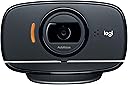
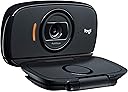
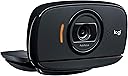
The Logitech HD Webcam C525 delivers crisp 720p HD video and 8MP photos with ultra-smooth autofocus and automatic light correction. Its 360-degree swivel and foldable design make it the ultimate portable webcam, perfect for professional video calls and instant social media sharing via one-click uploads.
| ASIN | B004WO8HQ4 |
| Antenna Location | Indoor/Outdoor |
| Best Sellers Rank | #1,932 in Webcams |
| Brand | Logitech |
| Built-In Media | box |
| Camcorder Type | Video Camera |
| Color | Black |
| Compatible Devices | Devices with compatible operating systems (Windows 8 or later, macOS 10.10 or later, ChromeOS) and a USB-A port |
| Connectivity Technology | USB |
| Customer Reviews | 4.4 out of 5 stars 2,526 Reviews |
| Display Resolution Maximum | HD |
| Effective Still Resolution | 8 mp |
| Effective Video Resolution | 921600 pixels |
| Exposure Control Type | Automatic |
| File Format | JPEG |
| Flash Memory Type | Micro SD |
| Focus Type | Auto Focus |
| Form Factor | Compact |
| Global Trade Identification Number | 00097855073372, 00777782115719, 05099206027121, 10097855073379 |
| Image Aspect Ratio | 16:9 |
| Image Capture Speed | 30 frames_per_second |
| Image stabilization | false |
| Item Type Name | Webcam |
| Item Weight | 0.15 kg |
| Lens Type | Zoom |
| Manufacturer | Logitech |
| Maximum Focal Length | 1 millimeters |
| Model Name | C525 |
| Model Number | 960-000715 |
| Number of Batteries | 1 C batteries required. |
| Operating System | Windows 8 or later, macOS 10.10 or later, ChromeOS |
| Photo Sensor Technology | CMOS |
| Screen Size | 2.2 inches |
| Sensor Type | CMOS |
| Shooting Modes | webcam |
| Special Feature | Low Light |
| Style Name | C525 |
| Supported Audio Format | Mono |
| Supported Image Format | JPEG |
| UPC | 163120602582 824941793513 778889279199 803982728586 097855073372 777782115719 804066788830 097855074850 |
| Unit Count | 1 Count |
| Video Capture Format | ASF |
| Video Capture Resolution | 720p |
| Video Resolution | 720p |
| Viewing Angle | 60 degrees |
| Warranty Description | 2 year limited |
| Water Resistance Level | Not Water Resistant |
| White Balance Settings | Auto |
| Zoom | Fixed" or "Not Applicable |
N**E
User-Friendly, High-Quality Webcam for Reasonable Price
Webcams sure have come a long way since I last had to buy one. Before now all but one computer has had a built-in webcam in the monitor. The only one that didn’t was over 10 years ago. So this is the first time I’ve purchased an external webcam in over 10 years. Before purchasing this one, I looked at several comparable brands online and compared the different versions of webcams by this company side by side. It seemed that based on reviews and specs this was the best webcam for the price. I have to say I am very pleased with the results so far. Pros: 1. At 44 dollars and change, this is an incredibly affordable webcam. 2. The camera is very easy to install and to mount onto the monitor. All I did was clip it to the monitor and plug it into the USB port and it was up and running. 3. I love that it rotates easily, is small and compact, and is easily clipped and unclipped from the computer monitor. 4. The picture and video quality is pretty comparable to most. I have used this flawlessly on Skype, Yahoo!, and Facebook video chat with no problems. Cons: 1. The software that came with the webcam was a little less exciting than the ones I’ve used in the past with my webcams that were built-in to the monitors. There are no fancy features that you can use to spruce up the picture, such as adding in costumes or animations. But for the price I really can’t complain. 2. The only real issue I’ve had with this camera is that it turns itself off on occasion if I have left the computer on for a while. I have to actually reboot the entire computer to get it to turn back on again. I am not sure if this is a computer issue or a webcam issue. All in all, I would definitely recommend this webcam to a friend, and would buy again. Logitech HD Webcam C525, Portable HD 720p Video Calling with Autofocus
K**N
Great cam for novice user
I did a lot of research on webcams via amazon. I finally decided on C525 despite some of its supposed drawbacks and up to this point, I have yet to experience any of the problems some complained about. I have not had any problems operating the camera even though I have 2.17GHz duo core processor even though the instructions call for a 2.4 GHz processor duo core processor. This was a concern that I called logitech about several times and after 4-5 contacts I finally got a knowledgeable rep that answered the question. The best advice I received was from the Better Choice Online vendor that sells these webcams via Amazon. He was very knowledgeable and told me the webcam in itself should work fine. the more important issue, he said, would be the internet speed. We have AT&T Uverse and our area doesn't get great coverage. That and we are cheap. The tech at Better Choice Online suggested he pay for more internet speed and we would have a great webcam experience. He was right as I've had a few hiccups during calls due to our slow internet speed but the computer warned me of the problem before I got on the call and we made it through the call. The problem wasn't consistent enough where we couldn't finish the call. Just a few pauses and freezes. Not the fault of the webcam. And that was only 1 out of 10+ successful calls with no problems. Also, I Was concerned about being able to have the camera point down so that the other video caller could see me as I wrote on a pad and the camera can be set up to accomplish this. Another problem came upon reading on logitech's website and someone complained about the software being poor and adding viruses to computers. I have not experienced any virus or lack of performance after installing logitech software for webcam. Installation was extremely easy. I did, however, opt to let the computer notify me instead of just installing updates automatically just in case the software caused problems. Maybe software causes problems if you have older operating system? I have Windows 7 and I haven't had any problems. Up to this point, I am very satisfied with the webcam. I dont have much to compare it to since this is my first webcam but sound is good, video is good, installation easy, affordable price.
S**G
~~Great quality for price/performance, mic isn't the greatest, overall awesome product~~
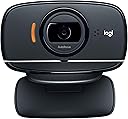
I started streaming on twitch and decided to buy a webcam to show my face and interact with viewers. This was a great purchase for me because not only do I use it for streaming, I've also used it for a job interview and Skype with friends. The video quality was surprisingly better than I thought it would be. I was expecting a less vibrant and more pixelated video images, but the video quality was very good. It's not as good as the newer models like the c910, but it'll do the job just fine. It has it's own control center that you can adjust your settings for. This camera has settings that can follow your face, zoom in, move around, and even brighten or darken your surroundings. The orange strip of line you see by the lens in the stock photo lights up red when you're recording so you will know when you're live.The way that the webcam is designed, it has a little bumper on the underside that helps it grip onto the top of your monitor. So when placing it on top of a flat surface, it doesn't sit well and will shake a lot if you move. This webcam also comes with its own microphone, but to be honest, you shouldn't use it because the quality is terrible. It picks up so much noise and it's always has that white static sound in the background. If you don't use a microphone frequently or don't have the money to purchase one, then the one that comes with the camera will do the job just fine. If you're playing online games with friends, then I would recommend not using it.
U**R
I Have Windows 7, My Software Works Now (fix below)
This webcam is very very very nice. It works well, it puts away neatly and the image quality is great to me. Now, after I got it I went to install it. Having Windows 7 I had to download the software from Logitech instead of doing a plug and play kind of thing. I was able to install my software, have the little test at the end for quality and the camera worked! However, after installation I could not bring up the software again! I had the icon in my taskbar but for some reason the service wouldn't actually run. Now, I tried quite a few things but this is what worked (...and this came from a Logitech support person): ---------------------------------- Please uninstall the software using Revo Uninstaller, this is a third party uninstaller. You can download the 30 days free trial on [Google: Revo Uninstaller, I don't think I can put links to something like that here?] This software will uninstall all the components of the program including the registry. Once you have installed the Revo Uninstaller, please follow the steps below: 1. Close the Logitech Webcam Software > go to the system tray and look for the icon. 2. Right click on the icon of the Logitech Webcam Software > Exit. 3. Open the Revo Uninstaller > look for the Logitech Webcam Software then right click > uninstall. 4. Wait for the software while it scans > it will ask to uninstall the software. 5. Once the software is uninstalled > select the scan to Advance then click Scan. 6. Once all the registry appears > click Select All > Delete. 7. You may now download and install the Logitech Webcam Software, please click on the link below: [Google: Logitech C525 (Should take you to it's product page, from there go to it's support page and it's downloads)] ----------------------------- That's the latest driver software for Windows 7. If you're running a different version of Windows please go to the camera support and downloads page on Logitech and download the correct file. :) By the way, I know that it says the software will mess with the registry but it does make a backup before doing any of that. If messing with the registry does make you uncomfortable do contact tech support and ask if there is a different method. :) So, again, just to repeat myself I have Windows 7, the software did NOT want to work, did this and now it's fine. If I get any more hiccups I'll be sure to edit this post. Goodluck and enjoy! Also, don't be afraid to contact tech support (by email), they got back to me within a day and they were friendly. :)
W**R
inexpensive, functional
This is a great, inexpensive little webcam for personal video conferencing (Skype). The picture quality is not incredible, but still far better than what most people you'll chat with have with their iPad, phone, or the camera built into their laptop. I've been doing videoconferencing and webcasts for some twenty years -- in the early days it was mostly Polycom units, but lately Cisco Telepresence. With Telepresence you have three 1080p 60" big screens. The monthly cost is enormous but often justified by savings in travel costs (if you say so). Personal IP services like skype aren't as dependable or as rich in quality but they're outstanding on a cost basis, especially if the DSL or cable ISP fee is sunk. I was tempted to step up to the 1080 (C920) camera but I've resisted because already nobody that I conference with (for personal use) has anything near as good as this, and they may also have trouble receiving or displaying 1080 video. Some of them even have monthly byte transfer limits from their ISP. So I see the 1080 HD services as better if it's really going to work out on all ends. Short of that, the autofocus this camera has is great especially when it's going to be more than a face-cam. I use mine to conference a whole room with a family of four. The kids are walking back and forth, to and from the camera and focus stays good. Its reasonably wide-angle is good too -- wide enough to see the room at some distance, but not so wide it distorts faces badly in closeup. I need to test the audio more at the longer ranges. It has an auto-gain feature that seems to be working well. Again, unfortunately, even if I get great audio at the source, it ends up going through someone's laptop speakers or an iPad on the other end. The most important and biggest improvements to video conferencing to make once you have an adaquate camera like this is in lighting and acoustics in the room. It's real common to see people on camera that are back-lit, with their faces in darkness and a room full of echoes, reverb and weird modes. Put a little thought into the whole audio-video scene of the conference from end-to-end and this camera/mic combination can be made to perform very well for quite a low cost.
D**E
Decent camera, bad software and pathetic support
I'm giving this webcam a three star rating. I took two stars off because there was no software included in the box and the installation problems I had when I downloaded and installed it. The software refused to install with a cryptic error message. So I looked up Logitech's support number and called them. The first tech dropped the line on me so I had to call back again. The second tech was helpful and we went through lots of gymnastics which did not work. He then sent me a different software installer to my e-mail that didn't work. We then booted the computer in "Safe Mode" - no dice. He then blamed it on my computer. They dropped the call again so I called their support again. This time another tech sent me different software which didn't work either. He then just wanted to get me off the phone so he told me that if this didn't work I should e-maill him back and he would get me in touch with level 2 support. I e-mailed him back and told him his software wasn't even compatible with my Operating System. They never replied. I then went searching for my particular error on the Web and found the error under a Microsoft forum. It wasn't related to this specific software but it described the exact symptoms I was having and their solution worked. One of the Microsoft system folders on my computer was corrupted somehow. I simply deleted it and the software then installed. The Logitech software guys were telling me I needed to reinstall my Operating System. Well, that probably would have solved the problem but I didn't have a week to reinstall and configure everything again. I don't blame the support people for not knowing about this particular problem but I do take issue with them just dumping me off and never responding to me again. It was like they get paid on how many calls they take but not on how many customers they satisfy. I have bought a lot of Logitech products in the past but I think next time I'm going to try another brand. Now that the software is installed, the camera works just fine. I'm using it primarily for Skype calls with my son. I like the way the camera mounts and it is much smaller than it looks in the picture. If you are thinking about using it for High Definition Videos, look elsewhere - but for Skype type video calls it strikes a nice balance between price and function. If the service would have been better it would have recieved 4 stars. More than likely you won't run into the same software issue I did but if you do, don't expect Logitech support to be much help.
R**N
5 Star Webcam, Mac Software is Limited as Usual
I haven't used this beyond a day and I normally wait awhile to write a review but I wanted to get this up here now since there seems to be some confusion about this working with Mac Computers. This camera works without the driver automatically within the apps of Skype and Facetime if you select the C525 cam and mic in the Preferences of those programs. But what you really want to do is go online and download a driver since with it the quality isn't that good as most of that is managed by the driver. Even though the C525 doesn't have a driver download on it's product page, the drivers for Logitech's webcams are interchangeable so you can go to [...] then click on Webcams, then click on the model HD Webcam C615, select your Mac OS operating system and download the driver. Once it downloads you just double click it open, install, and double click the App Logitech Icon and you will see the light come on the camera. You can record from the software that will display once this app is open then import it into iMovie and edit as usual. Unfortunately you can't select this camera for recording directly with iMovie but I don't mind the extra step. I believe if you were using this camera with a PC you would have a lot more options to use within the logitech software such as uploading directly to YouTube and other recording adjustments so I hope that logitech will be updating the Mac software soon but with the limits to Mac options at this price point this camera is worth it. If your computer screen is on while shooting then you will definitely be lit enough for things like Skype and Facetime but if you are shooting something for YouTube and you want a more natural light I dim the computer screen down half way to get rid of the blue cast on the wall behind me and use a few daylight lamps and it turns out great. With the options out now I love this new camera since... - It is definitely a better quality pic at 720dpi - Doesn't lag - Voice and picture sync well - Fold's up nicely to travel in my bag - Sound is great for a Webcam Mic and I think a bit better than the Macbook Pro Mich - You can choose which Mic to use as you record with the Logitech recording software so if I want to use a different Mic I can - Best inexpensive Webcam out there in my opinion for Mac users right now Hope this review clears things up and helps people get their cameras working with Macs :)
P**S
Logitech C525
Yeah, I'm a slacker because I didn't leave a review about this after I purchased it: My review of this (I'm a 'newbie' reviewer) is that this camera rocks, especially for the price. I was looking to buy a webcam and even though I'm a 'computer guy' I didn't know what I was looking for - musta spent weeks on the research. Torn between spending $30 bucks for a so-so webcam or spending $80+ because there wasn't a happy medium there, I finally found this deal. Since it's my first review I'll try to be clear: this webcam rocks! I believe the ones I was originally comparing were the C500 and the C615 but the (main) differences is the glass lens. And (now) I do know that having a glass lens really does make a difference. I also purchased a C600 but the picture is totally different between them - it's like 'night & day' so to speak! I purchased another and sent it do my dad because it is so clear, even in low light. Make sure to download the latest drivers for it (I'm using 64bit Windows) just in case, but if not the driver disk that was included wasn't that old so it should work fine out of the box. Sorry for my lame excuse of a review but at the same time my recommendation is to get this one - stick to this price of a webcam unless you can put out the big bucks and get a 900 series or such. And you really don't need that unless you plan to do some serious recording (just my opinion). Please feel free to give me advice on my review. I know, I know, I shoulda been more prepared....
C**K
Flexible, easy to use and fit for purpose
I bought this for work from home purposes (ring light for laptop) and also for personal video calls on my android device (Pixel 3XL). I also have a logitech c525 that mounts into the phone holder.
A**E
Five Stars
Gives a good clear picture when using skype.
L**K
clear images for video meetings / good price
Good product delivering clear images for video meetings. Oddly enough it seems better than a more expensive model I had tried before (615). Good price and an excellent tool right now for work from home.
P**K
Very good quality
I m happy to suggest you to use this product
S**A
Excelente
Webcam pequena, qualidade enorme! Seria como eu descreveria com poucas palavras esse produto, na familia dela [são três modelos diferentes] esse é o "mais fraquinho", porém, sua resolução é extremamente alta, e o microfone é muito bom tambem, a sua camera gira 360º e tem um foco muito bom tambem, permitindo trazer objetos bem prox a lente, e ainda sim ficando bem focado, a instalação é facil tb, só plugar no pc [eu uso o win 10], e esperar surgir uma notificação de completo, se vc usar antes de a instalação ocorrer, a qualidade n vai surtir em toda "sua glória", dps de instalar a qualidade fica nota 10, recomendo, o preço atendeu as expectativas
Trustpilot
2 weeks ago
2 months ago