Desertcart purchases this item on your behalf and handles shipping, customs, and support to Ireland.
๐ Elevate your workspace: Dual 4K power meets seamless control!
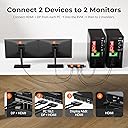
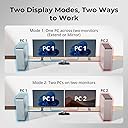
The TESmart USB 3.0 DisplayPort + HDMI KVM Switch enables professionals to control two computers with dual 4K@60Hz monitors using a single keyboard and mouse. Featuring ultra-fast USB 3.0 ports for peripheral sharing and phone charging, EDID emulators for stable display settings, and versatile switching options (remote, button, hotkey), itโs designed for high-efficiency multitasking and flawless device management.


| ASIN | B0CGMWXBM6 |
| Actuator Type | Push Button |
| Best Sellers Rank | #313 in KVM Switches |
| Brand | TESmart |
| Brand Name | TESmart |
| Circuit Type | 2-way |
| Color | Black |
| Compatible Devices | Desktops, Laptops, Wired Keyboards, Wireless Keyboards, Mechanical Keyboards, Gaming Keyboards, Wired Mice, Wireless Mice, Gaming Mice, USB Peripherals (Printer, Scanner, Webcam, Hard Disk) |
| Connectivity Protocol | Infrared |
| Connector Type | Plug In |
| Contact Material | Metal |
| Contact Type | Normally Open |
| Control Method | Push Button, Remote |
| Control Type | User Control |
| Controller Type | Push Button |
| Current Rating | 2 A |
| Customer Reviews | 3.3 out of 5 stars 27 Reviews |
| Item Dimensions | 11.81 x 4.33 x 1.18 inches |
| Item Weight | 1.3 pounds |
| Manufacturer | TESmart |
| Material Type | Metal |
| Model | TES-HDK0202A2U-USBK |
| Mounting Type | Panel Mount |
| Number of Items | 1 |
| Number of Positions | 2 |
| Operating Voltage | 12 volts_of_direct_current |
| Operation Mode | ON-OFF |
| Part Number | TES-HDK0202A2U-USBK |
| Specification Met | CE, RoHS |
| Switch Type | Push Button |
| Terminal | Solder |
| Unit Count | 1 Count |
| Wattage | 24 watts |
C**1
Highly recommended.
Very easy to use and does a wonderful job. My previous one switched one monitor between four computers, but I no longer have that need. This one switches two of my 34 inch monitors between my desktop and laptop and does a great job switching not only the video but also USB. I have a USB 3 hub hooked to it and it switches everything seamlessly between them. Highly recommend it.
A**E
HORRIBLE IN EVERY WAY
I initially bought the USB 2.0 version of this KVM switch, but it didn't work with my camera. After contacting tech support, I was told I needed the more expensive USB 3.0 version instead. Reluctantly, I returned the 2.0 and purchased the 3.0, only to find out that, despite the upgrade, my camera still wouldn't work. When I reached out to support again, they admittedโafter wasting more of my timeโthat this product just wouldn't work with my camera. They offered a discount or a compatible camera as compensation, but that was the last I heard from them. Theyโve completely ghosted me, ignoring every single follow-up email. To make matters worse, my Corsair keyboard was also not compatible with the 3.0 KVM switch. I experienced constant typing errors, random spaces, and missed keystrokes, which made the keyboard completely unusable through the switch. I ended up buying a new camera and keyboard, which did help. However, the switch still causes typing errors, albeit far fewer than before. Not only is the product itself a complete failure, but the customer service is even worseโnonexistent and utterly unprofessional. It's been 4 weeks of pure frustration, trying to get this switch to work, and now I'm stuck begging for yet another refund. Save yourself the headache and avoid this brand at all costs. This company doesn't care about their customers or their products, and they certainly don't deserve your business. Absolutely disgraceful.
V**O
Can't wake up computer when it is in sleep mode without tinkering with the on-off switches
It works when I first turn on my computers. The issue is when my computers go to sleep. The mouse and keyboard don't work until I manually press the on-off switch multiple times. Even then, it still doesn't always work. Sometimes, switching back and forth between computers helps. Othertimes, I have to go to my computer and wake it up by pressing the computer's on-off switch. Very annoying. Wouldn't recommend unless you can't find a better one that works flawlessly.
P**K
Good quality overall.
Pay attention to wireless keyboard/mouse combos with USB... Had to purchase a wired combo since my mouse was glitching.
S**R
Solid dual-monitor KVM
When I was searching for a 2-monitor KVM, there were few appealing choices but I'm very happy with this TESmart model. Initial configuration was a bit finicky while I was getting my bearings, but ultimately it does exactly what I want, reliably for the last two years already. It's compact and sturdy and pleasantly designed. Mind you, I switch displays using keyboard hotkeys, so I don't need to access the device, so it's installed on a shelf under the desk, so I rarely see it. Very occasionally (once every 6 months or so?) I do need to turn it off and on again when _something_ gets confused. I certainly won't hesitate to upgrade to a higher-end TESmart switch when I need support for higher resolution or USB-C or more monitors/computers -- especially since after registering with TESmart (they don't automatically recognize Amazon purchases, but give credit for these if you reach out to them with proof of purchase) you get extended warranty, discounts on new purchases and trade-in credit for old devices.
R**O
Works quite well
I just got mine a few weeks ago, and it works great. There is a minor delay when switching between devices, but nothing to complain about. Setup was easy, since product included detailed instructions. At first it did not work with one of my computers (laptop), but the issue fixed itself once I restarted the laptop. I can recommend this product.
M**P
Dead HDMI Ports
Unit was connected properly, keyboard, mouse and all other features worked. As others have stated, the batteries for the remote are a tad difficult to put into the remote. The main problem, was that the HDMI ports provided no video output to either of the monitors. Checked cabling and all was connected properly. Even used their provided HDMI cables direct from the PC to the monitors and they functioned. Just not from the KVM itself. Item is in process of being returned.
B**T
WompWomp - Does not work with 2x Macbook Pro M1Max
Tl:DR This product will not work out of the box with Macbook pro M1Max (Ventura). Its not plug and play, it just flat out doesn't work. It's possible the one I received is broken - but either way what I bought and waster time on does not work. Neither mac recognizes the external monitors, even after multiple attempts to trouble shoot and reduce the complexity (1 monitor at a time, etc). M1Max is capable of supporting 2+ monitors without a dock, if this KVM requires a dock for all connections, then they should mention that up front - as that nearly doubles (possibly triples) the setup cost.
Trustpilot
1 month ago
3 weeks ago