Buy anything from 5,000+ international stores. One checkout price. No surprise fees. Join 2M+ shoppers on Desertcart.
Desertcart purchases this item on your behalf and handles shipping, customs, and support to Ireland.
🖤 Power your rig with industrial-grade airflow — because your build deserves the best.
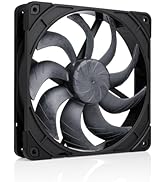
The Noctua NF-F12 industrialPPC-2000 PWM is a premium 120x120x25 mm heavy-duty cooling fan designed for high static pressure applications like radiators and dense heatsinks. Featuring a 12V 4-pin PWM connector, it offers precise speed control from 450 to 2000 RPM while maintaining a low noise profile of 29.7 dB(A). Its rugged fibre-glass reinforced polyamide frame is IP52 certified for water and dust resistance, ensuring exceptional durability and over 150,000 hours mean time to failure. Ideal for professionals seeking reliable, high-performance cooling solutions with a 6-year warranty.


| ASIN | B00KFCR5BA |
| Best Sellers Rank | #372 in Computer Case Fans |
| Brand | Noctua |
| Brand Name | Noctua |
| Compatible Devices | Desktop |
| Cooling Method | Air |
| Customer Reviews | 4.8 out of 5 stars 1,232 Reviews |
| Global Trade Identification Number | 00842431014351 |
| Item Dimensions L x W x H | 4.72"L x 4.72"W x 0.98"H |
| Item Weight | 0.15 Pounds |
| Manufacturer | Noctua |
| Material Type | Fibre-glass reinforced polyamide |
| Maximum Rotational Speed | 2000 RPM |
| Model | NF-F12 iPPC 2000 PWM |
| Noise Level | 29.7 Decibels |
| Number of Items | 1 |
| Part Number | NF-F12 iPPC 2000 PWM |
| Power Connector Type | 4-Pin |
| Product Dimensions | 4.72"L x 4.72"W x 0.98"H |
| UPC | 842431014351 |
| Unit Count | 1.0 Count |
| Voltage | 12 Volts |
| Warranty Description | 6 year manufacturer’s warranty |
C**.
Great radiator fan!
These fans are made to be used on radiators, or in areas with restricted air flow, like the front of your computer case, to blow air through your hard drives, if you have any, or just anywhere that might in any way hinder air flow. Installed these on a Corsair H100i CPU radiator, to replace some Corsair SP120 HP fans I bought for it originally, because one of the fans was making a grinding noise, like something was wrong with the bearing, they were getting increasingly loud, and I wasn't getting the performance I wanted. I installed these no problem, using the same screws off the other fans. All in all, I was done in about 10 minutes, taking my time. I ran the fans at 100% speed, and let me tell you, at that speed these things are pretty loud. They're as loud as the Corsair fans I had. But at a lower RPM, and they move WAY more air! I had my hand about 4ft above the PC tower (radiator is mounted on the top) and could feel air moving! These suckers don't play. I messed around in my bios trying to get the fans set right. Even with my i7 4790k OCed to 4.5ghz, these fans won't usually run above 1250-1300mhz. Even on the H100i AIO. That's mighty impressive. I was getting 100 degrees Celcius with my old fans, running Prime95, testing the CPU with the overclock. I ran it for about ten minutes, and they didn't go above 85 (that's what I was getting with the Corsair fans brand new without the OC.) I ran it for about 5 minutes, after adjusting the profile again, and the fans only ran at 1250-1300 rpm and never went above 65C. Just browsing around, they're almost dead silent. And that's on a silly AIO cooler. If you have a custom loop, you could set these things to 1000RPM and forget about it. Aesthetics are way better than the premium retail model NF-F12. Only thing I would like about that model, is it only running up to 1500RPM, so it would never get really loud. All in all, terrific fan, although pricey. But you get premium fan, for premium dollar. Will be buying more of these when I redo my build for water cooling later on this year.
K**C
Noctua Quality Lives Up to its Reputation
I got exactly what I expected. These are the first Noctua fans I’ve ever purchased (bought 3). You can literally feel the quality difference when you hold these vs other fans and you can definitely tell that a lot of engineering and research went into these. The also come with rubber, anti vibration pads which can also be purchased separately in alternate colors. Now then, are these something I would recommend to the average Joe bag of donuts that needs to replace a fan that went dead in the living room PC. Not really, these are high speed capable, static pressure fans for water cooling radiators or high fin density heat sinks. Full speed they are LOUD. These are 2k rpm fans after all. However at low speeds during normal, low load operation/everyday use, they are nearly inaudible if not for a faint motor hum which is something you’d need to be inches from your PC to actually hear. I’d argue to say that most users searching specifically for these fans know what they’re looking for and getting themselves into. Especially because these are optimized for static pressure and likely will be used for mounting to a radiator. All this being said, Noctua has many different fans available for pretty much any purpose. Whether it’s airflow optimization, static pressure, balance of both, or something that balances silence and airflow. They pretty much have an option for whatever one may need, IF you can look past some of the color choices. Looking at you, brown/cream color scheme. All in all, 5/5 from me. Yes they can be loud at full speed, but these aren’t exactly the fans you search for if complete silence is your focus.
J**E
Amazing fans, crazy performance, decent audio levels
These fans are great. I previously had a combination of Corsair SP and AF 120's in my case (5 total). Those fans looked great, and were decently quiet, but didn't move any air. I have an h100i and my cpu idle temps would be at around 30-35. NOW I have replaced all my fans with these. I run then all at 900 rpm, and have them all controlled by Corsair Link on the h100i (I used a powered PWM fan splitter). At 800-900 rpm these still move at least twice, if not more, as much air as the Corsair fans, and dont have a higher-pitched whiny fan noise. BUT, these aren't silent by any means. They have a lower-pitched hum. The loudest thing in my case are my hard drive and the pump itself on the h100i, neither of which are very loud. My cpu now idles at 23-25c and my MSI GTX 980 idles at 32c without the fans on the gpu running. You can definitely hear the air moving through the case, but I think that is just because my case isn't the quietest. ALL IN ALL these are amazing fans. Great looks, fantastic build quality (The best built components in my system imo), decently quiet at lower rpm's, and still manage to move a lot of air at lower Rpm's. Even if you arent looking to replace all your fans, I will strongly recommend these for any radiator or heat sink setup. The static pressure is crazy.
D**L
Skeptical at first, but it's good
Bought to replace Hyper 212 evo OEM fan that was starting to make funny noises and it works great. The Hyper 212 comes with an extra clip set and I attached those to this fan then just swapped them out. CPU stays nice & cool even during stress tests and makes noticeably less noise at max RPM than the original fan (both 2000rpm). At lower speeds I can't even hear it. I was skeptical about Noctua fans cause all the hype, high prices, and ugly colors but this one is good and I'd buy it again. Would have purchased the regular model but I refuse to put that tan/brown color fan in a otherwise good looking pc with a side window. Bonus is that this one's extra durable and doesn't cost much more than the retail one. Black color scheme, great radiator cooling, very reasonable noise levels, PWM speed control, and quality cable sleeving make this a good buy. Only came with screws, long silver ones, but I didn't need any accessories anyway. If only it came with interchangeable color options for the rubber corner pieces instead of just brown it would be perfect.
T**D
Quite simply the best fan I have ever owned.
As a bit of a perfectionist when it comes to my case, I wanted to get something a little better than the stock fans that came with my Corsair Carbide 500r. I tried Corsair fans, and some of them began to rattle after about a year, on top of significant fan noise for the performance they garnered. I then bought one of these for a mini-ITX build I was working on to replace a stock radiator fan. After seeing the performance it was capable of, I bought 3 more. Compared to other Noctua fans (that don't spin as fast), there is a bit of a noise increase, but compared to other 2000rpm fans it's practically silent. Incredible airflow, very solid pressure, so it makes a fantastic radiator fan. Just make sure you get the PWM version if at all possible, as these fans usually don't have to spin at max to keep things at room temperature. The price is high, but you won't need another fan for a very, very long time. And in the worst possible case, the fans come with a 6 year warranty from Noctua as well.
N**.
Noticeable Airflow Difference, Not Noisy
I recently purchased two of these fans to replace my current radiator fans in my IN WIN 101. First impressions were great, I could easily feel the flow of air through the radiator and the panel holes once I had everything closed up. I chose these fans for the superior static pressure to push air past the radiator. I also noticed that the computer runs cooler now as well. As for the noise, I tested running both fans at full RPMs and personally didn't think they were all that noisy (I'm sure the rubber pads help with the vibration). My only complaint is the color of the pads, which is just an aesthetic complaint only. Instead of that dark brown, why not a neutral black like the fan? Why this company tends to lean towards brown colors is a mystery to me. With the performance of these fans so far, I will definitely refer to this company for any future fan replacements.
E**X
Great fan, but missing accessories.
First I will describe my experience with this fan, then give my opinion: I received this fan in the mail yesterday and installed it right away. The included screws were somewhat hard to screw in. It seemed like there were no threads in the fan itself and I was 'making my own' as I screwed the screw in. Noctua should pre-thread in the fan to make installation easier. I felt like I was torquing the fan , when the screw was not nearly screwed in all the way. Next, I plugged the fan directly into my motherboard via a 4-pin fan header. I booted up my computer and the fan spun for a few seconds then slowed to a stop. I tried this with several different motherboard headers and each had the same result. After some troubleshooting (plugging different fans into the same headers and they worked), I figured that there was not enough power in the motherboard headers to power the fan, so I dug a 4-pin splitter that was included with the original Noctua NF-F12 that I had already purchased and plugged both a regular NF-F12 and the Industrial NF-F12 into the splitter that was getting power directly from the power supply via my Corsair H-100i. This worked perfectly and I have no issues. Just check to make sure that your motherboard outputs enough power to support these fans if this solution is not available to you. Molex to 4-pin fan converter cables are available if needed. My opinions: PROS: FINALLY a black Noctua fan. I have been waiting for this to become available for a while so that I could keep the colors in my case coordinated. This fan looks great and I even left the (removable) brown rubber grommets on because I like the accent they add. The fan is VERY quiet and the build quality is excellent (as we have come to expect from Noctua). Even though this fan spins at 2000 RPM (unlike my regular NF-F12's that spin at 1200 RPM with the Low-Noise Adapter), it is still quieter than the fan I replaced (stock Corsair case fan). Finally, the air flow is excellent (duh!). CONS: Come on Noctua....you charge $30 for a fan and don't include any accessories? At least include an extension cable or a low-noise adapter. That's pretty lame. All that's in the box is the fan itself and the screws. Not even a pamphlet or anything. When purchasing a premium fan, I expect accessories to be included as a kind of 'thank you'. Especially since an extension cable, 4-pin Y-cable (splitter), low-noise adapter and rubber anti-vibration mounts are included with the cheaper regular NF-F12. TL:DR: Great fan - as expected from Noctua. But some accessories should be included.
N**P
Great Looking, Quiet, And Powerful Fan
Great Fan, I replaced an arctic cat fan on a GPU radiator as the Arctic fan was the loudest part of my computer. This fan runs quietly and matches my black computer quite well. It has has mild use and has worked without issue. It seems to pull plenty of air through the radiator without issues and I've not had any problems with overheating. The change in blades for this fan may have made it possible for me to drop the RPM of the fan on the radiator; making it even quieter. I'm very pleased with the fan and will be very open to buying another from Noctua in the future should I need it. I've had this since April 7, 2016 and will update the review later about what has changed or if the quality has degraded. As of May 5th, 2020 this fan is still running and quiet. It's had mild usage over the years and is on most days. Great fan and will be buying Noctua again.
J**E
Great Delivery
Fans were easy to install.
J**N
Noisy fan
its noisy and there is a bearing sound, not recommended for noise sensitive. else get the noctua nf a12x25 chromax, still one of the best and quite fan.
F**O
Excelente ventilador
Lo uso para ingresar aire con fuerza a una RTX 3060 Ti a través del conducto de ventilación angulado en la parte inferior de mi gabinete NZXT H5 Flow. La verdad es una chulada de ventilador y ayuda a refescar no solo mi GPU, también todo el sistema en conjunto con otros 5 ventiladores noctua NF-P12 redux de 1700 rpm. Estoy encantado con esta marca, he estado con temperaturas en casa entre 38 y 40 °C a veces un poco mas y mi GPU no pasa de picos de 69°C en plena carga y promedio de 65°C, mi CPU es un i5 13400f y en usó del procesador entre el 60% a 85% en gaming a 38°C de temperatura ambiente, me dió picos de temperatura de 64 °C y promedio de 60°C, el dicipador es un noctua NH-U12S chromax black con pasta tenermica suministrada con el producto y la curva de ventiladores está con prioridad a que la GPU no pase de 74 °C. Escribo todo esto esperado que a alguien le sea de utilidad,como a mi me han servido tantas reseñas de personas que se toman el tiempo de compartir sus experiencias. El material se siente de muy buena calidad, el ventilador en general es silencioso y a plena carga no molesta pues al estar dentro del gabinete, el sonido se ve bastante reducido y desde mi percepción no es molesto.
P**L
Cooling performance is second to none!
Used this fan as replacement fan for noctua cooler and it works great. It is fairly loud if you push it to the max but for the performance you can forgive that.
A**I
Awesome fan!
Totally changed my H60 Corsair! It's more powerful now than ever before! Idle temp 29 Celsius. Never reached beyond 50. Specs it worked flawless on: -i7-4770K OC @ 4.1Ghz, 16TB RAM, GTX960 2GB (don't even remember which card i had when used this fan...it's al blurry, and i have tried too many GPUs. lol, -HP W2558HC and BenQ XL2411Z monitors. ---- P.S. Reporting on 2020-April; the Eagle has landed in the trash, but it's dead. I didn't even get to use it for more than six months. I switched back to using old Corsair's default radiator FAN for H80, and this fan was just sitting around--in a box. Maybe that's why it is dead now. There goes my money in the gutter.
Trustpilot
1 month ago
2 weeks ago