🖱️ Elevate your workspace with ergonomic precision and wireless freedom!
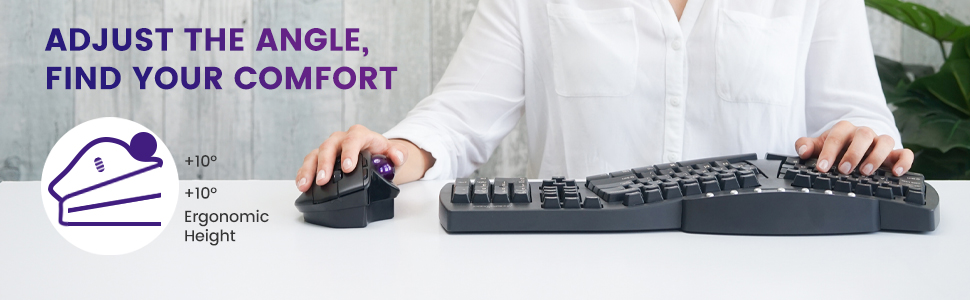
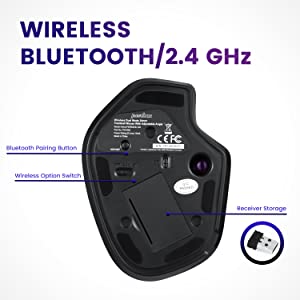
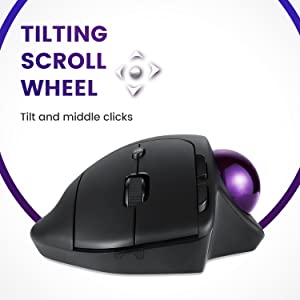
The perixx PERIMICE-720 is a wireless ergonomic trackball mouse featuring adjustable angle stands (0°, 10°, 20°) to minimize wrist strain, dual wireless connectivity via Bluetooth and 2.4 GHz, and two DPI levels up to 1600 for precise control. Designed for right-handed users, it includes a tilted scroll wheel for multi-directional scrolling and supports Windows 7 and above without requiring drivers.


| ASIN | B084TJS4H9 |
| Antenna Location | Office |
| Are Batteries Included? | No |
| Are Batteries Required | Yes |
| Best Sellers Rank | 53,410 in Computers & Accessories ( See Top 100 in Computers & Accessories ) 1,099 in Mice |
| Brand | perixx |
| Brand Name | perixx |
| Button Quantity | 6 |
| Colour | Black Wireless |
| Compatible Devices | Laptop, Personal Computer |
| Connectivity technology | Bluetooth |
| Country of Origin | China |
| Customer Reviews | 4.0 out of 5 stars 824 Reviews |
| EU Spare Part Availability Duration | 1 Years |
| Enclosure Material | ABS |
| Global Trade Identification Number | 04049571000954 |
| Hand Orientation | Right |
| Hardware Platform | PC |
| Included Components | Perimice-720, 10 degree support, 20 degree support and user manual |
| Item Dimensions L x W | 13.9L x 10.3W centimetres |
| Item Type Name | PM-720-11449 |
| Item Weight | 4.6 Ounces |
| Manufacturer | Perixx |
| Manufacturer Part Number | 11574 |
| Minimum Required Operating System Version | Windows 7 |
| Model Name | PERIMICE-720 |
| Model Number | 11449 |
| Mouse Maximum Sensitivity | 1600 Dots per Inch |
| Movement Detection | Laser, Trackball |
| Movement detection technology | Laser , Trackball |
| Network Connectivity Technology | Bluetooth |
| Number of Batteries | 1 Lithium Polymer batteries required. |
| Number of buttons | 6 |
| Operating System | Window 7, 8, 10 |
| Power Source | Battery Powered |
| Product Features | Wireless |
| Product Finish Type | Glossy |
| Product Warranty | 24-Seller-Limited-Warranty |
| Range | 10 |
| Special feature | Wireless |
| Style Name | Modern |
| Theme | Ergonomic Office Mouse |
| Unit Count | 1.0 count |
A**R
Rollerball
It's a good rollerball. Like all rollerballs, you will need to occasionally 'pop' out the ball to clean any dust from the sensors (usually the end of a biro works), plus clean the ball itself (important in these virus days - hand santizer will do). I am currently using it with a Chromebook and it has no issues with that. You can also use it with a bluetooth connection. Using a rollerball for the first time does take a bit of practice 'cos you will try and move the whole thing instead of just rolling the ball.
S**C
Good Bluetooth trackball but no dedicated Mac support.
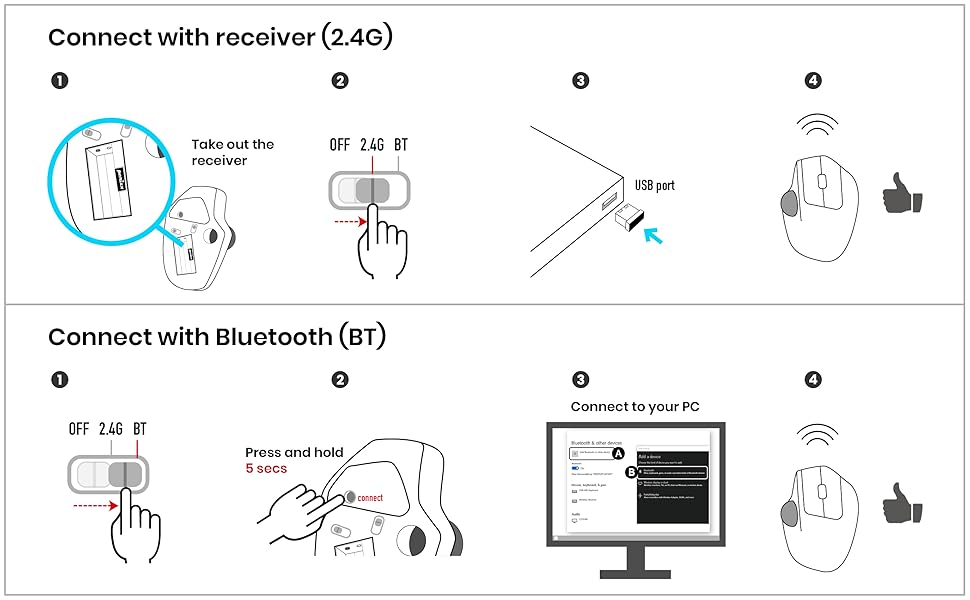
I like trackballs - have not had issues with RSI since changing to a Logitech M570 more than 10 years ago. I saw this had Bluetooth, which was my one niggle with the Logitech. Overall, it's good, with a nice solid trackball that loosened up nicely after a couple of days. The Bluetooth frees up a USB slot and seems less prone to interruptions in signal than the Logitech, at first acquaintance at least. There are nice touches like interchangeable bases to change the angle the trackball sits in your hand. I prefer it without, though. If you use a Mac like me, you will find the trackball works fine, but the two small buttons on the side don't work as browser back/forward buttons, and the little mission control button doesn't do anything. This is not an issue for me as I don't use these as a rule anyway. The scroll wheel and left/right buttons work as they should. If you prefer the 2.4 Ghz USB connection in preference to Bluetooth, you will find the dongle neatly concealed in the battery compartment. It's not obvious! Overall, it's a good trackball mouse that would be excellent if it provided Mac support and the ability to custom-configure the buttons.
V**V
Nice.
Good quality and has worked well. Very ergonomic, nice to use.
J**Y
Good quality and comfortable to use
Good quality product, well packaged and easy to set up. I use one of the two plates fitted to the bottom of the mouse, to achieve the correct angle for my hand. I find the mouse to be a little too responsive at times - the cursor speeds across the screen sometimes, but overall I'm very happy with it. A worthy successor to my old Logitech mouse.
M**Y
Great alternative to the usual other makes, but too big for average woman's hands
I wanted an alternative to my usual logitech m570 which I've used for many years. The logitech one has to be replaced every two years as it wears out very fast (plus it's rubbish for gaming!). Mouse tracking and button functionality is better than the logitech, however this Perixx mouse is too high under the palm of the hand, and size-wise it seems designed for a man's hand. I'm an adult 5'8" female with large-for-a-woman hands*. I'm getting wrist ache because in order to rest my hand on top of the mouse, my wrist ends up an inch above the table. This also has the effect of making the attachments to change the angle of the mouse unuseable for me, because these attachments raise the overall height of the mouse, in addition to changing the angle. [*My hands are 17.5cm from the tip of my longest finger to the base of my palm.] I'm using this mouse for now because it is functionally superior to the logitech, but until Perixx bring out a smaller version, I won't be buying another. Perixx, please make this mouse a 1/4 to a 1/3 smaller! In summary: great mouse for people with large hands, but if you have small hands, forget it.
A**L
Grate for the job
I have 2 off this 1 4 pc and 1 for table. Nice bluetooth mouic. Works grate on my tabe when im using in on blender to do 3d
O**R
Good mouse but it would be better if it comes with rechargable pin
overall good Nice to have an off button on top/side and a rechargeable battery
P**N
Pretty nice trackball, but lack of programmability is a missed opportunity
This is the first time I've seriously used a trackball and I'm pretty pleased with this model. The ball itself feels really nice - I got used to it much quicker than I expected, and it's easy to move accurately around the screen. (It worked better with "Enhance pointer precision" disabled in Windows.) The buttons are better suited to those with bigger hands, but mostly don't feel too bad after a few days. The scroll wheel is quite chunky - it's OK for scrolling, but pressing it down (to act as a middle button) requires an uncomfortable level of force. The little "mission control" button behind the scroll wheel is actually ergonomically pretty convenient - but that brings me to my last point... While Perixx supplies a driver for the 520 (wired) model which lets you change what the buttons do, there isn't one for the 720 (wireless). So the average non-technical user is going to be stuck with the default button assignments. If you're happy to use AutoHotKey then you can find some scripts online to remap most of the buttons - but the "Mission Control" button is more of a pain, because it actually presents itself to the operating system as a keyboard device that sends Alt and Tab keystrokes when you press it. You can get around this using the AutoHotInterception library in conjunction with AutoHotKey - I now have mine set up as a middle mouse button, but come on Perixx! Users shouldn't really have to go to those technical lengths to do what should be quite basic configuration. (As far as I can tell, with the 520 wired model you can reprogram all the buttons *except* the "mission control" - you still have to do some tinkering with AHK and AHI to program that one.) I'm still happy with my purchase, but it would be really improved by quite a small amount of software investment from Perixx.
B**Y
Cordless mouse
19 out of 10
A**X
Kann was!
Der Trackball ist echt nicht schlecht! Er passt unter meine großen Hände was schon mal nicht selbstverständlich ist. Die Winkelstücke hab ich ausprobiert, ohne Adapter ist aber am besten. Look & feel ist nicht gerade hochwertig und auch die Lager für den Ball sind aus Plastik. Muss aber sagen in der Praxis taugt er. Ich kann noch nichts zur Langlebigkeit sagen, habe ihn erst 2-3 Wochen in Gebrauch. Den Ball nutze ich für CAD Zeichen und Musikproduktion und das macht er wirklich gut. Habe auch verstanden, dass die Kunststofflager des Balls besser gleiten. Er läuft auch tadellos unter Linux- einfach - alle tasten sofort da. Alles was mir an dem Trackball fehlt ist ein besseres Mausrad mit Schalter für Freilauf.
購**者
手が大きい人にはいい商品だと思います。
今までにいくつかトラックボールマウスを触ってきましたが、その中で恐らく最もサイズは大きいモデルです。 なので手が大きい方はこの商品、体に合うと思います。 また、最初から傾斜をつけるアタッチメントが付属しているので、そこもうれしいところですね。 一方、サイズが大きいということは持ち運びには不向きということなので、会議や出張など外でマウスを使う機会の多い人には向かないかも知れません。デスクワーカーで基本的に定位置での作業がメインな方は検討の価値ありがと思います。
T**N
Very inaccurate mouse
This mouse has a trackball so inaccurate that I better use a stylus attached to my d1ck in combination with a touch screen. Worthless.
S**N
Billig
Fungerar rätt bra, upplevs som om kulan "slirar" lite ibland då den inte svarar fullt ut.
Trustpilot
3 days ago
3 weeks ago