We remain fully operational. Our teams are working around the clock to ensure your deliveries continue safely.

DOWNLOAD THE APP


Copyright © 2025 Desertcart Holdings Limited
DOWNLOAD THE APP
Buy anything from 5,000+ international stores. One checkout price. No surprise fees. Join 2M+ shoppers on Desertcart.
Desertcart purchases this item on your behalf and handles shipping, customs, and support to Ireland.
⚡ Unlock your Sony world with speed and style!
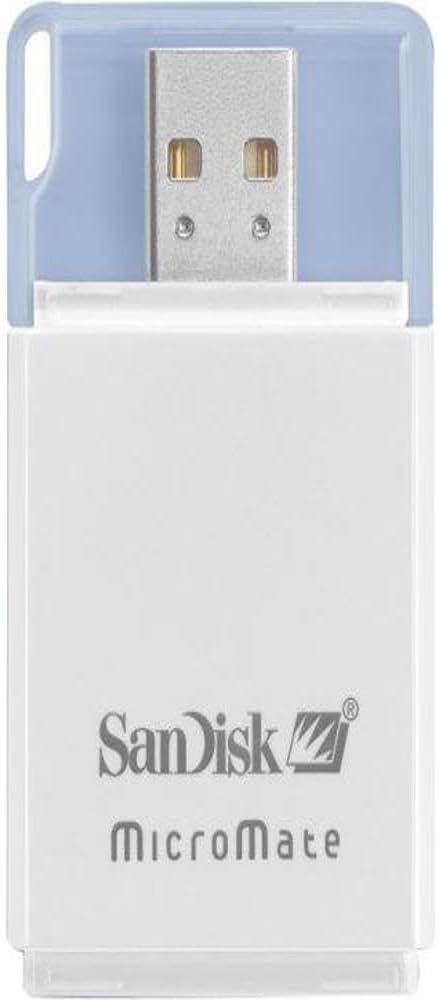
The SanDisk MicroMate SDDR-117 is a compact, high-speed USB 2.0 card reader designed specifically for Memory Stick Pro and Pro Duo cards. Ideal for professionals juggling multiple Sony devices, it offers fast, reliable file transfers and doubles as a USB flash drive, making it an essential portable tool for seamless digital media management.
| ASIN | B000HDU0Q4 |
| Additional Features | Compact |
| Best Sellers Rank | #1,268 in Computer Memory Card Readers |
| Brand | Sandisk |
| Color | White |
| Compatible Devices | Printer |
| Connectivity Technology | USB Type A |
| Customer Reviews | 4.2 4.2 out of 5 stars (198) |
| Data Transfer Rate | 480 Megabits Per Second |
| Global Trade Identification Number | 00619659028459 |
| Hardware Interface | Memory Stick, Memory Stick Duo |
| Item Dimensions L x W x H | 7"L x 1"W x 5"H |
| Manufacturer | SanDisk |
| Media Type | Memory Stick, Memory Stick Duo, Memory Stick PRO Duo |
| Model Name | MicroMate |
| Operating System | Windows, macOS, Linux |
| UPC | 619659028459 |
| Unit Count | 1.0 Count |
L**H
Essential if you plan on living in a "Sony World"!
You're probably looking at this review because you own more than 1 Sony electronics product that uses Memory Stick Pro Duos and you're looking for a portable and easier setup than the one you're currently using. :) As for myself, I own a PS3, a PSP, a walkman phone, and a Sony DSC-T200 digital camera. ALL of them use a PRO DUO (2GB - 8GB) and I needed something that would let me access these multiple memory cards without having to go through the whole rigamarole of attaching a cable, turning the Sony device on, setting the device to USB mode, etc. It's just such a hassle! I wanted something portable, since I need to access the contents of multiple cards in multiple places. :) I saw a few other choices here on Amazon, but I ultimately chose the Sandisk Micromate Reader. It doesn't look flimsy, but it has that classic look, and it works great as intended. Read times are fast, so pulling and putting files onto the card is quick and easy. The memory card slips about halfway into the MicroMate, so taking it out after you're done loading or copying files is a snap. The only con that I can see is the width of the thing. If you were to put it in a USB Hub, it would most likely take the ports that are directly next to the one currently inserted, but PRO DUOs are wider than regular USB plugs, so it really can't be helped. I like to research before I make a purchase, so you can believe it when I say that this card reader comes highly recommended. Especially if you live the Sony lifestyle!
M**K
Small and it works! One worry....
Not a whole lot to say about something like this except it is small, but not too small. I have a Sony handycam with one of those stupid cards that I can never get to work on one of those multi-readers. I needed something reliable and so I tried this, It has worked every single time I have used it. Pros: It works. Easy to use. "Idiot proof." Cons: It's wide side may be hard to put into some laptops if USB is close to power cord or other USB ports. I have 3 USB's on my laptop and can't use this in the one next to where my printer is plugged into - not enough room. I didn't take a star off because, for me, I can still use it on another USB port - but it might not work on all desktop or laptop settings. Take a look at the picture before you buy and decide for yourself if you have the room on both sides of your USB ports. If you do, you shouldn't have any problems. Hey, if this review was helpful, give me a thumbs up!
M**L
This is a nice little unit
This is a nice little unit. HOWEVER.... It doesn't meet my needs. I bought this because I wanted a small MS Pro Duo adapter to connect to the Apple Camera (USB) connect kit to display my picture on my iPad Mini2. The iPad won't use it and states it uses too much power. I've very disappointed with this product for that reason -- it is the only reason I bought it. I have other MemoryStick card readers (that are larger) that plug the Camera Connect Kit and work fine. Also I have others that plug into my computers USB port for transferring images to my computer. And to be clear, this unit does that also without any problems. But if you intend to use this with your iPad and Apple's Lightning-to-USB camera connect kit, don't bother with this one MS reader as IT WON'T WORK. I'm only giving 3 stars because it is a nice solution for other uses, just not my intentions... Why did SanDisk make it consume so much power???
A**F
Works great, makes sharing pictures easier
I ordered this product for my camera's 4GB Sandisk Memory Disk Pro Duo. It works great and is easy to carry with my camera so I can transfer pictures to my friends and families computers, instead of worrying about carrying the camera's USB cord or emailing pictures later. I also like the clear plastic cap to protect the USB interface. Very handy. UPDATE / BEWARE: This price has gone up significantly since I purchased it. You can buy the same thing elsewhere for around $16. I wanted to update my review rather than delete and rate it lower because it is a good product, but definitely not worth the crazy price of $40.
R**T
Does what I needed
I got the reader 11 days after ordering it and it worked fine out of the box. No problems with it, yet. I got it because connecting my camera to my computer to transfer photos seems to be quite a drain on the camera's battery. As is obvious in the picture, the device is wider than a typical USB connector so it will block side-by-side USB ports, but a short USB extension cable should take care of that if that's a problem. I noticed a few people said their readers failed after a short period of time. I haven't had this one long enough to know if mine will suffer a similar fate, but maybe this procedure will help avoid early failures: (1) Plug the PRO Duo memory card into the reader before plugging the reader into the USB port and fit the MicroMate's clear plastic cover over the memory card to avoid accidentally dislodging it, (2) Plug the reader into the USB port, (3) Transfer photos to the computer, (4) Right mouse click on the drive designator in Windows Explorer (File Explorer in newer versions of Windows) and select "Eject" from the popup menu, (5) After the operating system flashes the alert saying it's safe to remove the device, unplug the reader with the memory card still in it from the USB port, (6) Remove the memory card from the reader. I know it sounds like a lot when you spell out all the steps, but it's not really that complicated and ejecting a device is a safer way to ensure all files are properly closed before disconnecting.
F**E
a must have For anybody with a Sony Camera
Trustpilot
1 month ago
2 months ago