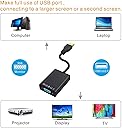
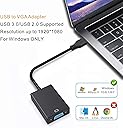
๐ Connect, Extend, Excel!
The ABLEWE USB to VGA Adapter allows you to connect a VGA-equipped monitor, projector, or HDTV to your laptop or desktop via USB 3.0/2.0, supporting resolutions up to 1080P. It's easy to install with no external power required and is compatible with various Windows operating systems, making it perfect for multi-display setups in professional environments.


| ASIN | B07TRMSCNB |
| Best Sellers Rank | #450 in USB-to-VGA Adapters |
| Brand | ABLEWE |
| Compatible Devices | Monitor, PC |
| Connector Type | HDMI |
| Customer Reviews | 3.7 out of 5 stars 2,191 Reviews |
| Finish | Projector |
| Finish Type | Projector |
| Item Weight | 0.06 kg |
| Manufacturer | ABLEWE |
| Mfr Part Number | ABLEWE |
| Model Number | AB-USB-HD2 |
| Number of Items | 1 |
| Number of Ports | 3 |
| Package Quantity | 1 |
| Specific Uses For Product | Monitor,Projector |
| Unit Count | 1 Count |
| Warranty Description | 2 |
| Warranty Type | Limited |
A**R
Works Fine
Along with the product, there was a letter from Joe at [email protected] letting me know that he will work with me in case there are any problems. I appreciated that and wrote Joe the following email--this should describe my experience with/feelings about the product. "Hi Joe, I recently purchased your USB to VGA adapter for adding an extra monitor to my laptop. At the moment everything is working fine. I had some anxious moments: 1. My laptop has a Windows 10 OS. By mistake, I installed the NT version--of course, nothing worked. When I reinstalled the correct version the product worked. I will give you a good review. 2. The sound stopped working when I installed the adapter. I had to make a certain device the default device. This has happened at other times also and thus may not have anything to do with the adapter. 3. The font size in your users guide is very small. I had trouble reading it. This is the only major problem I have/had. I am tempted top remove one star for it but won't :-) :-) 4. The monitor connected to the adapter has to be powered on before powering on the laptop. Otherwise, the monitor is not recognized.
S**M
Never got it to work.
I bought this USB adapter as an inexpensive solution to duplicate the display on my old Windows 7 test laptops that I use for a networking lab onto my one monitor so that I can control the laptops with my KVM switch. The first obstacle was that there were drivers that get installed on the laptop first - as opposed to being "Plug-n-play". The instructions say that when first plugging the USB VGA adapter in, it should appear in file explorer as a drive and that you run the correct driver application depending if you have Win XP or Win7/Win10. After double-clicking the Win 7 executable, it just sat there. I had to use the enclosed mini-CD on another machine, copy the executable off the CD on to a thumb drive and plug the thumb drive into my test laptop. The DVD drives don't work on these old test laptops. After the driver executable finally started to work, I was prompted to allow an unsigned driver to install. This was my second sign that this driver may or may not work. After the reboot, Windows did detect and successfully installed the new drivers. Good sign - maybe this will work. The instructions then stated there should be an icon in the system tray that I can click to open the monitor properties. There was an icon in the system tray, but even with the VGA cable plugged into the USB VGA adapter, their monitor icon only gave me two options - "device" or "exit". When I click on "device" it only shows the built-in laptop display. There was no "detect" button or any buttons for that matter to detect the external VGA display. I decided to try this VGA adapter on a second test laptop - a Presario CQ57. ( The first laptop was an old Dell Inspiron 1300) My experience on this second laptop was the same: Drivers would not install off the built-in drive from the USB VGA adapter. After rebooting, no control panel to try and detect the VGA monitor. I right-clicked on my desktop as they instructed, but there were no special menu items. I clicked on Screen Resolution, and it only showed the built-in laptop display and the Intel (the Dell laptop) or AMD Radeon (Compaq Presario laptop) adapters as choices. No choice or mention of their XXX USB VGA display adapter. Nothing ever appearing on my external monitor and no obvious way to detect or configure this VGA adapter. I spent at least an hour trying to make this work, along w/the reboots, and another hour to take pictures and to share my experience. There's a downside to buying less expensive, no-name USB VGA adapters - quirky installation process, unsigned drivers and very few to no features in the software. And most important of all, it flat out doesn't work. I know they offer a 30 day money back guarantee but I can simply return to Amazon and get my credit back anyway - which is simpler than contacting them for customer service. I gave it a try on two laptops but no go. Sorry, 0 out of 5 stars. Oh, I had to select at least one star to submit the review, but it's really a 0 out of 5.
R**2
Works well, gives me the ability to dual monitor on my surface without needing a dock
I would say the first thing out of the box is this can be used with USB 3.0 and 2.0 but I would recommend using it with 3.0. I have tried it on 2.0 and it has a lag time in between movement and what is shown in the screen. I guess there is not enough speed for a usb 2.0 to handle. The cable is short and really only meant for laptops in my opinion since many laptops nowadays only have USB 3.0 or mini displayport or type c. That being said, this works great for if you are trying to hook this up to say an older monitor or even a new TV. It also allowed me to have an extra display for my gaming laptop that only has 1 HDMI port that I can use to plug this laptop into. The cable itself is pretty sturdy so you do not have to worry too much about the neck getting frayed. You can easily bend and store if needed. The VGA female does not have the screws on the side so you are unable to attach the VGA securing screws on the left and right side but it does not effect performance. I would say it works great up to 1080P and i do not see any heating issues from what I can tell. Be aware this still relays on the ability of the onboard graphics so if you have an older PC that does not support 1080p it will just down grade to whatever it needs to be. It does not require any external power and is pretty light weight so you can put it say in your laptop bag. Another thing I would say about this product is that the picture quality is good and there is no lag when you use USB 3.0/3.1. No drivers are need from what I can tell to get this to work as it will auto install via windows 7,8,10. Overall I think this is a great product to have if you are looking for a decent expansion for your laptop or even desktop. It does not transmit sound so be aware of that and it does take up a USB port so for my surface pro I had to utilize a bluetooth keyboard and mouse.
H**B
Works - Driver Issues
Amazon is really slow in updating reviews. The device works if you get the drivers load correctly. Support told me how to unload and reload the drivers. I then had to load a software package from Actual Multiple Monitors to get all three monitors on my computer to work. I uploaded two videos to Amazon and they havenโt uploaded the second as of this time. Upgrading rating to four stars. Only because I had to play with the drivers and load third party software to get my system to work the way I wanted it to. If you are only using one monitor, you wonโt need the extra software assuming you get the driver to work. โโโโโโโโโโโโโโโโโโ Sent this email to support and waiting to see how they respond before returning. Should have mentioned all computers are running windows 10. Adapter came today with version Windows7-Windows10_2.0.2 drivers / software. Tried on four computers. Only works on one of them and Intel graphics software does not recognize display on the pc that it is working on. Can mirror display but not extend. Also can not uninstall software to re-install or remove. Do you have a newer version of drivers? and or suggestions on how to remove? Thank You Feb 2022 - Bought 2 more. One of them worked for 5 days and expired. Amazon replaced w/o issue. They have updated their driver and seems to work. Now have a total of 4 monitors if you count the laptops.
J**R
Makes worklife easier
I ordered this cord for my office computer so I could have 2 monitors. I couldn't wait to use it. I tried following the instructions on that were included and watched YouTube videos but couldnt figure it out. So I reached out to this company via amazon message and a lady emailed me back with a link and I used that link, within 2 minutes I had 2 monitors working. This made my Friday so much better all us girls in my officer were all excited I finally got my 2 screens I wanted. Thanks to this product and Alice for emailing me!!
G**A
It works - just the whole installing a driver with a sketchy name feels sketchy
I was very hesitant to install the software needed for this. It's important to note that the software can be installed without the CD, as soon as you plug in the adaptor you'll be able to install the software needed to use it (choose from the XP or Windows 10 option). The CD is just a back up. The main problem for me is that it has a weird name XXX_USB and very little instructions so I had to read through a bunch of reviews to see if anyone had tested it for malware and then take a leap of fait. I installed it and the extended monitor is working well. A bit blurry and a bit laggy, but it works OK for what I need.
G**S
Great product!
At first this did not work for me. I emailed the company and they offered to refund. I did not initiate this. A few days later the company sent me a new driver. Worked splendidly!
D**W
No good, especially for portrait mode.
I bought this to connect my windows 10 laptop to a VGA 1680-1050 60hz monitor. I wanted to use this monitor in portrait mode, something that I have done quite often with a regular HDMI to VGA adapter, but this particular adapter would refuse to rotate the image. Changing the display setting in windows for that monitor only caused it to do an awkward crop, making it completely useless to me. Now if you are looking to use this with a horizontal display... Don't. The picture quality is still bad with terrible ghosting. If you are trying to do a USB->monitor setup, I would recommend looking into USB to HDMI adapters, then connect your second display with HDMI or even DVI. DVI is pretty common on most old monitors, and is basically the same signal as HDMI just without the sound. so you can daisy chain a USB -> HDMI device with a simple HDMI <--> Dvi cable, and that should work fine. The only reason I went this particular route (usb-vga) is because my monitor only has vga. and if you are like me... try elsewhere, this product will not do it for you. Also.. a Note on the drivers: I actually installed the software from the disk first and that did not work. but after I uninstalled it and reinstalled it from the device itself, it was suspiciously different from the stuff on the disk... both were "USB display drives" but one had "HYC" or something at the beginning of the title and the other had"xxx"... btw, having your driver title start with "xxx" does nothing to add to the legitimacy of the product. Anyway, the final verdict... NO, do not buy.
B**L
Bad product quality
Very bad quality received defective product and broken cd
T**Y
Only worked for 3 days
I bought a VGA USB adapter from Amazon to be use to connect a 3rd monitor to my desktop computer. I followed your instruction in the User Guide, after installation, it worked, no problem. I enjoyed the monitor for 3 days, no problem. Then the computer could not detect the third monitor. Then I tried unplug the USB and reconnected again. It worked, then if I turned off the computer, when I restarted the computer, the third monitor could not be detected again. So I tried to uninstall the adapter, a message came up "Uninstall has detected that XXX USB Display is currently running. Please close all instance of it now, then click OK to continue or Cancel to exit." I don't know how to close the XXX USB Display since it was not working as the third monitor could not be detected. I restarted the computer again and tried to uninstall, same message came up. How can I make the adapter work? I followed all the instruction in the User Guide. Help! I am very disappointed, if I don't hear from you I will need to return to Amazon and will leave my review with the product on the Amazon website.
M**S
I added 2 more monitors.
I had an old USB 2.0 hub and bought two of these to add 2 more monitors to my laptop. The displays were a bit blurry but looked ok when I adjusted the display sharpness controls. The monitor identities get reversed from time to time when I reconnect the USB hub. I think that is a Windows (10) issue though. I really like the workflow improvement now that I have 4 monitors!
S**S
Doesn't work, very very poor picture quality.
Doesn't work, very very poor picture quality. Customer service was pretty good though and they did refund my money. Installed on 6 month old Dell PC with Windows 10.
J**E
Wasted money and not worth mailing back for return
Didnโt work at all - going to garbage. Tried several different desktop and laptop- nothing. Waste of money and time
Trustpilot
2 days ago
2 weeks ago