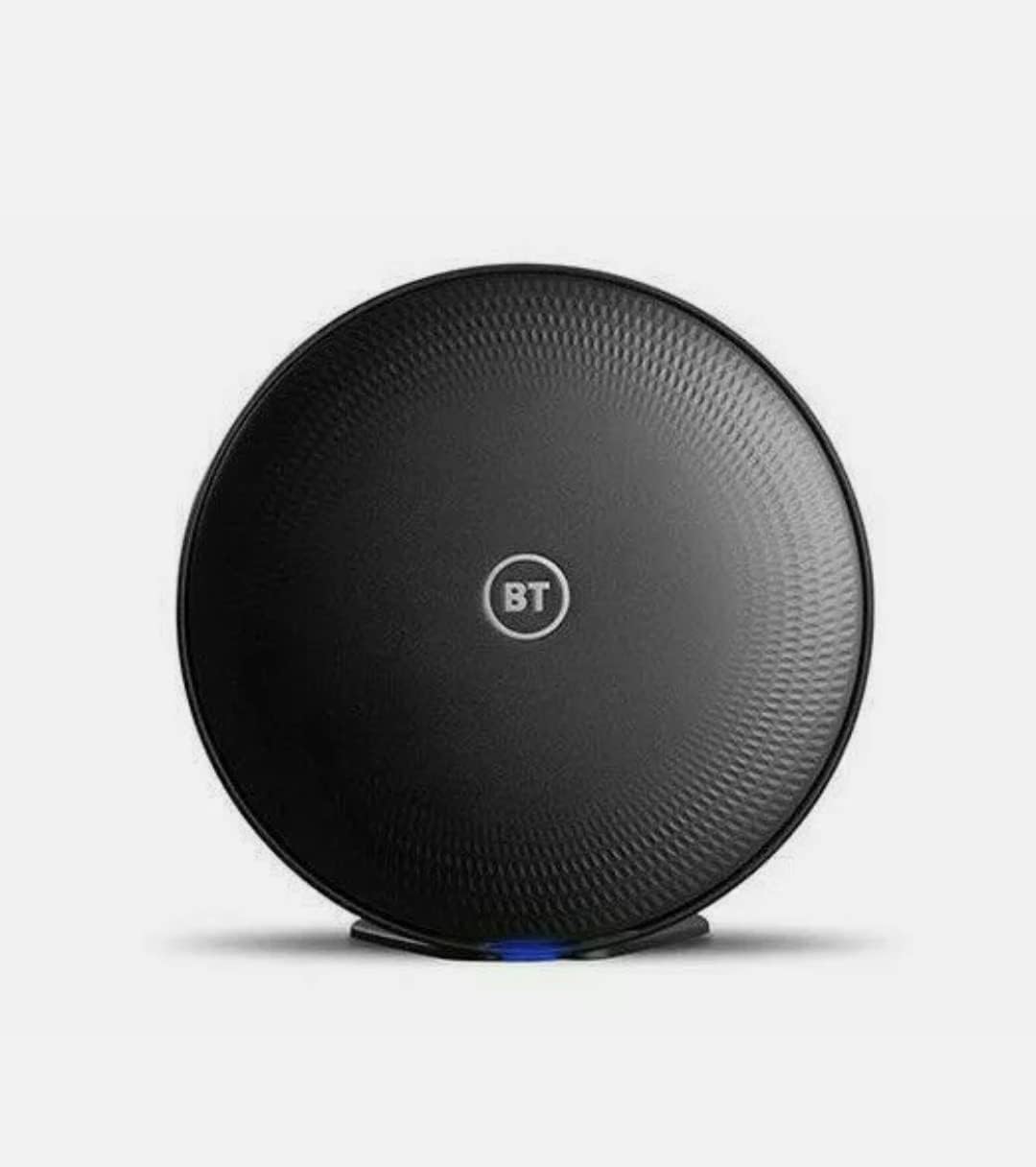
BT COMPLETE WI-FI DISC, ADD ON DISC, dual band
Product ID: 143484998
⚡Plug & play setup
📶Dual-band AC1200 speed
🔗Seamless mesh expansion
Buy anything from 5,000+ international stores. One checkout price. No surprise fees. Join 2M+ shoppers on Desertcart.
Desertcart purchases this item on your behalf and handles shipping, customs, and support to Ireland.
📡 Expand your Wi-Fi kingdom—never lose signal, never miss a moment!
The BT Complete Wi-Fi Add-On Disc is a dual-band AC1200 wireless extender designed to seamlessly integrate with your existing BT Complete Wi-Fi or Mesh system. Its compact black design and plug-and-play setup make it an effortless way to eliminate dead zones and boost your home or office network coverage with reliable, high-speed connectivity.
| ASIN | B07TYZR7MQ |
| Are Batteries Included | No |
| Best Sellers Rank | 3,065 in Computers & Accessories ( See Top 100 in Computers & Accessories ) 15 in Whole Home & Mesh Wi-Fi Systems |
| Brand | BT |
| Colour | black |
| Customer Reviews | 4.5 4.5 out of 5 stars (803) |
| Date First Available | 19 Jun. 2019 |
| Guaranteed software updates until | unknown |
| Item Weight | 690 g |
| Item model number | UYH1 |
| Operating System | RouterOS |
| Product Dimensions | 16.5 x 3 x 16.5 cm; 690 g |
| Wireless Type | Bluetooth |
T**L
Easy Enough to Set Up but I only configured to 5GHz only for top speed
A little bit of digging you read the woes of people with these discs where they connected them up and fine that there is a speed drop off as they configure themselves back to the 2.4Ghz network, then apparently the rest of the system feeding off these slow up. Needed a solution to connect the BT Smarthub 2 downstairs across into the upstairs open lounge opposite side of the house (5 bedroom house, 3 bathrooms, sunroom etc). If you are not planning to use the 2.4Ghz band if you turn it off it stops the discs downgrading the connection speed. Using our own router didn't want to use the BT Smarthub2 as a router but just as a modem but keep FON since I like it for when out and about in a rural setting, no 4G but Fon available off another BT customer. Went for the minimalist approach of having the BT Smarthub2 plug straight into a new master socket with the built in ADSL filter. Had the extension wiring disconnected and don't have a phone plugged in - thus zero interference once the BT line gets into the house. No degraduation of signal. Conversation with the Openreach engineer went, well I can disconnect these if you are not going to use the extension phones. Rod for your own back in getting the signal to your final destination or plugging the Smarthub 2 in an extention socket which can be degraded. So said disconnect the extension wiring as the new master socket went in. Rural setting so pleased that we get 37 speed from the cabinet 0.6 miles away (we don't get the 50 service here). Was shifting the broadband connection via plugs and sockets (powerline adaptors) to an Asus 3200 router before, now changed to a Zenwifi. Ripples in the power, switches going on, tumbles driers were not being kind to the powerline adapter connection. Drop out several times a day for 3 minutes or so. Think the 3 minutes could be the the Asus picking it back up again after the power line adaptors lost it. The grand plan was to use a Zenwifi node as well as the router to serve the top office and bedrooms the front and the second Zenwifi the rear. Latter in place. Now using this disc to receive the 5 Ghz signal from downstairs front, to rear upstairs and into the Zenwifi via ethernet cable from disc to Asus. 5 Ghz is achieved by turning off the 2.4 Ghz band in the BT router. I also like to select my own wifi channels. Selected channel 48 on the BT router. Since its a mesh I believe it uses other frequencies around there. You will note that the BT router doesn't allow you to use frequencies above channel 48 which suggests the mesh is using the rest or multiplexing into that channel. Found that using channel 67 or 68 on the Asus wasn't good, went to channel 32. All is fine broadband speed is coming out the same as it went in :). People try to frig with the BT router to turn it into a modem. I would not bother. If using your own router you can turn off the firewall in your own and rely on the Smarthub2 router for that. So job done with the BT disc. I bought the so called reconditioned ones (£89) - think these are returns where people have been sent additional ones by BT but give up. Probably user error. It didn't come in a box but as said simple enough to use. Plug ethernet capable into the BT Smarthub2 even if it's a BT Essentials package. Wait 5 minutes, constant blue light. Disconnect and reconnect at location - this time orange light. Ethernet out also provides a cable out (that's what I used) but also radiates the signal out again. If you go for the 5 Ghz only solution remember you can't access the router on 2.4 Ghz... can cope and know it won't trigger a down grade. Should be an improvement from the power line adaptor to get the ethernet upstairs. We will see. --- Footnote Orange light on it means at the limit, blue is fine. Now blue once the disc is placed one floor above the router in the office. Seems to be still radiating a 2.4 Ghz signal (using iNSIder to check). May be does this to get 2.4Ghz for backhaul. Will know when we move it.... ok moved to final position seems we just have the BT Fon now radiated with the Smart hub 2 2.4Ghz band turned off to keep 5Ghz fast throughput on. Footnote 2 Turned the 2.4 Ghz band back on, on the BT SmartHub2. Think the light when orange means it's cut back to the 2.4 Ghz band on the disc. Always on blue, left it as it was. All works well after a month on. Rock solid and it feeds the Asus Mesh well via the Ethernet cord out of the disc back. No complaints. Tools to check all of this is InSSIDer (channel use and signal strength) and Fast.com app or site (speed check). Now working like a dream to feed an Asus Ax WiFi mesh network. The disc does the heavy lifting of internet from one floor down then via Ethernet cable straight into the Asus air mesh hub and node via backhaul across the house providing two WiFi hot spots and Ethernet via two network switches, lounge and office to serve wired devices. Getting the best of all worlds, BT connection but your own mesh router to manage your devices. BT discs alone with the Smarthub 2 are fine if you dont have heavy networking needs but add in your own router if you do and for that the discs are fine if you need to get the broadband to your own mesh equipment which might be remote from master socket and you can't lay an Ethernet cable. I wouldn't worry about "NATs" a preoccupation of network people.
T**J
Compact WiFi booster
Great item, does what it says and helps boost connectivity with WiFi as I have an older house and WiFi dropped when heading towards the back. Now WiFi is stable, quick and easy to set up and the disc is nice compact size. Good value for money and seller dispatched and item received quickly. Would recommend seller as item exactly as described, thank you.
A**N
Excellent product extending Wi-Fi and improving RSSI especially for Ring Door bells.
Originally purchased to improve my wired Ring Doorbell RSSI to get it below 61dB as the video playback was sometimes a bit clunky. We live in a 3 story town house and the BT Smart Hub 2 is installed on the middle floor, it’s an excellent device paired first time, using the BT app wizard. The disc has now taken control half of the downstairs devices on both 2.4 and 5 GHz from the main Smart Hub 2 router. Better still the Ring Doorbell now at an improved Received Signal Strength Indicator of 41. Be sure to purchase the disc that’s not displaying the old coloured BT logo on the front think these are the earlier single band version (however not sure) and might not pair, there are many of these older versions on sale on eBay, the BT app wizard shows the newer disc that’s got the BT letters inside a white circle. Best to only purchase these newer discs to avoid disappointment. In have added photos that will help you decide on what disc to purchase. Definitely helped out 3 floor house. We’ve just got Fibre 100 package so on the more expensive complete Wi-Fi package the BT hub comes with one disc that’s usually £100 that they sell as Wi-Fi in every room of your money back.
A**R
Works well
Good extension for wifi
V**C
Good product
Arrived very late due to Royal Mail, hlowever, very esy to setup and works very well.
S**N
BT wifi extension
Extended my WiFi range cordlessly into my kitchen with great connection speeds. With my old add on the WiFi used to drop out occasionally but no issues with this one. Easy to set up to my BT internet.
A**R
Product works well - but evidently second hand.
Product works - but the product did not arrive in BT packaging box, no instructions and looks like it has been used before, scrapes, marks and dust all over it. It is evidently second hand. Contacted the seller as I have paid full price for this despite it being advertised as new. This is the second disc I have ordered from this seller, the first did not have any issues. Would be 5 stars for all, based on first disc, but based on second disc, I have marked down on value for money and easy install as per the above, second hand and no instructions.
D**H
Worth the cost - they are great!
Great product works so well! Please please add in a network cable in the box! I bought 3 or these and none of the boxes had a network cable so I have to go and buy one.
Trustpilot
1 month ago
3 weeks ago