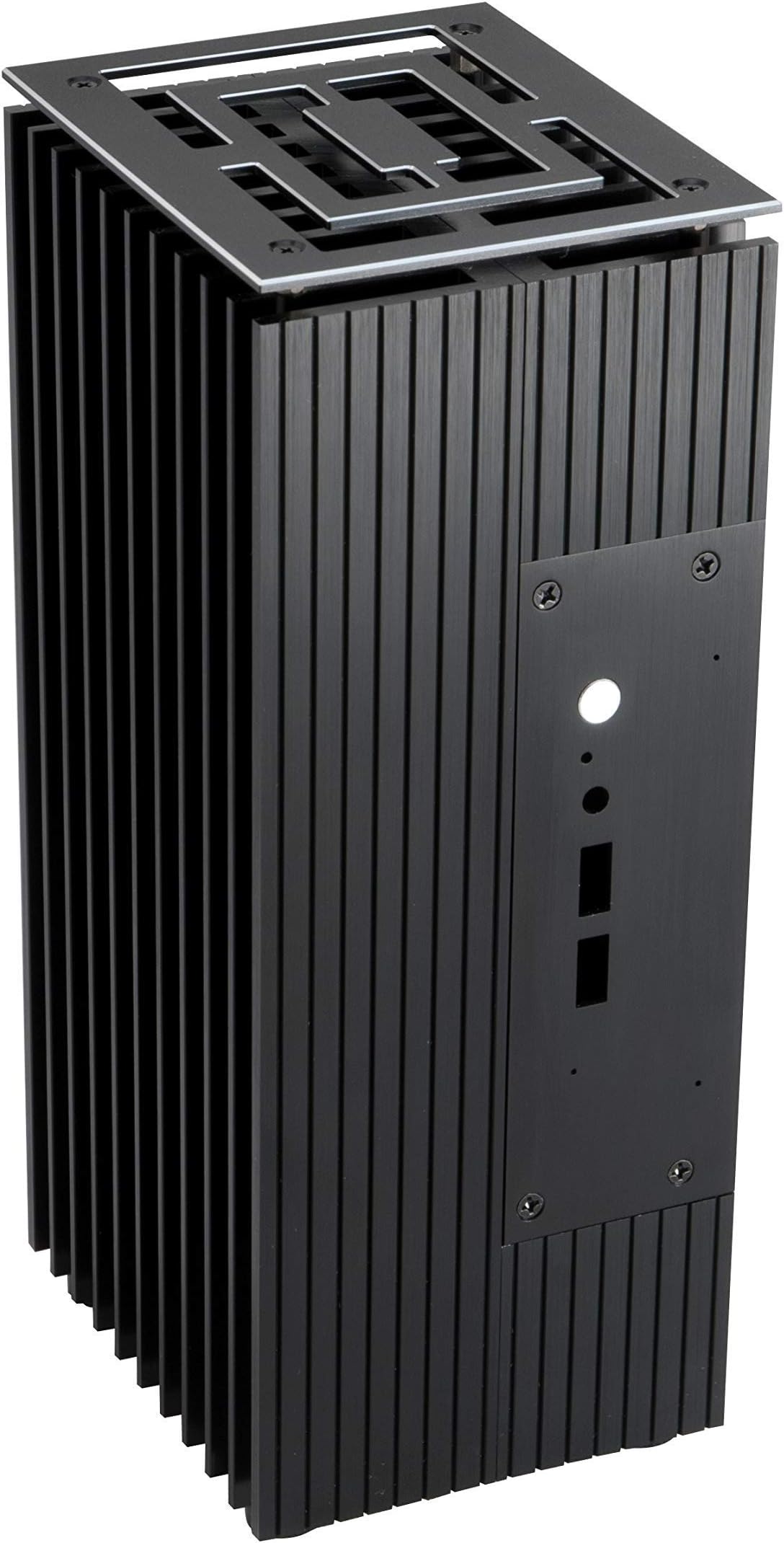
❄️ Stay cool, stay silent, stay ahead with Turing.
Turing is a premium fanless aluminium case designed for Intel 8th Gen NUCs, delivering superior passive cooling that reduces CPU temperatures by over 25%. Its silent operation eliminates fan noise, creating a distraction-free environment. With support for IR remote control, dual microphones, and 2.5" SATA drives, Turing offers versatile expansion options. Stylish diamond-edge panels allow flexible vertical or horizontal placement, making it a perfect blend of performance, silence, and sleek design for professionals and audiophiles alike.


| ASIN | B07RTBF1SY |
| Batteries | 1 Lithium Ion batteries required. |
| Brand | Akasa |
| Card Description | Integrated |
| Chipset Brand | Intel |
| Color | Turing Series |
| Computer Memory Type | DDR4 SDRAM |
| Customer Reviews | 4.2 4.2 out of 5 stars (140) |
| Date First Available | May 9, 2019 |
| Graphics Coprocessor | Integrated Graphics |
| Hard Drive | No Internal Storage |
| Hard Drive Interface | Serial ATA |
| Hardware Platform | PC |
| Item Dimensions LxWxH | 4.47 x 3.74 x 9.84 inches |
| Item Weight | 4.4 pounds |
| Item model number | A-NUC45-M1B |
| Manufacturer | Akasa |
| Max Screen Resolution | 3840x2160 |
| Number of Processors | 1 |
| Number of USB 2.0 Ports | 2 |
| Number of USB 3.0 Ports | 2 |
| Operating System | Windows 10 |
| Processor Brand | Intel |
| Product Dimensions | 4.47 x 3.74 x 9.84 inches |
| RAM | DDR4 |
| Screen Resolution | 3840 x 2160 |
| Series | Turing |
| Voltage | 12 Volts |
G**T
Excellent cooling performance
I had a NUC10i7FNH that constantly overheated (+95 C) even when running a standard amount of applications. I bought the Akasa turning case, and now it rarely goes about 70 C, even when running the "heavy Load" App to test out the cooling. Very pleased with my purchase. The instructions are a little light, though there are some good youtube videos of others fitting the NUC to the case. Also, you need to search out instructions for removing the NUC motherboard from the case (not straightforward in my case as various connectors were sticking to the case.) But once extracted and fitted, performance is better than I had hoped.
Y**N
Excellent fanless solution for 8th Gen NUC
The case turned my very noisy 8th generation i7 NUC with a faulty, overworked fan into a cool and silent machine. The instructions are clear and the Youtube tutorials are even clearer. It feels good quality and solid and it looks nice on the shelf. There are a few disadvantages to consider: 1. I lost access to the SD card reader. 2. it is significantly heavier. 3. it is bulkier.
A**.
Best NUC case but not without flaws
I am having hard time to give it a fair score. I own Akasa Turing for 8th gen as well which I find absolutely perfect. This one is also dead silent, nice looking and well performing in terms of temps. My NUC10i5 reaches 85 Celsius after 1h stress test and works at 3500MHz without throttling. It idles at 30 Celsius. All good here. But... Akasa Turing for NUC8 installation is a peace of cake. I did it three times and never had any issues. For this one I needed three attempts to make it work. Firstly, I had power button issue mentioned by others. It did not move a bit and did not power my NUC after first installation attempt. After second one I had problems with LAN port - cable was loose and did not lock with characteristic click sound. After quite a lot of time I found out that NUC10 board does not fit well in mounting points. It is easy to screw it in incorrect position and this is what causes all issues. Everything worked perfectly when I firmy pushed NUC board towards rear I/O panel. Then it is perfect. So this is my advice: start mounting NUC board by screwing rear screws first while firmy pushing NUC board backwards. It really helps. All in all, case itself is perfect. I love it. But at this price tag I would expect better fit and easier installation as it was in NUC8 Akasa Turing. Also, this one is not on Intel QVL so you void warranty by dissembling NUC10iXFNK/FNH to install it in this case. I wonder why as Akasa Turing for NUC8 is on QVL. Definitely a step backwards. Finally, my unit arrived with a very tiny small scratch. It is visible only from close distance at particular angles bit again - I expect flawless product at this price tag. Due to all these cons I take one start from my score, despite the case being fantastic.
D**A
Fantastic upgrade for any NUC
This is a really great fanless case; a well-constructed and quality item. Everything is thoughtfully included in the kit down to the thermal paste and every set of screws you might need. It even includes SATA connectors for the 2nd SSD, even though you may not be installing one. It went together really easily, everything aligns and fits first time. The instructions are simple and easy enough to follow, but if you need some extra help then there's an official Akasa build video on YouTube. The hardest part (for me) was getting the NUC motherboard out of its original case, but now I have a totally silent media server.
L**T
Excellent Heater
Purchased this to heat the corner of my room and it is working really well. The build quality is above average and the install of a NUC into it is straight forward. I would recommend a few extra things, m2 heatsink, wifi antenna and also much better thermal paste.
D**N
So far, excellent
Very happy with this, my Intel NUC (an 8 series i3) was very noisy, with the fan on balanced mode it still seemed to speed up every few minutes. I had previously replace the fan and recently it started failing again. It seemed better to remove the issue and get a fanless case. The Akasa X8 is one of only two choices (I could find anyway), both Akasa and I preferred the X8's form factor. Its covers more desk space but looks pretty good and it's well made. Assembly was easy enough but the instructions are poor, go to YouTube and watch the assembly demo (just search for the name). You will need to purchase WiFi antenna and Pigtails. I used Akasa ones (Akasa Omni-Directional Tri-Band Wi-Fi Antenna and Akasa I-PEX MHF4L to RP-SMA pigtails) as they are going to fit, unlike the first pigtails I bought. During assembly ensure properly clean the CPU with Isopropyl Alcohol (nail varnish remover is a good substitute). Also, use enough of the included Thermal compound on the CPU as this is vital for the case to do it's job. Once completed it was strange not hearing any sound at all while it booted up and made we wonder why I hadn't done it the first time the fan went. I used AIDA64 to do a quick stress test on the CPU, after about 6 minutes it had only briefly maxed out at 58c, idle it's about 20c. Another bonus, with the new Akasa WiFi antenna I saw a huge gain in speed and reliably of my connection, it now hits the max speed of my Internet connection. An excellent upgrade, not cheap but worth it, Recommended.
M**M
Effective upgrade from regular NUC case
The old-style fans on my NUC Bean Canyon system were becoming annoying as they were powering on all the time, so I started to look for alternatives. This is the best case I found. It's totally silent and Core Temp is giving readings of 35-50°C. Completely different world. Very helpful if you take a lot of Zoom/phone calls near the PC and don't want callers to hear the pesky fans!
W**7
I wanted to build a ROON ROCK in a fanless case. This is a great fanless case. However the ports are slightly off. So fitting cables to the port is a bit of an issue. The ports work, but they are tight. The finished computer works very well. Recommended purchase.
B**N
BTW - if your external wireless don't fit your NUC, which is what happened to me, there are open venting within the fins that you can't see on any pictures when you buy it. So if you pull apart the 2 wireless antenna's out of the NUC carefully, you can recycle the NUC's built in wireless antennas with the wonderful sticky fold that Intel used in the original case. Stick the small antennas to the walls of an external fins without anyone even noticing them. The one with the longer cables can go on the opposite side of the case fins and the short will fit the closest wall. So thank goodness for the extra ventilation that this case was designed with. I have been waiting to own a fanless case for more than 20 years and I am happy to finally own one, well worth my effort. Only complaint is the shipping cost but was at least shipped properly unlike so many other packages I saw this winter that were damaged and or stolen and that's just not funny.
P**T
Works well, designed well. I have the Nuc 8 i5 and it suits it well
T**I
Passt alles, sieht toll aus und kühlt besser ohne Lüfter als der laute Lüfter im original Gehäuse vom Intel Nuc.
E**O
Un case che è in realtà un dissipatore fanless pronto ad accogliere la scheda del NUC + le unità disco. Ha un suo fascino nella fattura appena un po' grezza. Funziona perfettamente allo scopo, con temperature inferiori alla situazione precedente di 20-30 gradi. Il montaggio si è rivelato più facile del previsto, i tutorial su YouTube aiutano. Non ho riscontrato il problema del pulsante di accensione, si avverte senza problemi un "click" come nel case originale. Sarebbe perfetto, se non fosse che le viti in dotazione sembrano fatte di burro, e se per qualche motivo dovete aprirle e chiuderle un paio di volte di più rispetto al minimo sindacale per montarlo, rischiate di rovinare irrimediabilmente la testa e di non riuscire più a estrarle. Arriverei a consigliare di comprare un set di viti migliori archiviando completamente quelle contenute nella confezione.
Trustpilot
4 days ago
2 months ago