🎬 Your personal theater, anywhere you go—don’t just watch, experience!
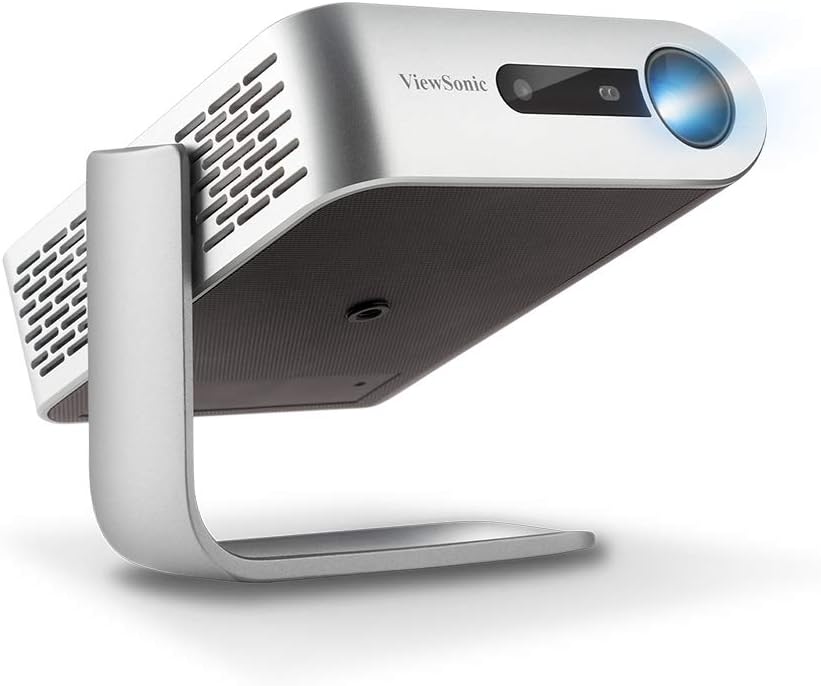
The ViewSonic M1+ is a compact, ultra-portable WVGA LED projector featuring 854x480p resolution, built-in dual Harman Kardon Bluetooth speakers, and up to 6 hours of battery life. It offers effortless setup with auto-focus, vertical keystone correction, and 360-degree projection. Cinema SuperColor+ technology ensures vibrant colors, while versatile connectivity options including HDMI, USB-C, and MicroSD support a wide range of media sources. Ideal for millennials seeking a stylish, on-the-go cinematic experience with premium sound and vivid visuals.


| ASIN | B07PJ3CPX9 |
| Batteries | 2 AAA batteries required. |
| Best Sellers Rank | #1,824 in Video Projectors |
| Customer Reviews | 4.1 4.1 out of 5 stars (2,836) |
| Date First Available | March 19, 2019 |
| Is Discontinued By Manufacturer | No |
| Item Weight | 1.54 pounds |
| Item model number | M1+ |
| Manufacturer | ViewSonic |
| Product Dimensions | 4.96 x 1.59 x 5.83 inches |
M**H
Thanks Viewsonic for a cheap 3d projector
For the money, this is a really feature-packed projector. I was looking for a projector that has 3d support. Most of the cheaper projectors, the "bluetooth" ones don't support it. I couldn't understand why they had every other feature, but didn't add 3d in. However, this Viewsonic projector does support 3d and it looks really great. As far as the usual projector stuff, this projector has decent brightness -- it looks ok even in a room that isn't pitch dark (we had a few lamps on). It looks nice in a dark room. If you're looking for a super bright picture in a bright room, you might want to consider a larger, more expensive projector. As far as 3d, to produce a 3d image you need three things. A projector (like this one) that supports 3d and projects the 3d image, you need a player that can play 3d disks (I bought an LG Bluray player that plays 3d disks) and you need 3d glasses. For glasses, I've seen a few people say you need to buy the Viewsonic PG-something glasses. Well, those glasses don't appear to be made anymore. However, don't worry, you just need to buy any regular old active shutter glasses that are for DLP projectors. Buy one of the brands that say they support all kinds of DLP projectors--this Viewsonic won't be in their supported list, but they will work with this projector. I had a little difficulty with the glasses, probably because I was turning them on incorrectly. But, if you mess with them, you'll get it. Also, another nice thing about this little projector is the sound. Wow! Its very impressive for such a little box. Its good enough to use to watch a movie, unless you're really after that thunderous sound of a movie theater, then you could explore the bluetooth option and connect a bluetooth speaker to this projector. There's a few things I don't like. First, if you use the built in arm as a base, on mine at least, the display is crooked. Also, the projector is so light that the HDMI cable will move it. So, to get the projector properly placed, you need to mess with the HDMI cable or even tape the cable down to the table where your projector is. I mostly solved the problem by attaching a tripod to the projector -- your tripod will just screw into the bottom of the projector. A pretty cool feature. It does have the ability to play movies from micro SD cards and external hard drives. I haven't messed with any of those. Its also connects to WiFi--that went very smoothly for me. That's nice in case there are any firmware updates, you can get them instantly over WiFi. So, overall, this is a really great budget projector with alot of features. One of its biggest strengths is that it supports 3d--very, very rare in this price range.
G**Y
Great Projector!
UPDATE: New firmware update FIXED THE PERMANENT MOTION SMOOTHING!!!! I have adjusted my rating to 5 stars. Viewsonic actually listened to its customers (I was not the only one complaining). I love this little guy. So versatile, great quality image. But the M2 employs permanent frame interpolation that you CANNOT turn off. If you don't know what that means, basically it takes the image and digitally fills in the detail between frames rendering a disorienting hyper-sharpness to the image. It makes all your favorite movies look like cheap soap operas. Most TVs come with this, but you can turn it off in settings. The M2 does not allow you to turn it off. And it ruins every film you try to watch. There is a hack. If you use 4-corner keystone correction it disables frame interpolation. Which is a bug I hope they DON'T fix. But unfortunately, it also creates a slight lag so the audio will be 2 or 3 frames out of sync. Honestly, I'd rather watch a film out of sync than ruined by motion smoothing. I pray they add the ability to turn it off in future firmware updates. Please Viewsonic, hear my cry!
S**N
Reviews of M1+ and M2. I'm keeping both!
UPDATE: Streaming movies directly over USB C using a Samsung S20 FE does not work on M1+ or M2 because (I think) the phone pulls too much power. It will work for 20-30 minutes sometimes and then the projector shuts down. Works great with both projectors using USB C to HDMI. It just means the phone has to be fully charged. --- The M1+ is an impressive piece of technology. It's solidly built. The sound quality is excellent. Better than the sound from the cheap smart TV I've owned and on par with the sound from quality bluetooth speakers. And the thing is tiny. The problem is that it's simply not bright enough for my liking. I bought the M1+ this to stream movies directly from my phone because I do not have or want separate home internet. I did however connect an Amazon Fire stick and a Roku stick to it just to test and it worked flawlessly. I think sometimes the resolution of the image my phone (LG V30) is sending conflicts somehow with the projector and the projector says there's no input signal. Usually simply unplugging and re-inserting the USB C cable fixes it. (Note that I now have a Samsung Galaxy S20 FE and it does does not work over USBC to USBC but works perfectly using USBC to HDMI on both the M1+ and M2) I have grown to absolutely love this projector for what it is. If you want to be able to watch a show/movie on any wall using a tiny, well-built projector and less than 100" image this is it. But it's not bright enough to use in any room other than a very dark one. I also bought the Viewsonic M2 when the price dropped to $450 last week and that projector is in a different league altogether. It's much much brighter and crisper, as well as quieter. It's not as portable. Just because it's called the M2 doesn't mean it's the same size as the M1+. It's actually the size of the a 9x9 cake pan instead of a paperback book, which is still very small but not super portable like the M1+. I've decided to keep both because I love them both. The portability and long battery life of the M1+ makes it amazing for travel. Just know that if you're looking for a projector to park in a room for daily use, particularly one with ambient light, the M1+ probably is not your projector, but the M2 might be. If you can get it for $450 as I just did, it is sincerely worth get getting. Also, the automatic focus on the M2 is also very helpful. The M2 produces a gorgeous picture. Easier to view in dim lighting than the M1+ which is obvious given the added brightness. I read and estimate that the M2 is around 300ANSI lumens and the M1+ is around 120ANSI lumens. Most nights I watch movies using the M2 and a screen size if around 120 inches and it's really nice! Streaming works fine via wifi on the M2 using built in Netflix and Amazon Prime but there are no options on the remote to pause a video. How is this possible? It's irritating but I finally figured it out. Also, and this might be a deal breaker for some, the HDMI slot is too close to the power cord slot to allow for a Fire stick to plug in, though a newer Roku stick does fit. One last note, I have a 100w USBC wall adapter and it powers the M2 just fine. No need to lug around the power brick that comes with it. A USBC battery pack that puts put 74 Watts or higher should power the M2. I don't have one. I do have a battery backup with an AC plug and it powers the projector fine. So even though it doesn't have a built in battery it can be powered by battery for outside use.
J**N
I use this both in and outside of my campervan. Inside, I use a simple blinder as screen, and outside I simply use the van as it's white. Perfect companion for my weekend trips.
D**S
Works well. Needs a darker room. Auto adjustment of the picture is a good feature. Fans were noisy until I upgraded the firmware, also eco picture mode gives a better picture and less fan noise. Overall really good 1080p led projector
A**.
Alırken çok araştırdım. Birçok farklı projeksiyon cihazını inceledim en son bu cihazda karar kıldım. Ufak olması görsel olarak kaba olmaması nedeniyle ev kullanımına çok uygun. 130" bir perdede kullanıyorum. Çin'den sipariş ettiğim projeksiyon perdesi ile beraber. Görüntü kalitesi harika. Xiaomi Mi Box bağladım. Kendi içerisinde yer alan uygulamalar çok kötü. Tek hdmi girişine sahip olması en kötü yanı. Xbox ve Mibox kullanmak için hdmi çoklayıcı almak durumunda kaldım. Ayrıca kenar düzeltme sağ sol ayarı fps drop'a neden oluyor. Dikey düzeltmelerde sorun yok. Satın alacak arkadaşlar en çok buna dikkat etsinler. Benim kullanımım tam karşıdan olduğu için sorun olmuyor. Genel olarak 10/9 cihaz. Benim aldığım dönemde fiyat 9k idi.
L**A
Prodotto di alta qualità, semplice da configurare e con un menù intuitivo. Adatto ad ogni tipo di formato video.
J**.
buenas calidad y precio.
Trustpilot
2 weeks ago
1 month ago