


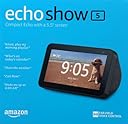





Echo Show 5 (1st Gen, 2019 release) -- Smart display with Alexa – stay connected with video calling - Charcoal
Product ID: 130120440
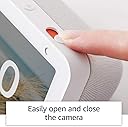
🎥1MP camera with privacy shutter
📱5.5” HD touchscreen
📶Dual-band Wi-Fi + Bluetooth A2DP
📺 Your smart day, smarter display.
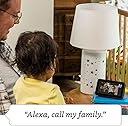
The Echo Show 5 (1st Gen, 2019) is a compact 5.5-inch smart display powered by Alexa, designed to streamline your daily routine with video calling, entertainment, and smart home control. Featuring a 1MP camera with a built-in privacy shutter, dual-band Wi-Fi, and Bluetooth connectivity, it offers seamless integration into your connected lifestyle while prioritizing your privacy. Perfect for multitasking millennials, it doubles as a digital photo frame and personal assistant, all wrapped in a sleek charcoal design.
| Size | 5.8” x 3.4” x 2.9” (148mm x 86mm x 73mm) |
| Weight | 14.5 oz (410 grams) Actual size and weight may vary by manufacturing process |
| Display | 5.5” touchscreen |
| Camera | 1MP camera with built-in shutter |
| WiFi connectivity | Dual-band Wi-Fi supports 802.11a/b/g/n/ac Wi-Fi networks. Does not support connecting to ad-hoc (or peer-to-peer) Wi-Fi networks. |
| Amazon Sidewalk | A shared network that can simplify Echo device setup and can help your device reconnect to your Wi-Fi router when you update your password or network name. Sidewalk uses a small portion of your internet bandwidth to provide these services to you and your neighbors, and is enabled on your device unless you have previously disabled the setting. You can disable Sidewalk at anytime. Learn more here. |
| Bluetooth connectivity | Advanced Audio Distribution Profile (A2DP) support for audio streaming from your mobile device to Echo Show 5 or from Echo Show 5 to your Bluetooth speaker. Audio/Video Remote Control Profile (AVRCP) for voice control of connected mobile devices. Hands-free voice control is not supported for Mac OS X devices. Bluetooth speakers requiring PIN codes are not supported. |
| Audio | Full range 1.65” built-in speaker. 3.5 mm stereo audio output for use with external speakers (audio cable not included) |
| System Requirements | Echo Show 5 comes ready to connect to your WiFi. The Alexa app is compatible with Fire OS, Android, and iOS devices and also accessible via your web browser. Supported operating systems. Certain skills and services may require subscription or other fees. |
| Setup technology | Amazon Wi-Fi simple setup enables customers to connect smart devices to their Wi-Fi network in a few easy steps. Wi-Fi simple setup is another way Alexa is always getting smarter. Learn more about Wi-Fi simple setup. |
| Processor | MediaTek MT 8163 |
| Accessibility features | On Echo devices with screens, you can enable Alexa captioning and closed captioning, magnify the screen, toggle color inversion, and choose between color correction options. You can also enable the VoiceView screen reader to use gestures to navigate the screen and hear spoken feedback about the items you select. Learn more about Echo with a screen accessibility and Alexa accessibility. |
| Warranty and Service | 1-year limited warranty and service included. Optional 1-year, 2-year, and 3-year extended warranty available for U.S. customers sold separately. Use of Echo Show 5 is subject to these terms. |
| Included in the Box | Echo Show 5, power adapter (15W)/cable (4.9 ft.) and quick start guide. |
| Privacy Features | Wake word technology, streaming indicators, microphone/camera off button, built-in camera shutter, the ability to view and delete your voice recordings, and more. Visit the Alexa Privacy Hub to explore how Alexa and Echo devices are designed to protect your privacy. |
| Language | Alexa speaks English and Spanish |
| Recommended device footprint | Echo Show 5 device is 5.8”W x 2.9”D. Recommended footprint: 6”W x 4”D. |
| Software Security Updates | This device receives guaranteed software security updates until at least four years after the device is last available for purchase as a new unit on our websites. Learn more about these software security updates. If you already own an Amazon Echo, visit Manage Your Content and Devices for information specific to your device. |
P**C
Comparison between Show 8, Show 5 and Nest Hub
I have been using the Echo Show 8, Show 5 and the Google Nest Hub for a few weeks now and I like them all.Assuming all your services work for Alexa or Google Assistant, its hard to determine the best one.Screen Size - Echo Show 8 (8”) > Google Nest Hub (7”) > Echo Show 5 (5.5”). Thats pretty obvious. A note about the screen size of the Show 5, its really small (about the size of the larger iPhones. XS Max in my case). The pics you see online make it seem a lot bigger but it isn’t, turn your iPhone Plus/Max/11 on its side and thats pretty much the size.Screen Quality - Nest Hub > Show 8 > Show 5. All the specs aside, the Google Nest Hub just looks crisper and sharper than the Echo Shows. But don’t worry, the screen quality is still good with the echo shows so this shouldn’t be a deal killer for either one.Sound Quality - Show 8 > Show 5 > Nest Hub. Again a close category but the Show 8 sound quality is very good and fighting well above its weight class. The Show 5 and the Nest Hub both are decent too so this shouldn’t be a deal killer either. There is just enough bass/mid/treble to give your music dynamic sound but if you’re an audiophile, you’ll probably think its just ok. The Volume is adequate for all three speakers.Doorbells and your Smart Displays. - If you own a Ring doorbell, you should buy an Echo Show device. If you own the Nest Doorbell, you should buy the Google Nest Hub. This is the reason why I even considered buying a Smart Display. The Button Push live view is a killer app and a huge help to my Smart Home. Its such a shame there is so much in-fighting between Google and Amazon preventing this from working on each others devices but this is the world we live in. The only ones suffering is us, the consumer…Picture Frame mode - Nest Hub > Show 8 > Show 5. The screen quality and a few picture options like skipping blurry pics and combining two portrait oriented pics on the screen makes for a much better picture frame. The Google Nest Hub also doesn’t show other information on its screen besides Time/Temp and Picture stats. The pictures are really the focal point when the display is idle. The Shows scroll through different information (News, Weather, Stocks, etc) and the words are prominent on the screen which becomes the focus although your pics are still the background. Its not bad, I like it but if you want a picture frame just for your pictures, it may be a bit too much. The Google Nest Hub uses Google Photo’s and the Echo Shows use Amazon Photo’s. They both have a “free” non-storage requiring option as long as you allow them to downgrade the quality of the photos. Do it, it doesn’t degrade the pics on the devices. Google Photos has Pet recognition which will categorize your Dog, thats pretty awesome. Note, I didn’t read the terms and conditions close enough to find out if there are any “ownership” or data mining issues. If this is a major concern for you, it may be best to keep that foil hat on.Communication/Phone/Video Calls - Show 8 > Show 5 > Nest Hub. The Nest Hub doesn’t have a camera. Bottom line, that kills it. You’ll have to buy Nest Hub Max to get a Camera and use Google Duo. Thats a bit pricey. Everything else is pretty competitive otherwise. The Echo Shows have a nice physical Camera cover that is not automated, so don’t worry too much about being watched. Thats a nice touch. But they are all always listening… They have buttons to turn off the mics but you never know. The camera cover you can see closed.All in all, I like them all and I’m not returning any of them. I’ll replace my existing smart speakers and scatter the smart displays throughout the house. Don’t hesitate, if you see a deal or really want it, go for it, you’ll be mostly happy. This will make a wonderful addition to your Smart Home.
K**O
I love my Echo the price can't be beat the units are good quality not cheap units.
Today my Echo Show 5 was delivered I already own an Echo Show after reading how bad the sound was supposed to be I moved the 10 inch Echo Show into my bedroom, (every now and then I like to watch a movie while in bed) my plan was to place the 5 in the living room. Well after the 3 mins it took to set up the 5 I decided to take it in my bedroom because the 5 is more alarm-clock like.The alarm works out great, falling asleep to music, an Audible book or a choice of sounds. It is the perfect size for a bedroom or kitchen. I have even gotten ideas and recipes. Well the sound quality and picture quality blew my socks off. I am impressed I have a large bedroom and the sound was fine looking at a movie lying in the bed with the 5 on the nightstand next to the bed it's perfect so now I'm moving the Echo Show back into the livingroom. There is no distorted sound the unit sound is set in the middle, there are no ads, picture is clear as a bell. I love the options for the clock display, the Echos are easy to set up. Try the unit out for yourself you have nothing to lose you don't like it return it. I have bought 2 other 5 Echo and gave them as gifts for $50 I bought one for my mother another for my son. With the pandemic I am able to call and drop in on family members. I think it's cool to do projects or cook together or to show my mother items like my new plants ect I love my Echos I have smart plugs connected and plan to expand my system. I have seen comments about ads they aren't ads but suggestions of things to try, news or information you choose. It's not annoying and it circles though I really don't notice because they have no sound its not intrusive. When you give Alexa a task or watch a movie or listen to the radio there are no pop ups. I have no idea what ads people are complaining about. As I said it's only $50 and worth every penny.
M**E
I LOVE LOVE LOVE MY AMAZON ECHO DEVICES!!
I finally got my first Amazon Echo Show with Alexa. I am kicking myself for not getting one earlier! I have fell in love with these devices and their many capabilities that I bought a dot, 2 Echo Show 5’s an Echo Show 8 and the new Echo Show 8HD! I am loving all the things they do. If you don’t have one and you’re on the fence here is the breakdown, pros and cons:Breakdown: super SUPER easy to use. Plug in the power cord and follow the on screen steps to set up your device to your liking. There are multiple clock faces to choose from, sounds for alerts and you can pick a background or use your photos from Amazon’s photo app. (I also was new to that app and Alexa. Both were super easy to use! My pictures synced faster than any other photo cloud storing app hands down. Plus as a bonus you don’t need to pay for storage. There’s no limit and zero fees!!)Once you’ve set up the Alexa app (I recommend the Smart Life app that’s compatible with smart devices/plugs and Apple Watch!) you just ask Alexa what you need and boom, it’s done! I asked her to calm down my dog and she put on music! I am amazed. You can make shopping lists (No more searching for a pen and paper in my kitchen), Ask for recipes, play videos, surf the Internet, find out the weather, watch your photo albums, make phone calls to anyone who has the same type of device (like most of the world does by now). It’s seamless and I even had my 8 year old set one up because it was so easy. I love the parental control platform it allows for too!Pros:Super easy to set upBeautiful looking with or without the swivel baseAmazing pictureGreat compatibility with phones, smart plugs, Works perfectly with smart devices and appsBetter than FaceTime for video callsLoud speakers with excellent sound qualityAlexa, Alexa, Alexa! Alexa’s voice recognition is so much better than Siri! Siri can’t understand a thing I say (I don’t even have an accent). If I ask Siri for the weather it gives me traffic. Super frustrating. I think that’s why I was hesitant at getting one of these. Man I wish I knew how much better Alexa is! Everything I ask is instantly understood and taken care of!! Music, calls, drop ins, weather...anything!The value for the price is unbeatableEverything about this device is a Pro!!Cons:It’s constantly listening. But honestly, I don’t worry about that. I’m sure the government listens in and sees things just through WiFi, the Nelson rating TV system, Arbitron ratings in your radios, computer cameras and cellular/mobile devices. This isn’t the only thing out there and really it’s so worth it for everything you can use it for. Besides, anyone that paranoid about what they’re saying is probably on The Hunt with John Walsh. LOLThe final analysis: BUY THESE DEVICES!! Get them for each room. Enjoy the capability to make your day to day life easier and more fun! Play music, dance and sing and be silly. Display your photos, try a new recipe and make sure that your prepared for rain, snow or heat. The Echo devices are like having a personal assistant that’s holding a computer screen. So enjoy your new found “tech” if you don’t already have any and you’ll be amazed like me at what these devices can do!
Trustpilot
1 day ago
2 days ago