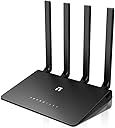
⚡ Stay connected, stay ahead — Wi-Fi that works as hard as you do!
The Netis N2 Wireless AC1200 Router combines cutting-edge 802.11ac dual-band technology with gigabit wired speeds and four high-gain antennas to deliver fast, reliable Wi-Fi coverage ideal for busy, device-packed homes. Featuring advanced WPA2 security and easy setup, it’s the all-in-one solution for seamless streaming, gaming, and remote work.
| ASIN | B00JYCJJNY |
| Antenna Location | Security |
| Brand | Netis |
| Built-In Media | Cable |
| Color | AC1200+ |
| Compatible Devices | 802.11a/b/g/n/ac |
| Connectivity Protocol | Ethernet, Wi-Fi |
| Connectivity Technology | Ethernet, Wi-Fi |
| Control Method | App |
| Customer Reviews | 3.7 out of 5 stars 123 Reviews |
| Data Transfer Rate | 867 Megabits Per Second |
| Frequency | 5 GHz |
| Frequency Band Class | Dual-Band |
| Global Trade Identification Number | 00088591201136, 00804904197961, 06951066951147 |
| Is Modem Compatible | No |
| Item Weight | 1.7 Pounds |
| LAN Port Bandwidth | 1000 Mbps |
| Manufacturer | Netis |
| Mfr Part Number | WF2780 |
| Model Name | WF2780 |
| Model Number | WF2780 |
| Number of Ports | 4 |
| Operating System | Windows XP, Windows VISTA, Windows 7, Windows 8, MAC and LINUX, Windows, Linux, MAC OS |
| Other Special Features of the Product | Access Point Mode, WPS |
| Security Protocol | WEP, WPA, WPA2 |
| Special Feature | Access Point Mode, WPS |
| UPC | 808113016389 804904197961 088591201136 |
| Warranty Description | 1 year |
| Wireless Communication Standard | 802.11ac |
| Wireless Compability | 802.11ac |
S**R
Best router I have found ****** 6 Stars
Ive been searching wireless routers for a week now and IMO this is the best router on the market based on performance and price. Speed is great. Range and signal strength are great. Price was great. Install/setup was a snap. Amazon even shipped it 1 day for $5 which I though was totally worth it. Only question that remains is longevity. Netis is a lesser known name but IMHO I think this router is the king for right now. (Jan 29, 2015)
B**B
Reliable but minimally customizable
1/14/2015 I've had this router a few days now, in a house with seven people in it, all of whom use the Internet daily. It's thus far been quite reliable. Range is pretty great. I am able to get an okay 802.11n signal from my backyard, about a hundred feet away from the router, through seven walls (all wood and drywall). I've not yet tested the range on the 802.11ac signal, but I presume it goes further than the 802.11n. Speed is everything I expected it to be, although the QoS isn't quite as customizable as I'd like. It does not let you custom prioritize by protocol or application, but rather it has a built in QoS priority list, and allows you to assign guaranteed (minimum) and maximum available bandwidth to individual clients. If I were able to install DD-WRT on this router, or if the QoS was made more customizable, I'd give it the fifth star. Overall, I'm pretty happy with the purchase, especially with the sale price. Final note: Upgrade the firmware before you do anything else with it! Mine did not have the latest firmware straight out of the box.
S**7
Don't buy... spend a bit more for something better.
I purchased two of these devices and would not recommend them at all. The first device I am using as an access point and the second device is used as a wireless bridge to connect a desktop in another room. These devices were meant to replace an aging access point and my old WhiteRussian dd-wrt wireless bridge (would still be using it, but the antenna suddenly stopped receiving signal). When I received these devices, I figured the configuration would be very straight forward. I used a Laptop and wired it to one of the devices. The device started up and provided my laptop with an IP. Easy enough. From the instructions, you are supposed to navigate to netis.cc (something like that) in the browser. I would've preferred an IP, but OK. The interface actually looks kind of nice (when it works) and has quite a bit of granularity with respect to configuration options. Unfortunately, after *every* change, no matter how minuscule it is, the device would need to reset itself. No exaggeration here... Setting the wifi password required the device to completely reset. It also seems like every option has its own 'save' button. In other words, you can't set the wifi password for the 2.4Ghz and the 5Ghz at the same time. You have to set one, save, wait for it to reboot, get yourself an IP, then set the other, save, wait for it to reboot, wash, rinse, repeat. I attempted to change the IP address on the device, but the IP address, and the DHCP range are in different sections with their own 'save' buttons. You cannot change them both at the same time, so when you save the ip address and the device restarts, the dhcp range is wrong. If you set a static ip on your wired machine, loading up the ip address does nothing. I tried setting the hostname in my /etc/hosts, but still.. nothing. I seriously tried to give these devices the benefit of the doubt and upgraded the firmware on both of them. Unfortunately, that didn't seem to affect the wonky behavior. When I finally got these devices connected (wireless bridge connected to wireless access point using 802.11ac), I ran a speedtest on it. The result was rather impressive over what I had before. Unfortunately, when I asked my wife later that night how the 'Internet' was, she said 'not good'. She showed me how only portions of her Facebook were loading. The images and videos would rarely be displayed during the first page visit and would often times have to be refreshed. I noticed this as well when connecting to the device from my mobile phone and using Netflix, but my first reaction was to blame my phone. I noticed that when I set my phone to connect to the device at 2.4Ghz, it seemed much more stable. I did the same for the wireless bridge connected to my wife's desktop, and now all is well with the 'Internet' and her Facebook again. hah Another thing... I purchased these devices for the 5Ghz capability. They are not more than about 30 feet away from each other and 5Ghz is unusable. Now I have settled for two sub-par devices connected to each other at 2.4 Ghz. I will end up keeping them simply for the fact that I don't feel like going through the hassle of returning them. I still have another wireless access point (an old Belkin that I purchased during a business trip in Shanghai about 5 years ago) hooked up. It has been reliable and I have no issues with it. Depending on how aggravated I get with these in the future, I might simply buy a better brand and give these away. P.S. After I received the product, the seller sent a form email hoping that I was completely satisfied and if for any reason I wasn't, to let them know before leaving a review. As a courtesy, and after having a bit of spare time, I decided to write a review on these devices. Before I did, I sent the seller an exclamation of my dissatisfaction. This was four days ago and I haven't heard a peep. I don't really expect anything, but just wanted to mention that I did actively contact them on Oct 10th. Update: Oct 24th, 2015: Returned both devices back to Amazon.
M**E
Great signal that reaches the entire house, exteremely stable connection
This router replaces a Cablevision free "managed" router (D-Link DIR-868L). The previous router would disconnect wireless and wired computers from the internet every 10-20 minutes. That would disrupt Netflix, Cisco client login to work and many other activities that require a stable connection. Along came the Netis router, and what a difference! The Netis router's 2.4G signal is much stronger than the D-Link and reaches all over the house, so I no longer need the network repeaters. The Netis WF2780 maintains wired and wireless connections properly, so I no longer get disconnected from Netflix, PS3 or work repeatedly.The 5G signal isn't as strong as the 2.4G, but that's to be expected. The router's 1000M WAN connection and wireless AC compatibility are nice features for the more modern devices.
J**E
but to set it up as a repeater / range extender is tedious. I had to mess around the network and ...
Review Date: Feb 14, 2015 I was researching for 802.11ac repeater and found this brand that I was unfamiliar with. I was aware that this is a router but can also act as a repeater / AP. So I thought I gave it a try. My scenario is this. my Apple Extreme Time Machine (latest version) is in my study room and the living room is about 50 feet away from lots of materials that bounce around the signal, so the HD streaming is stuttering from my NAS in the study room. I used to use the old Apple Extreme router (in bridge mode as a repeater) but since it could only do "N", so 300 Mbps is the upper limit. The setup for this Netis router is a mixed feeling. I can tell that the setup for the folks who don't already have a router is a breeze, but to set it up as a repeater / range extender is tedious. I had to mess around the network and wireless settings multiple times to get it to work successfully. I guess the most challenging part, was the installation guide does not provide any guidance to set it up for anything else but a router. The manufacturer's website is a joke. I've looked up all the FAQs and found nothing relevant. But after I set it up, everything works fine. Great range, good clean transmission. No more stuttering when streaming. My advice is this. IF you just want to use it as a router, by all means, go for it. You're likely to have luck with it. However, if you are not technical, and you want to set it up as a range extender, there are better / easier choice elsewhere. Granted you have to pay more of course. My rating for this unit is based on: 5 stars for stable and clean connection 3 stars for user setup simplicity. 5 stars for price / value / performance 1 star for poor documentation and unhelpful website. Average is THREE stars. If my review is helpful, please kindly rate it so I will continue to write more. Thank you. James
R**R
Net is NETIS !!! Excellent wireless router
Update: after updating the firmware to the latest version, the 2.4GHZ band doesn't work at all. Rubbish I bought this router about 3 months ago from Amazon for about 66 dollars or so. I bought this relatively new/unknown brand/item based on 4 reviews that were all positive. I needed an AC router since it was the latest technology but not an expensive router over $100. After reviewing many different brands/prices/reviews online - I finally decided to take a chance at this router (Chinese company) and I have had no issues whatsoever. Yes, the interface doesn't look as great as what you might find in Netgear or Linksys routers, but really why should that be a measure of the product's quality functioning? Not once has this router disconnected or given me any issues. I plugged it in with ease and I've been able to use both 2.4GHZ and 5GHZ band. I get full speed of my internet connection at 5GHZ and at 2.4GHZ, however, it drops by about 10Mbps per which is what you'd expect (5GHZ is mean't to give you better speeds). All in all, I would recommend this router to anyone who wishes to simply get a wireless router that can maximize their internet speeds and someone who doesn't want to be a scientist with this thing and muck it up.
R**T
4GHz range is good, nothing seems to be able to stay connected ...
While it does its job and the 2.4GHz range is good, nothing seems to be able to stay connected to the 5GHz channel, while in the same room. Not what I bought it for. Support software requires definite knowledge of network terminology to take advantage of.
T**U
I am a pc tech.. in this price range, NOTHING comes close
For the past 8 years I have been holding onto my Netgear 150-N router. It's old but it's reliable. After reading reviews of new A-C routers, all the best brands are getting dozens of failures and problems. This unit had good reviews, so for the low price I gave it a try. --- The router it replaced had a huge challenge in a two level townhome with over 1600 sq. feet. The distance from the router upstairs... to the TV Box downstairs... also about 70 feet across on the opposite side of the house.. which downgrades my 50 mbps to a mere 8 or 10 mbps with the old Netgear router, depending on the competition signals from about 9 other neighbors. --- In my home office, I placed the Netis on its stand with all four antennas rising up like a prairie dog with a Mohican...and connected ONE computer. The connections in the back are all gigabit, so the speed is awesome. Going back to my main computer, I opened a browser with the address 192.168.1.1. The menu appears instantly... and I quickly went to the advanced mode. Please take note that there are two different log-ins.. one for 2.4 and 5.0. Once I went downstairs, I booted my TV box with a combo N and A/C receiver. Having read and understood that the new A/C standard is not very strong with distance, I tried that first and only got 3 mbps. However, when I changed to the 2.4 band, I now got 34 mbps. Yowza! You can test your wif speed by visiting the site Speedtest (dot) Net, which all high speed internet technicians use during installation testing. The Netis does not come with a strong instruction manual. So here are a few tips. -- Make sure the router and your main pc are the only things on the wired network, before you add anything else. You may also need a reset signal from your internet provider after the first hook up. Change the names of the bands to whatever you want and use different passwords if you desire. The automatic 'wifi sync' button for adding other wifi devices to the network is orange (in the back) and it's awkward to press.. but it does work.. and it synced with my Canon Wifi laser printer after about 30 seconds. I am super pleased with this product.
A**R
Five Stars
Very good rote.
G**Y
Outstanding device with brilliant wireless range and speeds.
I have in the past used numerous wireless routers and AP's across my home to provide a consistent fast wireless service. All have in various forms failed to deliver on their promise of delivering a fast wireless service that provides consistent speeds in every area of my home. This is the first device that has achieved everything I need from a home wireless service and ticked all the right boxes when it comes to a Wireless Access Point and router. In the past I had to use two wireless AP's which were positioned at opposite ends of my home, using the same SSID on different channels and interconnected with a homeplug solution. Whilst this worked consistently, the speeds were still varied and inconsistent. Especially when streaming HD content like Netflix, or locally with Apple TV. Both of those wireless AP's have been replaced with this single device which has the wireless power to cover my house completely while delivering strong wireless signal and speeds. Absolutely brilliant device. The interface is not the cleanest, but you will soon get used to managing the device and configuring the hardware to work with my BT Infinty service was very very easy,
M**O
funziona
per ora sta funzionando alla grande. segnali perfetti e copertura ok. collegato sia direttamente al modem o tramite powerline non ha dato problemi. configurazione comoda tramite pc anche in lingua italiana. AGGIORNAMENTO: il router l'ho dovuto restituire. Non distribuiva più internet. Peccato
C**C
fonctionne, sans toutefois etre vraiment fiable
Sur le papier, le routeur wifi parfait : gros débit, multi bande 2,4 et 5 Ghz, bonnes possibilités de paramétrage.. Le problème, c'est que dès qu'on "tire" dessus j'entends streaming en wifi ou copies de fichiers, ou NAS..le débit s'écroule par intermittence puis le transfert de données stagne sans raison jusqu'a planter. Vraiment dommage car je l'avais acheté pour compléter une freebox mini qui ne fait pas la bande de 5Ghz : moralité mieux vaut un wifi mimo en 2,4Ghz à 300Mbps dans un environnement saturé qu'un signal 5Ghz à 800 Mbps qui s'écroule dès qu'on sollicite le routeur..il attend dans son carton. J'ai pourtant fait 2 mises à jour de firmware, donc peut etre que le souci n'est que logiciel ? Je reste convaincu qu'il n'y a pas de miracle, il faut mettre le prix pour avoir du bon matos
M**0
Awesome value router which I use to extend my WiFi around my house. Check It Out.
Very affordable AC router. Best price I could find was on Amazon. It has a lot more features than expected. Some of the features are not polished though. I needed to update the firmware when they arrived. The power supply was not Australian Tick certified so I may replace these with some others I have have lying around. I purchased three of these and they arrived by express mail. They have been placed around the house to ensure excellent WiFi everywhere but I use a different router for NBN connection. The WiFi range is no where as good as my TPLink router that cost me around 6 times the price of this router. As a WiFi extender this is a great buy. Very Happy.
Trustpilot
1 week ago
2 weeks ago